

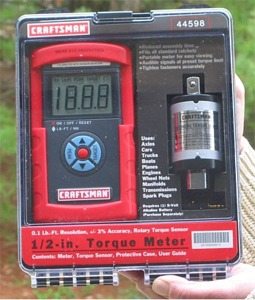
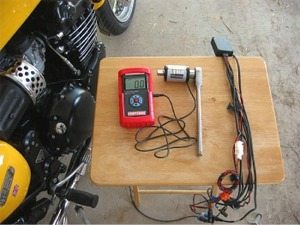
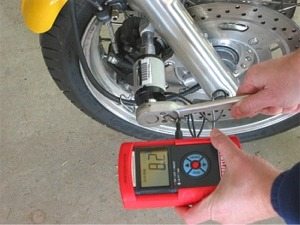
The Sears Craftsman Electronic Torque Wrench is and electronic sensor and the torque readings are clearly displayed.
The torque limits can be preset and a warning beep sounds when reached.
It switches between Nm or Lbs-ft and has an audible torque alert.
It is too big and bulky to use with anything other than exterior nuts and bolts on a motorcycle.
A standard torque wrench is probably a better option for motorcycle use.
I was intrigued when I first laid eyes on this new Sears Craftsman product in the Craftsman Tool Club catalog.
As a confirmed tool junkie, and a lifetime member, I figured I had to have one.
In my search for the ultimate torque wrench, surely this had to be the Holy Grail!
It wasn’t that easy to find one, either.
Sears doesn’t seem to know what to call this device — sometimes they call it an “Electronic Torque Sensor”, other times, it’s the “1/2″ Torque Meter”, and the owner’s manual calls it an “Electronic Rotary Torque Sensor System”.
It even takes a while to find it using the Sears search box on their website. I finally searched for item number 44598 and there it was.
I must have been one of the first to purchase one; although Sears was advertising it in their flyers, it wasn’t even in stock yet. Anyway, it finally arrived, in a nice plastic box (that will probably badly crack the first time it’s dropped), and I took it out to play with it.
The Electronic Torque Meter (the name Sears seems to have settled on for the device) is a pretty neat device. It consists of a 103mm (4″) long, 292 gram (10.25 oz.) sensor unit with a 1/2″ female square drive socket on one end, and a male 1/2″ square drive on the other.
The sensor unit has a 132cm (52″) long, 3mm (1/4″) diameter cable coming out of one end. The cable plugs into an electronic box that measures about 162mm long by 90mm wide by 40mm thick (6-3/8″ x 3-1/2″x 1-1/2″), including it’s red soft plastic case.
The electronic box weighs 398 grams (14 oz.), and it has a fold-out arm that allows you to stand it upright, and a fold-out tab on top with a hole in it for hanging up nearby when in use. Also, the sensor takes one 9v battery.
The unit can sense torque settings from 0 to 200 Nm, or 0 to 150 Lb-Ft. The readings are displayed on a large LCD screen in 0.1 Lb-Ft. resolution, and you can easily choose between Nm or Lb-Ft. at any time the unit is powered up.
Sears claims that it has 0.1 Lb-Ft. resolution and +/- 3% accuracy, which I believe is about the same as their “Digitork” or “Microtork” torque wrenches.
In theory, the Electronic Torque Sensor takes the place of two or three Sears torque wrenches.
I have a Sears “Digitork” torque wrench, which works from 5 – 80 Lb-Ft., and I also own the “Microtork” torque wrench, which works from 25 – 250 inch-pounds.
I also have a Craftsman beam torque wrench, which works up to 150 Lb-Ft. to cover all the bases.
I almost never use the beam wrench, as I can’t read the increments, so it’s basically worthless for anything other than tightening lug nuts on a car.
What’s interesting is that this Electronic Torque Meter carries a one-year warranty from Sears. Their Digi- or Micro- Tork wrenches only carry a 90 day warranty. I used my Digitork wrench about a dozen times or so in two years, and it broke.
I found out about the 90 day warranty when I took it back to Sears, thinking that because it was a Craftsman tool that it would be warranted for life. It cost me $50.00 to get it fixed and recalibrated.
Add that to the $90.00 or so it cost for the wrench to begin with, and maybe I should have bought a Snap-On! I now have more money tied up in torque wrenches than some people do in motorcycles!
The Electronic Torque Meter has a couple of unique features: it can be set to “Peak Mode”, which displays and then holds the highest torque reading in any one application.
This can be useful if you’re working in a location where you can’t read the meter (which is highly unlikely, due to the portability of the LCD).
The display can be cleared by pressing a couple of buttons on the box to get another reading.
The unit will also turn itself off after a short time if not used, and if the wire becomes unconnected from the box when in use, you’ll also get a warning tone.
The most useful mode is probably the “Target Mode”, which allows you to pre-set a specific torque reading. As you apply torque, the unit beeps. As you get closer to the pre-set torque value, the beeping frequency increases, and if you exceed the pre-set value by >5%, you’ll hear a continuous tone. Kind of cool…..
The unit also has codes for things like low battery, zero over limit, circuit failure, and poor sensor connection. Sears does warn about the potential for magnetic interference from some metals.
The owner’s manual claims that “Offsets of more than 10 Lb-Ft. (14 Nm) are not unusual when contacting even slightly magnetic steel bolts or wrenches”.
To counteract this anomaly, you can re-zero the device after it’s near the magnetic interference.
But the biggest problem with the Electronic Torque Meter is that it’s way too long to use in many motorcycle applications.
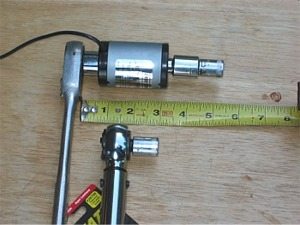
After you add up the length of the sensor unit itself, a 1/2″ drive ratchet or breaker bar, a 1/2″ to 3/8″ conversion socket, and whatever size final socket you need to torque the nut or bolt, you end up with what is virtually a 6″ long socket.
This is just too long to fit into most of the cramped areas under a frame or bodywork of a motorcycle.
This photograph illustrates the length and bulk of the Electronic Torque Sensor compared to the Microtork wrench, both with a 3/8″ drive metric socket attached.
My recommendations are to save your money and stick with the “old fashioned” torque wrenches until maybe they reduce the size of the sensor down to about 1/2″ long or less. The search continues……
| wBW Review: Sears Craftsman 1/2 in. Electronic Torque Meter | |
|---|---|
| Available From: Sears online store | List Price (2006): $149.99 |
| Review Date: 2006? | Made In: Germany |
| Product Comments: Sears Item # 44598. | |
| More: wBW Motorcycle Accessories Page | Motorcycle Maintenance and Repair Articles | |
Owner Comments and Feedback
See details on submitting comments.