

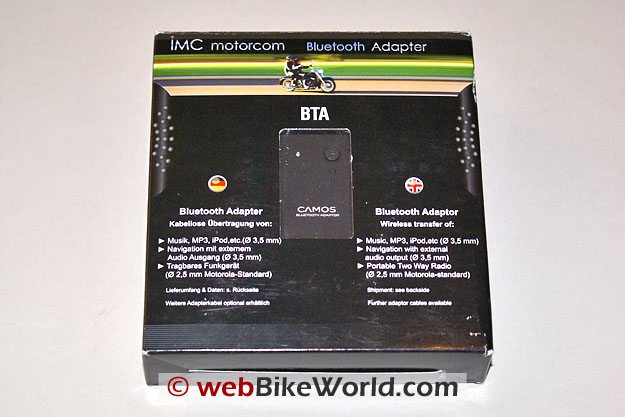
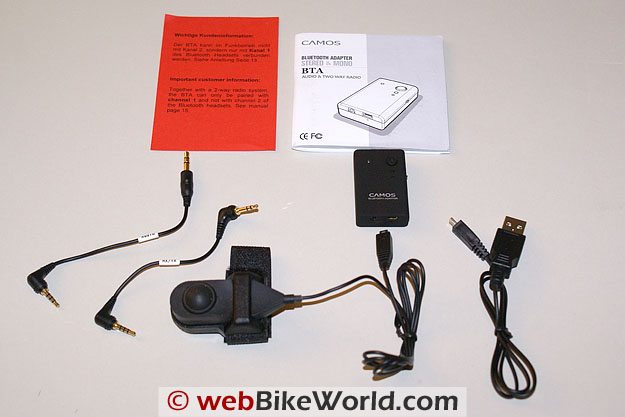
This kit and the wiREVO Bluetooth Stereo Headset Set, described in Part III of this series, were sent by Benchmark Helmets in the same box as the two BTS 300 systems.
Over the past three months I have really come to appreciate all the items received.
While the BTS 300 systems get used on the motorcycles, this kit, along with the wiREVO gear, gets used all the time – riding, driving, walking, working out in the garage or pounding away on the keyboard.
The Camos Bluetooth Audio and the “Funk” Adapter kit is a clearly marked IMC product that is readily available from the suppliers and resellers listed in the Product Review box at the end of this article.
Camos Bluetooth Audio and Funk Adapter
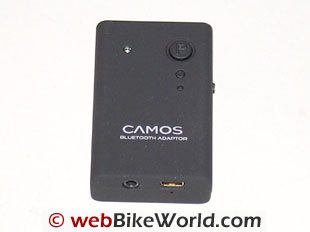
Like the wiREVO D1000 Bluetooth adapter, this smaller-than-a-matchbox-sized device is one of the most versatile Bluetooth devices I have ever used or evaluated.
The kit I received was the BTA-R (for radio) version containing the BT module, a 3.5mm 3-contact to 2.5mm 4-contact audio cable for stereo use, a 2.5mm 3-contact to 2.5mm 4-contact Motorola radio adapter cable, a Push-to-Talk (PTT) switch harness, a USB to mini-USB cable for charging and a North American plug power adapter.
Controls are few: a small Power/Pairing button, the mono/stereo switch on one side and a pin-hole reset switch on the same end as the audio port and the mini-USB charger port.
A small Red LED resides to the left of the Power/Pairing button.
Everything in the kit can be carried in a small bag and transported wherever. As stated earlier, the adapter is used with the BTS 300 system to host non-Bluetooth devices and to interface with other Bluetooth systems as part of my ongoing ‘research’ activities.
And before I forget, the ability to support both mono and stereo connections is a great feature.
As might be gleaned from its name, the “funk” or radio connectivity feature is a capability that I have been looking for quite awhile.
Although some promising results have been hinted at with other Bluetooth systems, this device paired up to the BTS 300 is the first to deliver the goods, at least for me.
Excellent battery life, as with the other Camos and wiREVO stuff, is the norm for this device. Standby times listed in documentation would seem to be very realistic and getting seven to eight hours per charge out of the adapter was typical, even with switching it on and off, and playing around in general.
Charging the unit takes about 2.5 hours and can be done two ways – use any compatible IMC Camos adapter, like that supplied with the BTS 300 system or via the included USB charger cable.
As noted in the BTS 300 article, being able to use one charger or a USB cable to recharge everything is great and cuts down on pieces needed for travelling.
Configuration
To turn the dongle On/Off, push the Power/Pairing button for three (3) seconds. When it comes on, the Red LED flashes for three seconds and when turned off, the LED flashes three times in one second and goes out.
Pairing, like most Bluetooth devices, is done from Off. Push the button for seven to eight seconds, the LED will flash rapidly (every 100ms for those who can count really fast). If the device to be paired is within range and also in its pairing mode, a connection will be made within seconds.
A pairing and connection link is indicated by the LED flashing two or three times every second. When the BTA is in standby or idle mode, the LED will flash every three seconds. Pretty simple eh?

About the only other thing to remember is that the mono/stereo switch must be set to the desired mode before pairing. The mode cannot be changed while the device is powered and connected. If the switch is changed while powered up the dongle will shut itself down and will need to be manually restarted.
Camos Audio and Funk Bluetooth Adapter Specifications
- Bluetooth – version 2.0 with A2DP, AVRCP, HFP and HSP
- Frequency Range – 2.402 – 2.480 GHz
- Transmission Output Power – up to 2.5mW (Bluetooth Class 2 device)
- Maximum Cordless Distance – 10 metres or 30 feet
- Dimensions – 29.0 x 46.0 x 12.0mm (1.14 x 1.81 x 0.47in)
- Weight – 16.4g or 0.578oz
- Operating Temperature Range – minus 20 to plus 50C (-4F to 122F)
- Standby Time – 176 hours
- Speaking and/or Play Time – 7.5 hours. Standby and Speaking/Play time are dependent on the number of connected devices and percentage of use.
- Battery Type – Li-Polymer (Li-ion) probable, not confirmed
- AC Adapter – from BTS 300 kit, Input is 100 to 240V 50/60Hz, Output is DC 5.0V, 1000mA
Also In This Series:
▪ Part I: Camos BTS 300 Review
▪ Part II: Camos BTS 300 Configuration and Specs
▪ Part III: wiREVO BT Stereo Headset & Adapter Q&A
▪ Part IV: IMC Camos Bluetooth Adapter
Owner Comments and Feedback
See details on submitting comments.
SPECIAL NOTE: Lots of interesting discussion and a dialog between the author and another owner on the IMC Camos Bluetooth adapter and other issues related to the evolving use of Bluetooth for motorcycle intercoms on this page.
From “L.A.” (February 2012): “I have found that the Camos Bluetooth Adapter stereo and mono adapter (review) pairs with the G4. At last I have a Bluetooth connection between the G4 and my Uniden 5 watt two way radio mounted in a RAM waterproof box on the handlebar.”
From “C.B.” (06/2011): “I would like to know if this adapter can be powered from 12V from motorcycle. I know it can be recharged, but I like to travel by tent and stay away from civilized world sometimes 4-5 days in a raw.”
HBC’s Reply: As long as the USB power connector is providing a 5V output within required amperage, it will power the IMC Camos Bluetooth Adaptor (dongle) just fine. And if they work like my two, they can be charged and used at the same time.
When paired and actively streaming the BTAs display a double Red LED flash sequence and when powered, the Red light stays on, but you can still discern the double flash sequence. I’ve been using these adapters with non-Bluetooth devices, on the USB power port equipped motorcycles, for some time now…
I suspect many others, including the AKE BTA, will work the same way, as long as there is no charge override circuitry or other protection in place.