

The system effortlessly hosts multiple wired and wireless devices, providing enough configuration options to please virtually any user.
Specific features such as i-VOX and the optional Interface Device serve to differentiate the PowerCom systems, the INNOVA specifically, from most of the other offerings on the market.
Everything is easy to install, configure and use. The PowerCom Bluetooth is the best ever used, period. Requires a higher initial investment, but the returns are definitely worth it. Highly recommended.
One Good Thing Follows Another…
The initial AKE PowerCom system evaluated, the ROGER One, is an excellent system in its own right. Providing basic communication functionality including the intercom feature, it can be enhanced with the use of optional Bluetooth modules paired with compatible Bluetooth devices such as GPS, mobile phones, etc.
Many of us, as motorcyclists and consumers, are seldom satisfied with the basics and typically keep ‘upgrading’ or looking for something better. The initial product evaluation clearly demonstrated the quality, functionality and versatility of the AKE PowerCom systems. So, the chance to test the INNOVA became more than just an idle thought.
The thought became reality when, as a result of email correspondence with the AKE representative regarding some technical questions, an second package was received. This package contained an INNOVA kit along with some adapter cables and additional Bluetooth components.
Admittedly the timing was right. The ROGER One kit had whetted the ‘show-me-more’ appetite and additionally, AKE has now established a North American presence (see summary table at end of article), so that marketing and support of their products can be done closer to the North American consumer base.
System Overview
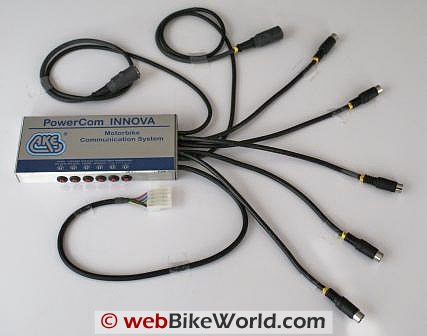
The INNOVA is the PowerCom system offering all the bells and whistles. While its brushed aluminum housing looks like all other PowerCom modules, the plethora of cables originating from the right side is the giveaway. The brushed aluminum housing measures a manageable 15 x 7 x 2cm (6 x 2.5 x ¾ in).
Packaged similarly to other PowerCom systems, the kit is delivered with the INNOVA control module and all attached cables or leads, the standard two piece five-wire power supply harness, a set of installation and operating instructions in German and English and mounting items (Velcro, adhesive fasteners, long and short cable ties).
Some key features of the INNOVA are:
- Automatic power up and power down
- Automatic power-up of accessories (depending on wiring harness configuration)
- Intercom on demand
- Stereo audio input
- Audio security feature for rider (override with muting)
- Extensive built-in vehicle de-jam (noise) compensation
- High sensitivity microphone input with driving noise compensation
- Fit for motorcycle two-way radio hands-free kit
- Driving noise dependent modulation
- Priority signal management (inputs)
- High/low level combined input/output
- Automatic volume control of the audio signal depending on driving noise
- Headset overload protection; and
- Optional manual operating device.
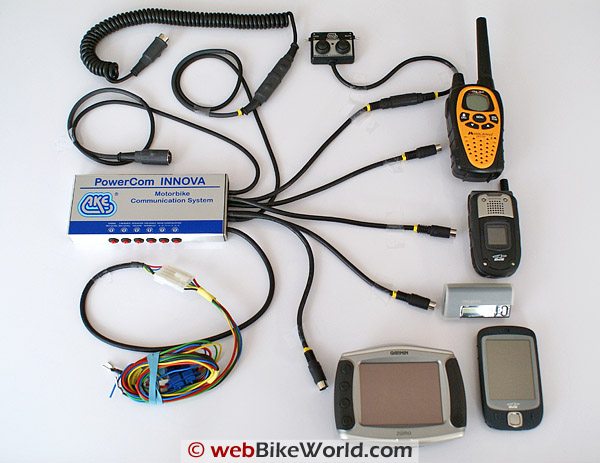
With eight (8) cables exiting the right hand end of the module, it looks like a maze of sorts, but everything is clearly marked, well documented and easy to work with. All leads, less the power harness, end in large or small DIN connectors.
The longest leads, with the large DIN connectors, are the wired helmet leads for the rider and intercom user. The remaining five shorter cables, all with mini-DIN connectors, are for accessory modules or for connecting peripheral devices using the appropriate adapter cable.
All connectors are securely capped with high-quality (Moss brand) weatherproof end caps to keep the elements out when the cables are not being used. Sleeves are also provided with the leads and interface cables allowing the user to maintain a weatherproof seal at the connection points.
The power harness is a two-piece assembly joined by a five-pin flat connector. One part is the power lead from the main module, while the other part ends in five separate wires: Red – positive; Black – negative; Yellow – optional driver security features; Green – optional relay use; and, Blue – needed when not using the automatic helmet detection/power-down capability.
The functions and tag assignments of the interface leads are:
- Lead A – audio connection, small DIN plug
- Lead D – wired helmet connection for the driver, large DIN plug
- Lead F – mobile radio connection, small DIN plug
- Lead H – mobile phone, small DIN plug
- Lead N – navigation systems, small DIN plug
- Lead R – remote control for iVOX Activator Module or Manual Operating Device
- Not Tagged – Wired helmet connection for the passenger, large DIN plug
- Not Tagged – Power harness, two piece with five-pin flat connector.
Six compensation controls or “trimmers” dominate the front edge of the module. These are used to adjust volume and various input/output levels. Left to right: phone microphone level; radio microphone level; intercom volume; threshold (VOX/i-VOX); and, two road noise compensation controls for compensation levels1 to 3 and 4 to 6.
The default setting for the trimmers is straight up (12 oclock position) and for street riding or low speed off-road riding, none of them had to be adjusted. But when used in higher noise environments, stopping to fine tune the various controls (plus or minus) provided a much more enjoyable user experience. The trimmers are not just decoration.
First, the Rules
An important feature of the higher-end AKE systems (FREEWAY, ON TOUR and INNOVA) is intelligent priority signal management. This in essence means that all audio input/output (I/O) is handled on a priority basis. This reduces contention and more importantly provides a built-in safety factor for the users – only one source will be active or audible at a time.
The documented signal management priority is:
- Mobile telephone device (H)
- Radio device (F)
- GPS navigation device (mono or stereo audio) (N)
- Audio input device (tuner, player, etc) (A)
Priority of the mobile phone (Lead H) and radio device (Lead F), and that of the GPS (Lead N) and audio (Lead A) can be changed at the connection leads if desired. During the evaluation it was found that in some configurations, the priorities were seemingly not recognized — more on this later.
Note – when powering a device on and off while part of the system or when plugging a device into the system, any current audio is instantly muted for a few seconds and then softly restored.
Rider Security Feature
All of us as riders are responsible for maintaining a safe riding environment. This riding environment is a combination of many things, most based on the timely and intelligent use of our senses, including hearing.
Legislation in many countries (federal, provincial/state, county/municipal levels) provides clear guidance and restrictions in the use of audio devices on or in a moving vehicle. While the pros and cons are hotly debated, in many instances, the failure of individuals to maintain a safe riding or driving environment often initiated the legislation.
Considering both mandated and freedom of choice concerns, AKE systems provide rider security features that when installed facilitate maintenance of a good listening environment under all conditions, especially critical in dense traffic and at high speeds.
When the Yellow wire on the power connection is wired to ground, the audio signal to the rider helmet connection (D) is ‘synchronized’ or made mono (centered in the headset) and at high speeds (not specified or tested during this evaluation), the audio will be muted.
With a mono signal input (like a single headset) and even with the audio centered in a headset, external sounds sources, i.e., sirens, traffic control alarms, etc, are more readily discernable. Formal studies and rider experience (still the best validation) will attest that a stereo environment, especially at higher volumes, detracts significantly from the ability to discern other discrete sounds.
These features, in combination with automatic level controls, the ability to vary thresholds via the trimmers, and manual control provided by the optional interface device should help riders maintain a safe and enjoyable riding environment while using all their senses.
Input/Output Functionality
AKE is very conscious of the need to provide a safe and secure riding environment while still providing functional options for the rider. Key to providing this environment is the use of voice-operated-exchange or VOX, allowing hands-free operation of the system.
While not new to communication devices or systems, the AKE implementation has taken VOX to a new level, a fact discovered in conducting the ROGER One evaluation. AKE has added a supplement to select systems that when used with the bundled i-VOX Activator module, brings a whole new dimension to VOX.
This discrete little device provides the intelligent or i-VOX supplement found on the ROGER One, ON TOUR and INNOVA systems. When used with these systems the module provides intelligent voice control by its sensing, buffering and switching capabilities. Bottom line, VOX response delays, so common in many systems and radio devices is eliminated.
A functional alternative for the rider can be found in the optional Operating Device that can replace the i-VOX Activator module. This little module is packed with features. A small toggle switch on the left side allows either i-VOX or PTT mode when using communication devices, while the left side pressure button functions as the actual PTT switch.
A similar toggle (driver-audio-mute or DAM) on the right side mutes (MUT) any stereo audio signal to the rider (but not the passenger). The right side pressure button is used as ‘enter’ (ENT), to answer/end a call as may be enabled by a connected mobile phone.
Use of this device adds another feature to the rider security environment in that the MUT switch allows the rider to instantly mute any stereo audio signal being fed to the rider helmet headset, a feature found very useful during this evaluation.
The size and shape of the modules allows it to be easily mounted either on or close to the left hand control nacelle using double-sided pressure tape. A 200cm (79 in) long extension cable allows routing of the connection to the main module lead (R). While a complete hands-free environment is desirable under most conditions, this device allows the rider to exercise options.
The Wired Realm
Following tried and true procedures, the INNOVA system was initially set-up and evaluated in a static environment. This allows everything to be inspected and initial data collected along with initial impressions, before it all gets stuffed into the tank-bag of some two-wheeled platform.
Speaking of two wheels, the live environment activities were primarily conducted during the annual escape to Florida for Speed Week. The chance to leave the white stuff behind and recharge the moto-spirit, along with the less-than-onerous task of playing with all the new toys accumulated over the winter was not to be ignored.
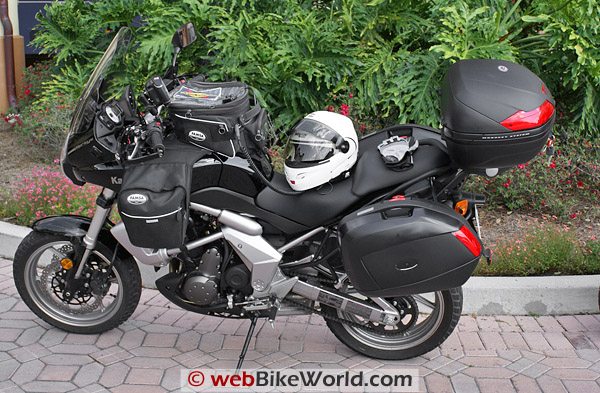
The INNOVA system and components were installed and used on both the R1200GS Adventure and the test-mule Versys. Headset configurations included a HighVoice headset in the ARAI XD helmet, a High Sound headset installed in the Nolan 102 Flip and, for the intercom user, another HighVoice headset, installed in a second Nolan 102 Flip.
Making the system ‘live’ is as simple as connecting the intercom and rider cables to their respective leads on the main module, listening for and receiving the power-good ‘click’, and conducting the first intercom conversation.
Intercom
While having a passenger is a (very) rare occurrence for this rider, having an intercom as a standard feature is very practical — it is always ready for use. When riding alone the intercom is automatically muted, so the rider needs only to control the i-VOX or PTT feature to safely sing along inside the helmet!
With both helmets plugged in, the intercom is live and the two users (or more, depending on any expansion option) can participate fully in all communication sessions and share the audio from peripheral devices. This peer to peer arrangement is really appreciated – many other multi-function systems typically restrict intercom access, and not just for safety reasons.
When an intercom session takes place, any music audio present will be softly faded down, so that the intercom conversation can take place. After a few seconds of voice inactivity, the music will be restored the same way – a nice touch.
Radio Use
With the alan456R PMR446 radios used briefly for evaluating connection and use features, live environment data was collected using a set of Midland GMRS/FRS radios and a pair of Radio Shack portable CB radios – both are compatible with the dual-jack mobile radio interface cable.
For this connection, a PowerCom adapter (Art No. 33337) was used. This cable is 170cm (67 in) long. One end has 2.5mm and 3.5mm jack plugs (both 2-pole) that plug into the speaker and microphone sockets respectively on the GMRS/FRS or CB device, with the other end, a small DIN (F) being plugged into the matching lead from the main module. Finally, turn the radio devices on.
The riding environment in Florida was a mix of flat and relatively clear terrain, along with some good stretches of winding roads through dense forestation. In general, effective communication ranges for both the GMRS/FRS radios and the CB sets were 1,500 to 2,000m or 4921 – 6561 ft (over a mile in spots).
All things considered the distances observed were pretty normal. While the CB radios, in clear open terrain can provide longer distance communications, especially with a more effective antenna installed, the newer GMRS/FRS radios, with higher power settings in some modes, are just as effective.
During this evaluation the radio devices were secured in a tank-bag side pocket — by no means the optimal mounting position, but relatively clear of immediate obstructions, physical or electrical, and providing a safe distance between the transmitting device and the rider.
With the i-VOX Activator module (Art NO. 33355) plugged into the ‘R’ lead plug, a completely hands-free and intelligent sensing capability is brought into play. i-VOX does an outstanding job of keeping communication sessions intact from start to finish.
The system compensates for switching delays common in most portable radios and during this evaluation, no matter the device used the i-VOX never stumbled. Between the very good headsets, sensitive microphones and system enhancements, external sessions, factoring in some separation between motorcycles, were almost intercom quality – crisp, clear and without any lost words.
Mobile Phone Interface
The plan was to use two phones, an older Sanyo SCP7300 device that has provided faithful service and was to have been the wired device, and its replacement, an HTC Touch PDA being the second (being Bluetooth enabled).
But, without the necessary adapter cable, the correct wired connection could not be evaluated. However a workaround of sorts was put in place. The phone was wired using a 3.5mm to 2.5mm 3-pole adapter. This allowed phone audio to be heard via the (A) plug lead.
The only other required action was to set up the phone to automatically answer incoming calls. In this configuration, calls could be received and a conversation held using the headset. Terminating and initiating calls had to be done manually using the phone menu.
AKE does list an adapter, identified as the PowerCom HandyAdapter HH3 adapter (Art No. 33311). It is 175cm (69in) cable with a 2.5mm 3-pole jack plug on one end and a small DIN (H) connector on the other.
GPS Interface
Two GPS devices, a Garmin zumo 550 and a BMW Navigator III+ (reduced-function Garmin 2820) were used for the wired and wireless configurations. The AKE PowerCom adapter for GPS devices (Art No. 33328) is a 170cm (67in) cable with a 3.5mm stereo (3-pole) jack plug on one end and a small DIN (N) connector on the other.
Once the adapter cable was plugged into the audio-out socket of the zumo 550 cradle and connected to the main module via the (N) lead, audio, including full stereo music, was fed through the system into the headsets.
Audio Interface
The hands-free audio features provide automatic volume control (AVC) depending on road noise, lowering of audio volume when the intercom is used, stereo audio with the proper interface cable, and muting of audio to the rider while allowing the intercom user to continue listening ((Note: Only available when using the optional Operating Device component).
To connect an audio input device, in this case, a Creative ZEN 1GB Nano-Plus with built-in FM stereo, an AKE PowerCom Adapter cable (Art No. 33369) was used. This item has a 3.5mm 3-pole stereo jack plug with a small DIN (A) plug on the other end. This item, like most of the adapter cables is also 170cm (67in) long.
Even though automatic gain control (AGC) is provided by the system based on ambient noise levels, the user can still make volume adjustments at the player itself. As audio prioritization is managed by the system, higher priority activity causes the lower priority (music) feed to be muted, but then restored softly once the other session is completed.
Be it mono or stereo, audio is very good. While the HighVoice headset provides excellent voice audio that is nicely centered, it is the High Sound headset that steals the show. Optimized for high-fidelity audio input, this headset provides an amazing stereo listening environment via a wired connection. Even a mono music stream from the GPS device sounds far better in this headset.
Going Wireless
Transitions
While the available Bluetooth adapter modules could have been introduced at any time to provide a mixed environment, the desire to build up a completely wireless environment and evaluate it, before moving on, took priority.
Acknowledging that the INNOVA has enough interface connections to make even the most jaded moto-techno-head smile, the smile gets even wider once the wireless capabilities are introduced into the mix.
The AKE statement that, “the best performance is obtained from using a totally wired system” is not disputed here, but with all the wireless technology available and in use today, moving to a wireless or mixed environment is an option that many consumers want or demand.
Recognizing this fact, AKE has stepped up to the plate in a big way. As discovered during the original ROGER One evaluation and reconfirmed during this activity, the AKE PowerCom Bluetooth offerings are simple, easy to use and extremely effective.
In essence, the INNOVA, with its multiple interfaces and with the right optional devices can be hands-free and totally wireless. What follows are the basic configurations proven while riding. Given everything the INNOVA can support this is not exhaustive by any means.
Step by Step
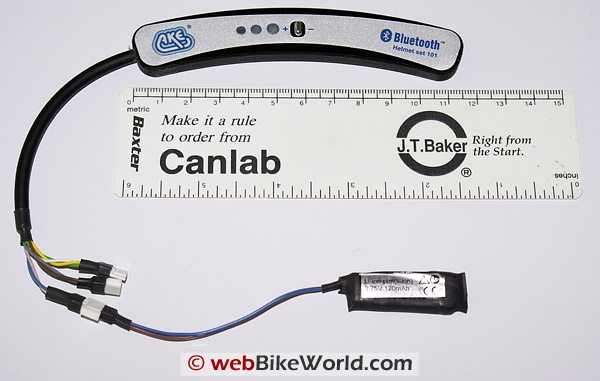
The first Bluetooth connection is made so as to eliminate the headset connection cable between the control module and the rider. With the Bluetooth Helmet Set 101 installed and turned on and its welcome squawk heard, the PB-HC2 Bluetooth module is powered up by plugging it into the rider (D) lead.
As the Bluetooth Headset and module come from the factory paired, the module flashed its Red and Green LEDs for a few seconds, indicating search mode. Once the headset was found the Green LED remains on and with a connection made the Red LED will blink slowly.
In about ten seconds a double set of musical (welcome) tones will be heard in the headset. This indicates that the system is ready for use. The physical connection is now ‘broken’ and the rider free to roam about, to a degree of course. All other system functions are retained as per the wired world.
Note: Unless otherwise identified, the radio device, as a primary peripheral, remains a wired connection.
The second Bluetooth connection is for a Bluetooth mobile phone. There are a minimum of two configuration options, one which will be saved until later. The first configuration has the PBM-H2 Bluetooth module plugged into the (H) plug lead, which serves to power up the module.
Two tones will be heard, the second indicating that pairing mode is active. Putting the HTC Touch PDA device into its Bluetooth discovery mode will result in the 3xxPlantronics device being found. Note: 3xx Plantronics is the chipset used by AKE for its Bluetooth modules.
If a pass code is needed, it will be ‘1234’, although on one occasion, only ‘0000’ was accepted. Once entered and accepted a secure link will be made. In this one to one pairing most basic phone features were available. Calls could be answered or ended by pushing the control button on the Headset module, but not without some consequences.
The consequences usually resulted in the call being ended but also the headset link and access to the system. In troubleshooting the issue, it was found that pushing the big Red button once or sometimes twice on the main PB-HC2 module would always restore the connection. Whether this issue indicates a glitch in the system or with the HTC device is unknown.
As the voice command menu was not set-up on the HTC, the phone was not used except when stopped. Typically calls are not accepted or initiated while on the move anyway and in many areas, this activity while on the move is illegal as well.
Nevertheless, configuring the phone so that the voice command menu is available would be a good thing and allow a hands-free environment to be maintained.
Before initiating the third Bluetooth connection, the second basic option for adding a Bluetooth mobile phone is exercised, that being having the Bluetooth phone connected via a Bluetooth enabled GPS navigation device. Before doing this, the PBM-H2 connection on the phone is dropped and the PBM-H2 module and cable removed from the (H) lead.
Before adding the GPS device to the INNOVA configuration, the zumo and the HTC phone are paired using the ‘add phone’ menu on the zumo 550. Once the required pass code (default is 1-2-3-4) is entered on the HTC, a new partnership and connection is made.
Note: A known issue is that the zumo may appear to keep dropping the connection, but in reality it doesn’t – the screen will eventually update itself.
Making the third Bluetooth connection is relatively painless. With the wired connection to the zumo removed, the PBM-N2 (navigation) module is plugged into the now available (N) plug lead. The N2 module functions just like the H2 and the zumo 550, in pairing mode, finds the 3xxPlantronics device within a few seconds.
While a pass code ‘0000’ may be requested by the zumo, with the connection made all audio from the GPS including the mono music stream from the zumo MP3 player will be heard in the Bluetooth headset and intercom connection, as applicable. All phone features supported by the zumo host will be available to the user via the zumo phone menu or icon.
If the radio devices are physically disconnected and if there is no peripheral audio device connected to the (A) lead, the result is a Bluetooth enabled or wireless system, less the power connection of course.
Mixing Things Up
In a mixed environment, the radio device is now re-wired to the system via the (F) plug and the peripheral audio device is reconnected via the (A) lead. The rider can be wired or wireless, and peripheral devices connected as desired. In this full house scenario, the user has lots of options.
Note that two music sources are now available, one wired in stereo and one wireless in mono. But availability is based on the connection priority and active sessions, i.e., the GPS device (N) is a higher priority than the audio (A) feed so using the MP3 player on the zumo causes the stereo feed to be muted.
If a second mobile phone configuration is desired, then it is a simple matter to removed any physical connection from the (H) lead, plug in an available PBM-H2 or PBM-N2 module and add other devices to the system. Both modules, less some differences in pass code requirements, work fine in both the (H) and (N) leads.
Outside of being able to mute the stereo audio feed to the rider while retaining the feed to the intercom user, the system does not allow the rider and intercom user to conduct separate sessions.
The Freedom to Roam
Regardless of whether the peripheral devices are wired or wireless, losing the cable between the system and the rider allows a measure of freedom that is appreciated, especially during stops. If left powered up, access to the system is usually maintained over a 10 to 12m (32 to 40ft) distance from the motorcycle.
Playtime: Other Bluetooth Devices
Using the PB-HC2 Bluetooth module to provide the wireless connection, two other Bluetooth headsets, the Cellular Interphone and the Cardo scala-rider Q2 were also successfully paired with the INNOVA system.
Following established procedures (well documented in the respective manuals), the pairing effort was quite simple for both headsets. With the PB-HC2 module in pairing mode (alternating Green and Red leds and with the applicable headset in pairing mode, a pairing is typically completed within the first session.
Having worked through these configurations previously, and being familiar with both headsets it was a relatively simple matter to take the final steps necessary to actually link the headset to the INNOVA module and make everything live. Each headset has its own series of actions documented in the applicable guides that need to be completed.
Although only the basic connection functions were carried out with these headset, it was discovered that both the Interphone and the scala-rider Q2 were actually more consistent in properly connecting and disconnecting from telephone calls than the PowerCom Bluetooth Headset 101 – curious.
Note – any previous pairing between Interphone or Q2 devices is lost while the primary Bluetooth link is occupied with the INNOVA Bluetooth interface. But, dropping the PowerCom PB-HC2 connection and bringing the two Interphone or scala-rider Q2 devices close together usually resulted in the respective pairs reconnecting, typically without any intervention.
Issues
Bluetooth Helmet Set 101 and Bluetooth mobile phone use: Initiating, receiving and ending calls via the Bluetooth Helmet Set 101 is not as seamless as it should be. Whether this is a glitch in the system, or due to compatibility issues with the HTC Touch PDA remains unknown.
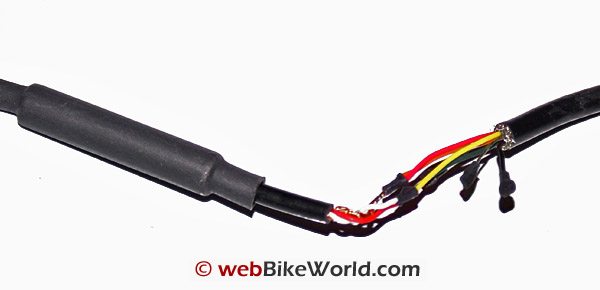
Adapter CablesThe GPS adapter cable actually pulled apart at this point and the wires were stretched, disrupting the shielding. While the cable connection still worked, the break in shielding integrity caused very audible interference on the system. For the rest of the evaluation the GPS was connected via Bluetooth.
Signal management priority: With a radio device plugged into (F) lead and the zumo 550 connected via Bluetooth to the (N) lead, a communication session via the radio and voice navigation was heard simultaneously and at equal volume in the headset (wired or wireless), although an ongoing stereo audio session was muted, as expected.
Based on the documented priority (mobile phone, radio device, navigation device, and audio) one could expect that the incoming audio from the zumo would have been muted, but it was not. However, other systems do place a high priority on navigational input – perhaps this is a default setting not well documented. A query has been forwarded to AKE regarding this.
Note that according to the documented prioritization, audio from the standard audio lead (A) is always muted if any other external session takes place via any other connection.
Conclusion
Despite the minor issues and observations, the INNOVA really deserve to be on top of the PowerCom system heap. All-singing and all-dancing (well at least it provides the music), its ability to host a wide and disparate range of communication, navigation and entertainment sources is excellent.
The i-VOX is an outstanding feature that facilitates communication sessions with speed and integrity — no words are lost and everything is heard. Using the VOX mode of the GMRS/FRS radios by themselves and then plugging one of them into the PowerCom system clearly demonstrates the positive features that i-VOX provides.
More of a challenge than the ROGER One to disguise or install, leads and adapter cables provide plenty of length to install the main module and peripherals almost anywhere on a motorcycle. Just remember the cautions provided in the installation instructions and make sure everything is routed in a safe and secure manner.
Dealing with all the leads and interface cables will take a measured approach, especially if a semi-permanent or permanent installation is to be done.
Until the GPS cable lost its shielding integrity, absolutely no noise, outside of the omnipresent and very low level white noise, had been heard from the system, the motorcycle or peripheral devices. All components are well-shielded and the noise-compensation system is very effective.
For mobility purposes and depending on the number of peripherals used, a good riding jacket with cargo pockets would do the trick, as long as the power lead is dealt with. Using a large DIN connection for the power lead would really simplify the whole exercise. This is particularly applicable when the only wire might be the power lead.
In This Series:
-
Part 1: AKE PowerCom ROGER One Motorcycle Communications and Intercom
-
Part 4: Motorcycle Communications Using the AKE PowerCom INNOVA System
Owner Comments and Feedback
See details on submitting comments.