

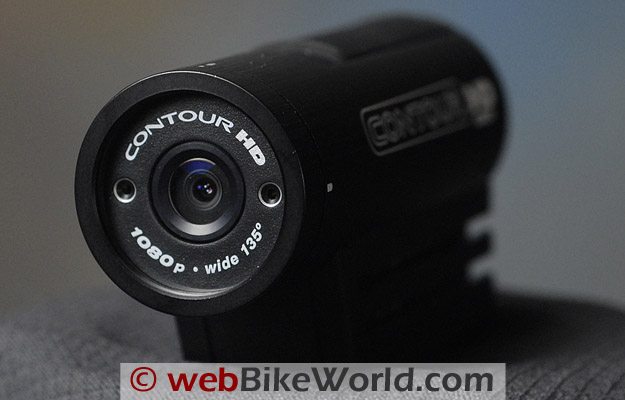

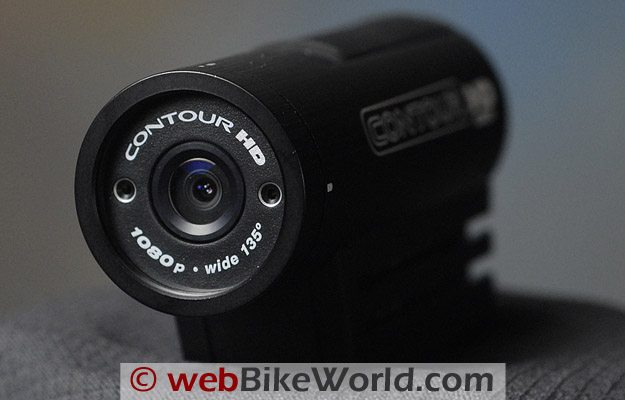
I like the new VholdR ContourHD version of the VholdR video camera much better than the original.
It’s easy to use (ditto for the original) and the HD video is surprisingly good — much better than I expected.
I can pick a few nits, especially with the QuickTime .mov file format and the bare-bones mounting adapters provided with what really is a very expensive camera.
But if you can get over that, there probably is no better quality video in this form factor available.
We reviewed the original VholdR video camera just about exactly (how’s that for an oxymoron?) two years ago, in January of 2008.
It had more cons than pros at the time, but I have to say that I think it’s great that VholdR kept at it and we now have the VholdR Contour HD in both 720p and 1080p versions (more about that in a minute).
The new Contour HD (they call it the “ContourHD” but my spell checker goes nuts over that) uses the same aluminum body and system features and it’s just as easy to use.
The battery in this 1080p version was fully charged upon arrival and both of the new Contour HD video cameras include a 2BG microSD card (thanks, VholdR!).
I was up and running and recording video literally within 10 seconds of opening the box. Turn it on, push the top rubber switch forward and you’re Cecil B. DeMented, Jr.
I’ll admit, based on my experience with the original VholdR that I was absolutely prepared to be underwhelmed by the new Contour HD right up until the minute I double-clicked on my first video to watch it in QuickTime.
Wow! I was stunned. In fact, I had attached a full-sized Canon HD20 video camera to the left-hand side of the bike so I could take a simultaneous video to compare with the VholdR and I have to say that the VholdR video came out better.
There’s only one word for that: amazing.
Now don’t get me wrong — surely the VholdR does not and can not have the same capabilities as the Canon HD20 and it’s no match for the Canon in anything other than “average” lighting conditions.
But on a cold January afternoon with fairly even lighting among the neutral gray foliage, the video from the VholdR was way better than I expected.
You can see some of the results in the Part 2 on-bike video embedded below.
But make sure you read my notes about that first, because the YouTube video quality is not as good as the original QuickTime .mov format that the VholdR spits out raw, and I’ll have more to say on that also.
The VholdR ContourHD is available in 720p or 1080p; see text.
The VholdR Contour HD Video Camera
The functionality of the new VholdR Contour HD videocam is nearly identical to the original, so I won’t repeat myself here and instead I suggest you read Rick’s 2008 VholdR videocam review to familiarize yourself with the operation of the unit.
I played with the original many times, but it’s been a while, and I think the new version is even easier to use.
As an example of that, the owner’s manual is only 8.5 pages long (not including the FCC cautions and info) and it basically tells you everything you need to know.
Once the parts are identified, it’s a matter of keeping the thing charged, turning it on, mounting it, lining it up and shooting your video.
Sounds easy, but let me discuss a few of these issues which, for better or worse, have not been improved from the original non-HD version.
Battery and Charging
First, the battery charging. The VholdR Contour HD uses what looks like about the same lithium-ion rechargeable battery.
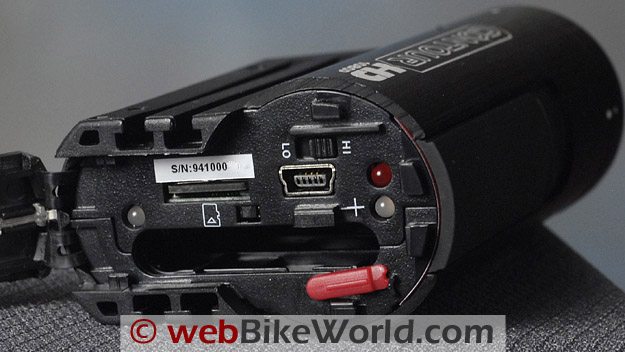
It charges via the USB port inside the rear cover. They supply a USB cable in the box and the unit must be recharged by connecting it to a live USB port on a computer.
The USB ports on many computers are not powered when the computer is off, so this means the computer has to be kept on to recharge the VholdR video camera.
A webBikeWorld reader back in 2008 gave us a good tip — there are relatively inexpensive powered USB hubs that can be purchased and used to charge the VholdR battery.
The case and inner configuration of the VholdR ContourHD is similar to the original VholdR video camera.VholdR Contour HD Accessories
VholdR now has an array of accessories, all at an accessory price (but actually fairly reasonable), including a wall charger for $49.99.
However, I own a USB 7-Port hub, although it’s a “flat” version and not a “tower”.
In any case, the USB port charging issue isn’t really a big deal in the scheme of things; just remember to plug it in the next time you’re reading a good webBikeWorld review.
The other issue involves mounting the VholdR HD. Like the original, the HD version is supplied with a bare minimum of mounting brackets.
There’s a bracket that’s supposed to mount on a pair of goggles, but for anyone other than dirt riders, it’s not very useful.
They also supply a stick-on helmet mount, but the problem is that both of these mounts are flat on the bottom and helmets are mostly curved.
Again, visit the VholdR accessories page for solutions to your mounting problems.
One I missed that I’m definitely going to buy — because I plan on using this baby a lot during the summer to record my extra-legal escapades — is the VholdR 3100 Universal Mount Adaptor.
This absolutely, positively should be provided with the 300-buck VholdR to begin with.
It’s basically an adapter that allows the VholdR to be mounted on the standard 1/4-20 threaded camera mount that’s been used since Louis Daguerre was shooting candid photos of his neighbor through the keyhole.
The VholdR doesn’t have a simple 1/4-20 (11 mm) camera mount screw on the bottom — the one and the same mount that comes on the cheapest Nikon, Canon, Casio, Olympus, etc. camera.
I think this is a mistake and it would be very easy to include it on the bottom of the ContourHD without having to charge the customer 20 bucks.
OK, rant off. But without the correct mounting system, you’re going to be very frustrated trying to find a good place to locate the camera, either on the bike or your person.
You shouldn’t have to spend another 50 to 100 bucks to do it.
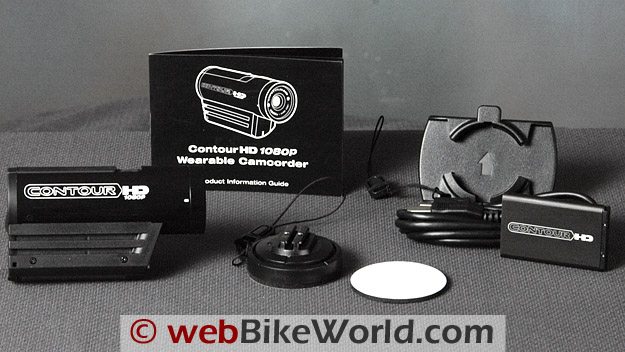
Contents of the VholdR ContourHD package.
VholdR HD File Format
Next up on my hit list is the QuickTime .mov file format (Apple’s flavor of H.264, MPEG-4) used on the VholdR HD as implemented by VholdR.
This is not an easy format to work with for Windows users, for a variety of reasons.
Someday, maybe, we’ll have a true open standard that everyone actually adheres to, but don’t hold your breath. H.264, like other standards, is the standard that isn’t a standard apparently.
VholdR will tell you that all you need to do is download the .mov video file from the ContourHD using their provided Easy Edit software and then upload it to the VholdR website to view it.
But I suspect that most owners will want to upload to YouTube or share it via their PDAs, netbooks, cell phones, etc. After all, when’s the last time you visited the VholdR Community to watch videos?
I thought so…
So Windows users will have to either use the Easy Edit software or download the free QuickTime Player from Apple (here) to watch your VholdR videos on your Windows machine.
But unless you know more than every video and film Director who ever lived, you will not be able to take a perfect video on the first take that doesn’t need editing.
Especially if you forget to turn the VholdR off and end up with multi-gigabytes worth on the microSD card!
To edit the .mov file, you’ll need some decent video editing software (we use Adobe Premier Elements 8.0) and a honkin’ computer.
I can not even successfully play, much less edit, the .mov files on the webBikeWorld 2.0 GHz Pentium 4 with 4GB of RAM and dual 7,200 RPM hard disks, with its Radeon X1650 video card. The video simply does not play on this machine, which, although outdated, was the fastest of its type when new.
The .mov files do play without a problem on The Editor’s brand-new HP HPE 180t.
But it is one of the fastest computers available (this week), with the Intel 3.3 GHz Core i7-975 Extreme Edition CPU (the fastest currently available); 12 GB of tri-channel 1066 MHz RAM; dual 10,000 RPM hard disks; and a 1.8GB NVIDIA Geforce GTX 260 graphics card.
Not many casual owners are going to have this type of horsepower, but this is about what it takes, I’m afraid to say, to do any serious editing with Premier Elements on the .mov files — even the brief 10-minute or so files I created while on the bike.
I’m not sure what the answer is here; working with HD (and AVCHD) takes much more time and effort and thought than working with good old-fashioned standard definition video, no matter how you slice it.
By the way, we have the same problem playing the raw video from the ContourHD using the VholdR Easy Edit software on the Pentium; the computer just isn’t powerful enough and the video is so choppy that it cannot be viewed.
In fact, the Easy Edit software crashes repeatedly on the Pentium and the application just disappears off the screen.
The VholdR Product Information Guide (aka Owner’s Manual) makes an oblique reference to this issue on page 3: “HD is beautiful but some computers cannot play smooth HD video and higher resolutions are more demanding”.
I’d have to guess that the encoding is an artifact of the ContourHD’s small form factor.
I can tell you that I indeed can and do play high-resolution HD video on the Pentium-equipped computer all the time, and even use it for editing the webBikeWorld HD videos.
So I don’t think it’s the computer — I think it’s the .mov file format on Windows problem.
For example, the raw 1080 .mpeg files that come out of the Canon HV20 can be played on the Pentium with incredible quality and perfect smoothness using the BS Player or similar.
Bottom line here is that you may not be able to even play the VholdR’s HD files on your computer, so check first with VholdR and while you’re at it, nudge ’em to dump the .mov format.
[UPDATE (Editor): I ran one of the VholdR .mov files through GSpot Codec Information Applianceand it shows that it uses the AVC1 codec in the .mov wrapper.]By the way, the on-bike video included below was processed on the HP with Adobe Premier Elements 8.0, saved in .avi format (which took about 20 minutes even with all that horsepower), then compressed using DivX.
It was then uploaded to YouTube because we feel most owners will want to share their video on YouTube or a similar video sharing site.
While YouTube did not have very good quality (nor HD) in 2008 when we reviewed the original VholdR, the quality of YouTube HD videos is actually very good.
You can see that by our other webBikeWorld YouTube videos and many other HD videos on YouTube that have much better quality than ours.
So we think this is a perfectly valid methodology we used and we’re not trying to game the VholdR system.
The .mov format issue aside, I will say this — when the VholdR raw video in .mov format is played on a proper computer, the quality is excellent, especially considering the little VholdR Contour HD video camera that’s spitting it out.
Again, I am very pleasantly surprised at the quality, so in the end, it’s worth the effort to bulldog your way through what’s needed to download, edit and play the .mov files on your Bill Gates special.
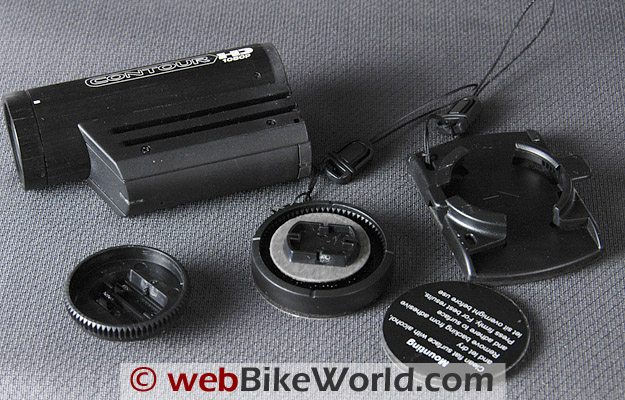 Mounting adapters provided with the VholdR ContourHD are limited but many more are available as options.
The Sound Problem
Unfortunately, the microphone issue we noted on the original VholdR hasn’t changed either.
There’s no mention of the microphone location in the owner’s manual, but it’s apparently the tiny hole on the bottom of the ContourHD body.
At anything over 10 MPH or so, the wind noise overwhelms the microphone. One webBikeWorld visitor sent a tip to place a piece of duct tape over the hole to stop the noise.
Unfortunately, you may not be able to record the sound of those beautiful new Termignoni pipes you put on the MV Agusta.
720p or 1080p?
I should note that the new VholdR HD video camera is available in two versions: 720p and 1080p. To some extent, from the consumer’s point of view, this is like the megapixel wars in digital cameras — more is better, right?
Not necessarily. While the virtues of one over the other is beyond the scope of this article, suffice it to say that I’ll bet you a megapixel that 99 out of 100 viewers won’t be able to tell the difference for most video.
But the 1080p version of the ContourHD has an interesting feature: it can be switched between 30 frames per second (FPS) or 60 FPS. From “E.G.”: I own a 1080p version and it definitely supports 60fps 720p video.
The format options are Full HD (1080p/30fps), Tall HD (960p/30fps), Action HD (720p/60fps), Contour HD (720p/30fps) and Fast SD (WVGA/60fps)”.
For motion video like that taken on a motorcycle, it is possible that 60 frames per second will be smoother (in theory).
It’s not slow enough to make slow motion; you’d need around 120 FPS for that — but more frames per second can mean more frames to cover each move, making for a smoother motion at 60 FPS.
Also, VholdR claims the 720p version stores 30 minutes per gigabyte at 30 FPS compared to 15 minutes per gigabyte at 30 FPS for the 1080p version (the 720p version stores 15 minutes per GB at 60 FPS in HD and 60 minutes per GB in SD mode).
And finally, the 720p version has a list price of $249.95, which is $80.00 cheaper than the 1080p.
However, you can see in our YouTube video (and the raw .mov clip we provided also as a download) that the motion is actually pretty good.
You can see some noticeable degradation in the YouTube video, due to the processing of the .mov file into .avi format, then compressed with DivX and compressed again by YouTube, but it’s not all that bad.
Try downloading the raw .mov file and play it in QuickTime Player and you’ll see.
Video Notes
The raw .mov files were processed in Adobe Premier Elements 8.0, saved in .avi format, then compressed with DivX.
The file is compressed again when uploaded to YouTube, so the quality is degraded from the original video.
If you’d like to view a portion of the original video in .mov format for comparison, download this 10-second 12.5 MB clip in .zip format and you can use QuickTime Player to view it.
See the notes above; the .mov file may not play smoothly in all Windows computers.
Because it’s an unretouched file, the loud wind noise from the camera is apparent, so lower the volume on your speakers.
Conclusion
I have ranted enough, but really, if you can get over some of these nitpicky issues, you’ll find that the VholdR ContourHD video camera is actually a very cool and tiny unit.
With the right accessories and a little ingenuity, can be mounted just about anywhere and it provides excellent quality HD video.
Besides the .mov file format problem (to which I’m sure some may not agree), there’s the price.
This is a very expensive video camera, considering that a very high quality digital still camera with very high quality HD video can be purchased for the same price or less from Canon, Nikon and the rest.
However, the fact remains that there really isn’t anything else out there that I know of that is this small with the same quality.
This leaves me with a bit of a dilemma but again, if you can get over the cons, there are some pros to be found with the VholdR Contour HD.
More webBikeWorld:
▪ Video Action Camera Reviews
▪ Intercom and Radio Reviews
| wBW Review: VholdR Contour HD Video Camera | |
|---|---|
| Manufacturer: VholdR (Twenty20, Inc.) | List Price (2010): $249.95 (720p) or $329.95 (1080p) |
| Colors: Black | Made In: China |
| Review Date: February 2010 | |
Owner Comments and Feedback
See details on submitting comments.
From “N.W.” (2/10): “Great review, just want to make a few comments (I work in video).
The QuickTime format is a container only…just like AVI. The quality contained therein depends on the codec used and then most importantly, the bitrate.
H264 (a variant of MPEG-4) video at 1080p resolution is no joke.
It takes a lot of CPU horsepower, and only computers made in the last year or so are going to be able to play it at full resolution, full frame rate. The newest comps have hardware MPEG4 decoders built into the graphics cards, and that helps tons.
The reason your Canon HV20 footage can be played with no hiccups is because it’s MPEG2, which older by a few years and a fair amount easier for the CPU to decode.
It also looks worse at a given bitrate than MPEG4, thus the move to MPEG4 in the latest devices.
QuickTime on Windows unfortunately is subject to a lot of variables (does it have direct access to video acceleration, what version of QuickTime is installed, etc etc) which puts it at a disadvantage for being an efficient way to decode 1080p h264 footage on Windows, as you’ve found. A pain to be sure, but…
…don’t blame the online quality issues on QuickTime.
There are ways to separate the H264 video from its QuickTime “wrapper” without ANY quality loss.
Even if you had to do a true transcode to something easier to edit, you only have to make sure the bitrates/formats you’re converting to are high enough so you’re not throwing away too much info along the way.”
From “S.B.” (2/10): “There are many good free programs that handle file format conversions for those who need their video in a different format. For example, Format Factory does a great job in transferring video (and audio, too) formats.
Any Video Converter is also a good free program, but it is really a kind of come-on to their better more expensive programs, but for some applications it does a good job.”
From “E.G.” (2/10): “Regarding the file format, I believe that it is just basic H.264 that happens to have a .mov extension.
It doesn’t appear to be in any QuickTime-specific wrapper or container, so changing the extension to .m4v or .mp4 should allow you to open it in any program that supports H.264.
Although that won’t change the fact that H.264 requires some serious CPU power for editing.
The reason that it is much slower to process on your computer than other HD video is probably because the other video your comparing it to uses less complex compression (or none at all).”
Editor’s Reply: Actually, we have no problems opening the file, just playing and editing the VholdR implementation of the format.
It’s curious that we do not have this problem with many of the other .mov or H.264 format implementations.
From “P.P.” (2/10): “Just read your ContourHD review… I must point out that most of the CMOS sensor based video cameras suffer from different degrees of the rolling shutter effect. I found out the hard way trying to mount my Canon Vixia HF10 onto my motorcycle.”
Editor’s Reply: Thanks for the reminder, this issue was discussed in the comments section of ourKodak Zi6 review.
We did not notice the effect (in the raw .mov file) when using the ContourHD for some reason, but it is slightly noticeable after the three compressions to get to the final YouTube version. It’s much better in this regard than the Kodak Zi6 we reviewed though.
Also (From G.G.): “In reference to the Rolling Shutter effect mentioned by the other reader, a company, NewBlueFX, has $80 plug-in they call Video Essentials II which has a fix for Rolling Shutter. They also have a fix for wide angle lens distortion.”
From “G.G.” (2/10): “There should have been a laser warning sticker on your camera. That sticker was placed over the mic to prevent wind noise.
But it’s not really good enough above 60 anyway.
To get good audio on the HD up to about 170, put one or two strips of electrical tape over the hole. Here’s some (YouTube) videos of mine with that done.
This one has the sound level from the lowered a bit so I can overlay other audio. This one has full sound level.
I have the 720p model, not the 1080p model. For processing, I use a 1.8GHz Dual Core with 8GB RAM and Sony Vegas Platinum.
Because Vegas Platinum has problems with the audio in the .mov file, I use QuickTime Pro or VLC Media Player to export just the audio.
After putting the video and audio in to Vegas and syncing them, I boost the contrast, increase saturation and sharpen with UnSharp. I render using Sony AVC to 1280×720 at 10Mbps and upload to YouTube.
I could render to WMV and get the same results but AVC uses H.264 and I just like that better for some reason.
I played with rendering for a while.
There’s videos on YouTube that explain how to get good quality HD. I don’t recall which ones I looked at but I looked at a few and they pointed me in the right direction.
Then, like I said, figured out what was best for me.
Vibration can cause the battery to lose contact and drop power. This shuts off the camera and renders any recorded video useless. This even occurs with the new batteries that are supposed to fix that – at least in my experience.
Cutting a standard piece of paper to the size of the battery and finagling the battery and paper into the camera holds the battery stable.
The Daytona video was after I crashed the camera. The PBIR video is prior to the crash. You can see saturation and stability differences.”