

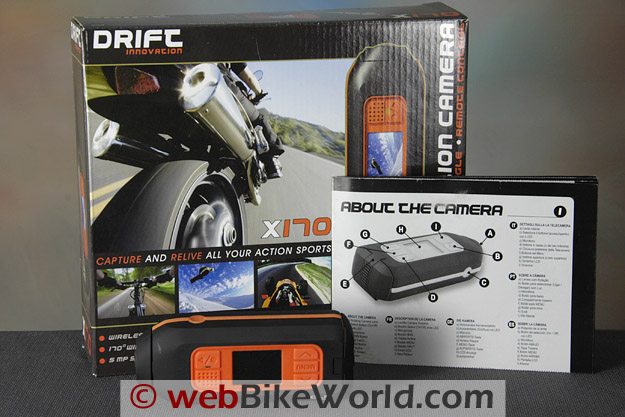
The Drift X170 has everything going for it…except HD.
Too bad, because the form factor, ease of use and the live view color LCD menu screen makes everything else seem so yesterday.
We can only hope that Drift will release an HD version soon.
In Part 1 of this two-part comparison, I reviewed the GoPro HD video camera.
It’s a nice unit and it takes very good quality HD video, and it has a very waterproof housing that is used by surfers, wakeboarders and others.
The Drift X170 has a color LCD live view screen and easy-to-use menu system that suddenly makes the GoPro seem hopelessly obsolete. Sounds good, right? Except the Drift X170 is not HD.
The videos aren’t up to the quality of the GoPro HD, much less a “real” HD dedicated video camera.
Nevertheless, the price and ease of use of the Drift X170, along with its built in 1/4-20 tripod mount and almost-sleek styling may make it a contender for some motorcyclists.
If this all sounds rather subjective, it is. When Drift comes out with an HD version — and we can only assume they are working on it (or should be) — it may just be the video camera to have.
GoPro would have to do a serious renovation of their boxy camera to match the features of the Drift X170.
The GoPro camera body has been in production for several years in various forms (the original GoPro camera was along with the GoPro Wide were both previously reviewed on webBikeWorld).
This may be a blessing and a curse, because to add a live view to the GoPro would probably mean a completely new system.
Again, it’s important to note that the Drift X170 is not HD; it is also a wide format camera and the owner can choose between 3:2, 4:3 and 16:9 perspectives (but the 16:9 is simply a cropped view and not HD).
As I wrote in the GoPro HD review, this makes a comparison a bit of an apples-to-oranges exercise, but both cameras have their pros and cons and the Drift X170 has so many cool features, it may just be worthwhile, even without HD.
UPDATE: June 9, 2010 — Drift announced the release of an HD version of the camera, here’s ourDrift HD 170 Video Camera Review!
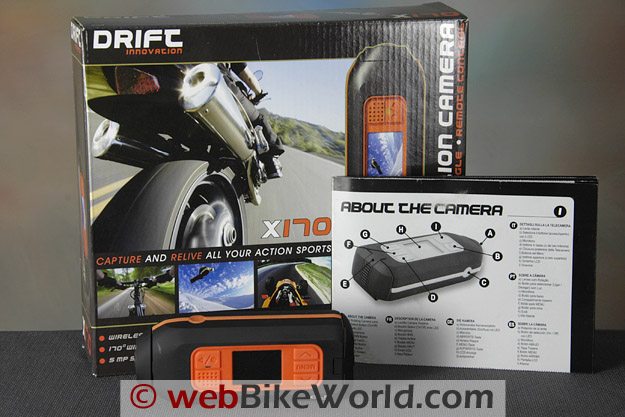
Drift X170 Specifications
The Drift X170 records video in either .MP4 or MJPEG .avi format and at 30 or 60 frames per second. The formats and speed can be selected in the settings in the menu system. Files are stored in .avi format on an SD card up to 16 GB.
The marketing materials for the X170 list different specifications than what is displayed in the camera’s menu system.
For example, our instruction sheet does not indicate that the camera will record at 60 fps, nor does it list the 3:2 format, but both of these choices are available via the menu (although we didn’t record at 60 fps so can’t confirm it actually works.
The camera uses a CMOS sensor and it will also record still images that actually seem better quality than we expected, albeit with the perspective distortion of its 170 degree wide lens.
The video resolution is 720 pixels by 480 pixels and the photos are taken at 5 megapixels.
UPDATE: Slide show added to the GoPro HD review in Part 1 of this comparison.
Drift X170 Features
Now you might think the Drift X170 is a non-contender because it doesn’t record in true HD, which is pretty much a must-have feature for any camera in 2010. But it has so many other endearing features that can really win you over.
For example, it has the the full color, 1.5″ wide live view screen that makes it so easy to use the menu system that the very simple instruction sheet isn’t required, unlike the GoPro, which has a very cryptic and difficult-to-use menu system on a plain and tiny black and white screen.
The Drift X170 also has a small remote control (radio frequency) that comes with its very own hook-and-loop wrist strap. This is a real advantage when taking videos on a motorcycle.
The strap can be secured around the handlebars or elsewhere and the camera can be easily turned on and off to record portions of the ride — a real breakthrough for motorcyclists.
The remote works from several feet away (claimed 5 meter radius) and we had no trouble turning the camera on and off with it while on the motorcycle.
Also, the X170 uses two AA batteries, so you can carry extra batteries and don’t have to worry about finding a USB port to recharge the unit.
So there are some real advantages here and we can’t wait until Drift releases an HD version of the X170.
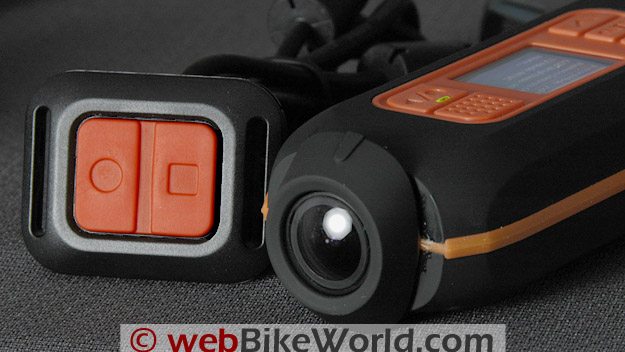 The lens on the Drift X170 rotates 360 degrees. The camera comes with a very handy remote control (L).
The Drift X170 housing is made from a soft-touch plastic material. It’s very easy to grip and hold and the form factor is obviously much different from the GoPro HD.
It’s not perfect though; the long and slightly thick shape does make it a bit difficult to mount on a helmet.
Also, the Drift X170 does not come with a suction cup mount, so I bought one at the local camera store for $25.00 (it has a ball head). The X170 does have a metal 1/4-20 tripod mount, something we consider mandatory for any camera.
The housing is nowhere near as waterproof as the GoPro HD; the X170 is rated to only 0.5 meter — that’s 1/2 of a meter, or 50 centimeters, or 500 millimeters, which is about 20″.
The lens on the X170 rotates through 360 degrees, which helps to line up the video, although you have to make sure the video is framed correctly in the live view with the camera in the correct position (i.e., with the “Drift X170” logo in the upper left corner as shown below).
The live view helps a great deal in lining up the camera to ensure you’ll get the shot you expected, unlike the GoPro HD, which is a guess-and-hope system.
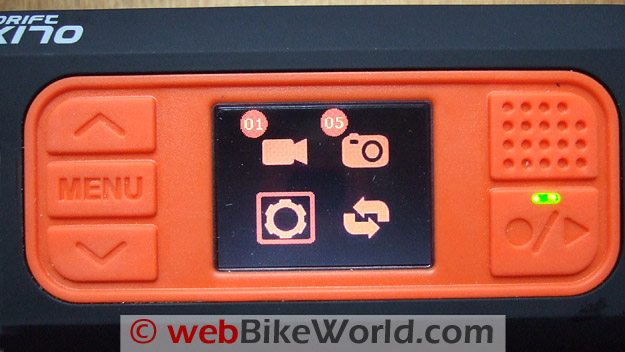 Initial menu on the color LCD screen of the Drift X170 shows 1 video file; 5 photos; the gear that is currently selected to access the settings and the dual arrows to download firmware.
Batteries and…No Charging!
The Drift X170 uses two common AA batteries. This makes it easy to carry spares for replacement if necessary, and rechargeable batteries can be used.
It comes with a pair of basic Maxell alkalines that last about 30 minutes, and Drift recommends using lithium batteries for up to 4.5 hours of recording.
The X170 and the GoPro HD have battery life indicators on their LCD panel.
When the Maxell batteries died, I put in a pair of Energizer AA batteries and it’s been running fine ever since.
The remote control uses a CR2032 camera battery. We haven’t found it necessary to replace the remote battery yet. Next time the camera needs batteries, I will try a pair of rechargeables.
The Box Again…
I mentioned the pet peeve about the useless boxes in Part 1 of this series, so won’t repeat it here except to say I sure wish they included a nice soft bag to carry the X170 in.
The round lens on this camera is very exposed, so it would be nice also to have some type of plastic form-fitted case to put the camera in when not in use. I’m afraid the lens will eventually get scratched — it’s almost unavoidable.
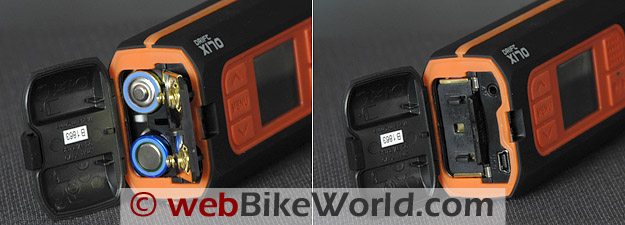 The Drift X170 uses two AA batteries (L). The compartment holds the SD memory card, the USB port and the AV port (R).
In the Box
The Drift X170 also comes with an assortment of accessories but, unlike the GoPro HD, it’s missing one of the most important: a suction cup mount.
I bought the separate Panavise-type mount for $25.00 and it has a ball head, which is a must-have feature for a suction cup mount in my opinion.
Besides the camera, the batteries and the remote control, the Drift X170 package includes an el cheapo bicycle handlebar grip; a couple of goggle mounts and straps (didn’t try them); a wrist strap for the remote control (very handy); and a USB cable and AV cable.
I never use the AV cables or the USB cables, preferring instead to yank the SD card and put it in my direct card reader to download the video and photo files.
By the way, like the GoPro HD, the Drift X170 can be powered from an accessory (i.e., cigarette lighter socket) power supply that converts to a USB output, like the car chargers with USB cable connections.
This is more theoretical than practical though, as the rear door on the X170 would have to be left open to access the USB port, while the GoPro HD would have to come out of its waterproof shell, which would then expose the lens.
But, just to note that either of the cameras can be powered by (and the GoPro HD battery can be recharged) on the road if necessary (not sure if the X170 would recharge a pair of rechargeable batteries when plugged in though).
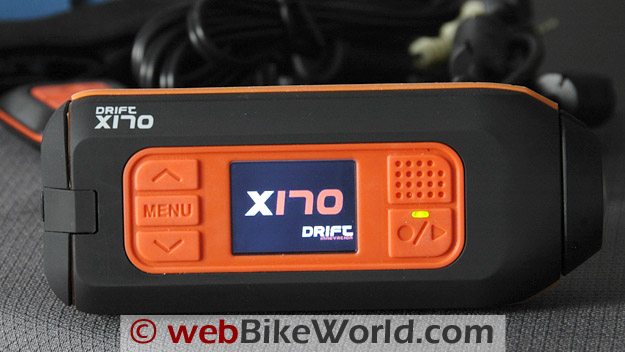
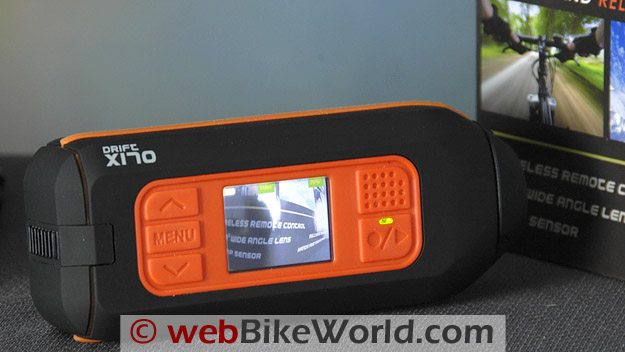 Live View Screen on the Drift X170.
Drift X170 File Format
The .avi format files saved by the X170 defaulted to MP4 so I left it at that and did not try the MJPEG flavor.
The files are relatively small, as I reported in the GoPro HD review.
We had no problems importing them into Adobe Premiere Elements 8.01 for editing and exporting to YouTube in the two videos included below.
The files were combined with files from the Canon HV20 and GoPro HD and saved as .M2T (AVCHD) HD files. Note that the video from the X170 is stretched to fit the HD format, which affects the quality.
Also, note that the DivX player we use to play videos would not play the audio from the Drift X170 without an added Direct Show codec.
I haven’t investigated this further because the audio plays when imported into Premiere Elements and since we always edit the videos before saving and playing them, it just isn’t important to me to figure this out.
However, if you plan on viewing unedited videos from the X170, this may be something to investigate.
As I mentioned in the GoPro HD review, the studio videos (below) are designed to compare the quality of the Canon HV20 video camera we use for most of the webBikeWorld videos (1080i) with the GoPro HD and the Drift X170.
You will see in the videos that the Canon still has much better quality, while the GoPro produces good quality video but the very wide angle lens that somewhat distorts the perspective, especially at close range, while the Drift X170 is wide angle only.
The field of view for the X170 lens is 170 degrees (hence the name) and the aperture is undefined but is fixed.
Like the GoPro HD, the X170 has occasional difficulties with high-contrast scenes, or when coming from shadows to sunlight when riding and shooting a video.
Both of those cameras also have lower quality, less saturation and lower contrast levels than the Canon and are lower quality than even most of the relatively inexpensive digital cameras with HD video capability, so we still have a way to go in this area.
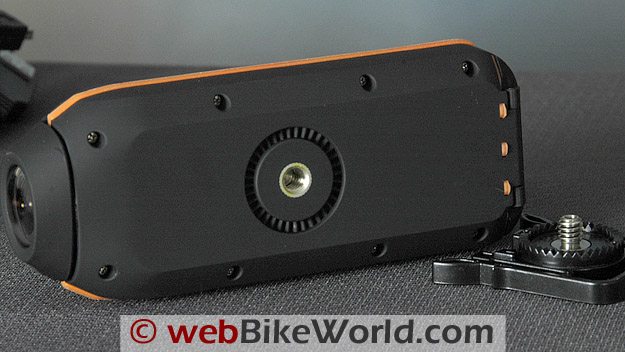 The Drift X170 comes with a 1/4-20 Tripod Mount.
 Still Image Lens Perspective Comparison: Left – Nikon D70, 18-200VR at 35 mm. Center – Drift X170. Right – GoPro HD. Here is a 625 pixel wide version of this comparison. Photos unretouched but cropped to 625 pixels.
Notes on Using the Drift X170
The live view on the color LCD screen makes a huge difference in setting up the Drift X170. Also, stored videos can be viewed on the screen, which at least lets you know whether you have what you expected.
And, the X170 even has a built-in speaker, albeit with poor quality. But you can at least confirm that your videos were recorded with sound.
With the GoPro HD, you’ll have to wait until you have access to a computer to even know if you have a video. This is a big plus for the X170.
The Drift X170 also has an easy-to-use menu system.
It takes a couple of tries to learn how it works: scroll to the gear icon and press the enter button. Then scroll through the menu choices, forward or back, using the arrow keys.
Press the “carriage return” button to choose and press the Menu button to go back. Repeated pressing of the Menu button will always return to the live view screen, ready to take a video or photo.
The color LCD screen on the Drift X170 measures 30 mm across by 25 mm tall, almost exactly twice the size of the GoPro screen. The resolution is undefined, but it’s pretty good for a tiny and inexpensive LCD.
Using the X170 menu system is a breeze, and the small instruction printout shouldn’t be needed after a couple of initial read-throughs.
Everything you need to know is in the on-board menu and it’s self-explanatory.
The only trick on both of these cameras is remembering to set them to your choice of parameters before shooting the video or taking the photos.
Also, as mentioned in the GoPro HD review, unless I’m missing something, it appears that both of these cameras do not have an obvious warning if no SD card is installed.
We tried taking videos several times and couldn’t figure out what was going on until we realized the memory card was not installed.
There should be a very obvious warning, flashing lights and beeps if the camera is turned on without the memory card.
The Drift X170 does have a 1/4-20 adapter, making it easy to connect the camera to a tripod or other standard camera holding device. Handlebar mounts with 1/4-20 screws are available to fit on motorcycle handlebars.
If all this sounds good, the main purpose of the X170 — taking video — is a letdown. The quality of the video is acceptable but below average and we noticed some pixilation in the moving videos.
It simply isn’t HD quality because it’s not HD and the wide angle format, while perhaps acceptable for surfing or skiing, isn’t a benefit for motorcycle use.
| webBikeWorld Overall Opinionator – AFX FX-50 | |
|---|---|
| Picks… | …and Pans |
|
|
Sound Recording
The X170 HD has a built-in microphone and speaker, but the sound quality isn’t quite as good as the GoPro HD, which is also not very good compared to a dedicated video camera.
We left the sound unchanged and unedited in the on-bike video samples.
With careful placement and possibly some wind-filtering experimentation, the sound may be better than we recorded, but we didn’t spend much time trying to perfect this aspect of the cameras.
Some owners report success using different types of open-cell foam strategically placed over the microphone.
NOTE: The raw files for the videos above were processed in Adobe Premier Elements 8.0 and exported as H.264 in .M2T format.
The files are compressed again when uploaded to YouTube, so the quality is slightly degraded from the original video.
Conclusion
The Drift X170 has many unique and useful features, but it’s let down by its non-HD video.
It seems obvious that the “faux HD” wide-angle file format is a stopgap measure until Drift comes out with a full HD version, which we hope is soon.
Nevertheless, it’s a fun camera to use and the price is lower than the GoPro HD. You can at least record video that’s a lot of fun to watch.
The words I wrote in the GoPro HD review conclusion are valid here also:
If the Drift X170 had full HD, it would probably be a clear winner in this comparison, unless you needed the full waterproof capability of the GoPro.
Next: Drift HD 170 Video Camera Review!
More webBikeWorld:
▪ Video Action Camera Reviews
▪ Intercom and Radio Reviews
| wBW Review: Drift X170 Video Camera | |
|---|---|
| Manufacturer: Drift Innovation | List Price (2010): $199.95 |
| Colors: Orange and black. | Made In: Cbina |
| Review Date: April 2010 | |
Owner Comments and Feedback
See details on submitting comments.