

A motorcycle Bluetooth intercom system with a very different approach to control layout that makes it very easy to use.
Very loud volume and excellent sound quality also.
The Sena “Jog Dial” is a new feature that makes it easy to choose or switch the internal features.
Firmware updates give the SMH-10 the latest capabilities.
Recent firmware updates have also provided the SMH-10 with the Sena “Universal Intercom” ability to connect with other brands of Bluetooth intercoms.
The Sena SMH-10 was named the webBikeWorld 2010 Motorcycle Product of the Year!
See Also:
▪ Sena SMH10 V4 Firmware Update Report
▪ Part II: Sena SMH10 Ride Report Update
▪ 2010 Bluetooth Intercom Comparison and Final Report
▪ 5,000 Miles With the Sena SMH10: Owner’s Report
▪ Sena SR10 Bluetooth Hub Review!
▪ Sena SM10R Bluetooth Intercom Review
▪ Sena SMH10B v4.3 Firmware Update Report
Introduction
Burn and I were working with the new Sena SMH10 intercom system one day last week, when suddenly we realized that a new day has finally dawned for motorcycle communications.
What might be called the first “Gen 1” Bluetooth intercom systems that we reviewed about 3 years ago were difficult to use. Communication of any type involved a series of obscure and illogical button-pushing sequences that challenged the gray cells of young and old alike, to a point where the intercoms were best left at home.
Next came what might be called the “Gen 2” systems, marked by an improved user interface but with sound quality and volume levels that quickly faded at anything beyond residential road speeds.
And now? Now we’re talking — if I may pun the saying — because we finally have arrived, with motorcycle intercom systems that work, and work beautifully well.
In fact, while past webBikeWorld intercom reviews were mostly a focus on what features didn’t work and why, along with tricks and tips to get past the issues, these new generation intercom systems are making the reviewing task a real pleasure.
It’s now assumed and expected that when you turn the darn things on, they’re going to pair (an amazing concept!). And they’ll pair with whatever else you throw at them — GPS, MP3, iPods, uPods, mePods, whatever…
So we can now call these the “Gen 3” systems; characterized by very nice products like the recently reviewed Interphone F4 (review); the Scala Rider G4 (review in process); and the Sena SMH10 system described here.
In fact, it was the Sena SMH10 system that turned on the light bulb for us, because this system pretty much defines the term “ease of use” as it applies to motorcycle Bluetooth intercom systems.
Introduction to Sena Technologies
Now while intercom manufacturers — er, pardon me — I mean “motorcycle communications systems providers” — with names like Interphone, Scala and Midland are familiar to motorcyclists, Sena is not.
But, chances are you’ve used a Sena product anyway without even knowing it.
Sena makes high-tech gear like “external, embedded, wireless and industrial device servers” and they’re also big in the industrial Bluetooth arena.
They make products like Bluetooth serial adapters Bluetooth access points used for information technology services, telecom applications, retail point-of-sale, industrial automation (i.e., advanced factories) and medical automation applications.
Sena specializes in what is known as “M2M”, or machine-to-machine communications. Customers for these products are mostly other manufacturers who embed and integrate Sena equipment in various types of manufacturing systems.
In fact, M2M magazine (yes, there is such a thing!) named Sena Technologies in their “Top 100 M2M Technology Providers” for the fourth year in a row.
OK, but what does a tech firm who makes “M2M” products know about things like motorcycles and a sensible user interface? Plenty, as it turns out…
The Sena SMH10 Motorcycle Bluetooth Intercom System
Just by coincidence, The Sena SMH10 intercoms and the new Scala Rider G4 intercom system arrived within 24 hours of each other. So comparisons are inevitable, but in some ways, the two systems are aimed at different audiences.
We wanted to bring you as much information as we could as quickly as possible, so this “First Look” at the Sena SMH10 will cover the basics.
Up next will be a more detailed look by HBC, our intrepid electronics whiz, who will be taking the Sena and Scala systems on an extended motorcycle tour in the warmer parts of the U.S. over the next several weeks. He will then report back with all the details.
The most striking thing about both the Sena SMH10 and the Scala Rider G4 systems are their size. With added features comes added size, apparently. But this isn’t a bad thing, because larger is better for glove-wearing motorcyclists.
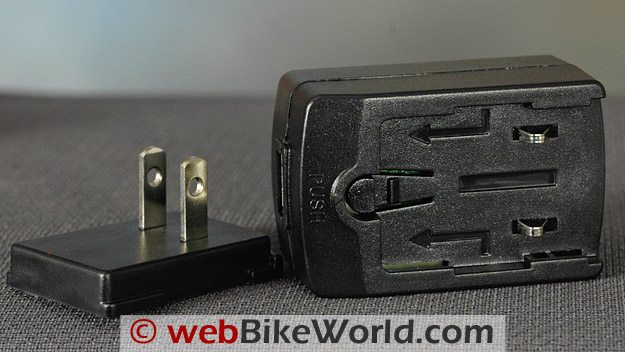
Wall charger is a module with country-specific adapters.Sena SMH10 Features
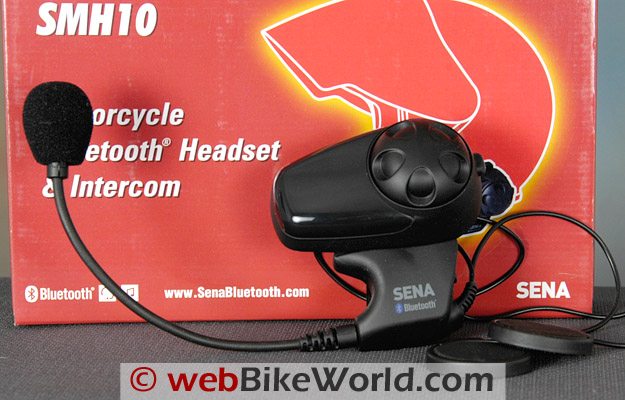
There are two design factors that are immediately noticeable on the Sena SMH10: first, the absence of buttons. Believe it or not, those M2M engineers at Sena have made what we think is a breakthrough in a motorcycle intercom user interface — take a look at the SMH10 and what do you see? A total of one button.
That’s right — only one! It’s called the “Phone Button” because is controls pretty much all of the functions of a paired cell phone.
The other can’t-miss feature is what I call the “Big Wheel” and what Sena calls the “Jog Dial”. The Jog Dial controls the intercom functions. The Jog Dial also rotates to — get this — raise and lower the volume!
Yep, just like in the old days, one of the best and most intuitive electronic interface systems ever made. Rotate the wheel one way to raise the volume; rotate it the other way to lower the volume. Why didn’t I think of that?
I’m being facetious, of course. When the Jog Dials is pushed, it activates some of the intercom functions. So I guess you could say it is a second button, but still — when’s the last time you used a motorcycle intercom with only two buttons?
We really like this feature, because the dial is nice and big and easy to find and use. It has a smooth rotation with just enough friction to provide feedback and to hold it in place when it’s moved.
The Jog Dial is indicative of the simplicity of the SMH10 intercom system. The owner’s manual is thinner than most because it’s easier to understand. Both Burn and I realized we didn’t have to keep referring back to the manual every time we wanted to use another feature.
Each SMH10 will also pair with three other SMH10 units, for a total of four, although pairing the four at one time does take another read-through of the manual.
But I’m getting ahead of myself here. Since this is a “First Look”, I’ll briefly describe the features we have been using over the last few weeks:
Easy On/Off: The SMH10 is very easy to turn on and especially easy to turn off. To turn the unit on, press and hold the single button and the Jog Dial for 2 seconds and the SMH10 fires up. Turning it off is a snap — it’s not necessary to press and hold and wait; simply press the Phone Button and jog dial again and it instantly powers down. Nice.
Sound: Stereo, Bluetooth 2.1, Headset Profile, Hands-Free Profile (HFP), Advanced Audio Distribution Profile (A2DP), Audio Video Remote Control Profile (AVRCP). The system has a wider than normal volume range, from very low to very high.
VOX: VOX can be enabled on demand. When enabled, the system turns on after a brief (~1 second) pause, then stays on during the conversation. If no words spoken in 20 seconds, the connection is put in sleep mode and can be enabled again by speaking. Once we discovered that both units must be put in VOX mode to get it to function, we used this method.
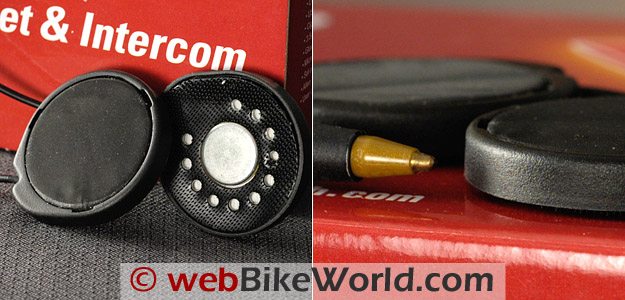
Speakers: High-quality speakers have a relatively heavy magnet (we weighed each speaker at 10 grams vs. 7 grams for the Scala G4), good sound quality and the volume can be raised very high.
Pairing: Four person pairing. Pairs with Bluetooth music players. Can also connect with non-Bluetooth music players or devices via a 3.5 mm input jack in the back of the intercom module. Pairs with Bluetooth-enabled cell phones and GPS units in stereo.
Battery: Lithium polymer. Claimed ~12 hours or more talk time, 10 days standby. Listening to MP3 players takes slightly more power, so a combination of the above will vary the battery life, as is usual with intercom systems.
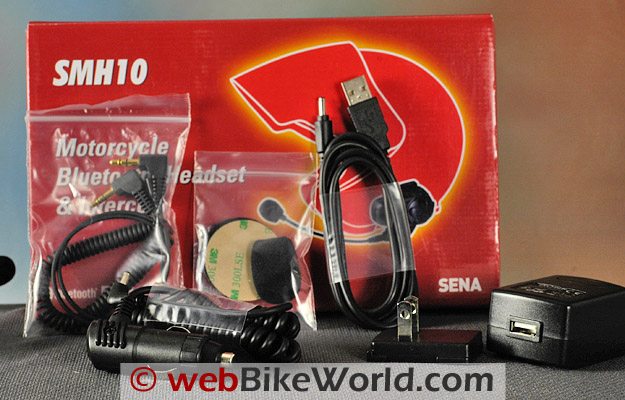
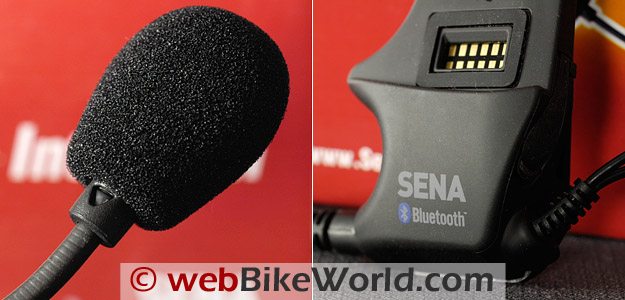
Accessories: The SMH10 is available either as a single unit or a dual kit. The single unit box shown above contains a headset (intercom module, robust mounting bracket, speakers, boom mic, charger, USB cable, cigarette lighter adapter, stick-on mount (if needed) and an extra microphone wind sock and Velcro stickies for the speakers.
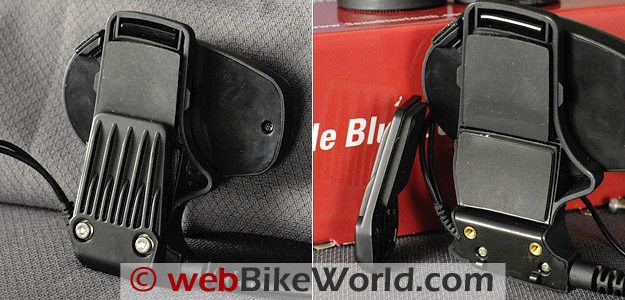
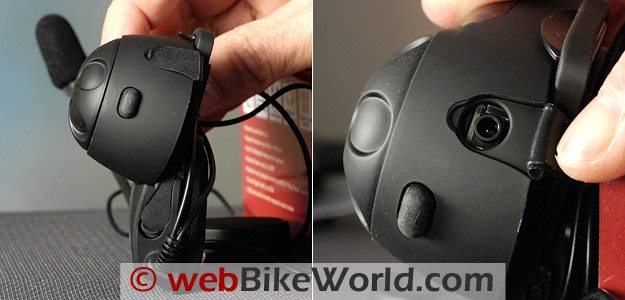
Very strong helmet mounting bracket uses hex-head cap screws, brass inserts and rubber padding.Helmet Mounting: The SMH10 headset can be described with words like hefty, robust and strong. Ditto on the helmet mount, which also features rubber pads on both sides to help protect the helmet and provide more grip.
The mount is a bit on the thick side, and may not fit between the liner and shell of some helmets…as is the case with other intercom helmet mounting systems also. But we’d much rather have big ‘n’ hefty than small ‘n’ wimpy.
The hex socket screws that are used on the helmet mount screw into brass adapters inside the headset, as seen in the photo above. This is a quality system that, once installed, should give no problems at all. Sena also supplies an external helmet mount bracket with double-sided tape which we have not used.
Microphone (L) has a small triangle to indicate the mouth side.Using the Sena SMH10
The SMH10 module locks securely into place in the headset unit with a tab on the bottom of the module and a clip at the top (see the video below). The module feels very secure once it’s in place in the headset, and the headset feels sturdy. The microphone boom also has a robust attachment where it enters the headset.
The headset and the module are mostly finished in a matte rubberized water-resistant surface treatment. The glossy part of the module is a translucent cover that hides the LED indicator light. The glossy plastic can get scratched, but it may be possible to polish it if necessary.
On/Off: Press and hold the Jog Dial and the intercom button and the system fire up within 2 seconds, noted by an announcement tone and the familiar flashing blue light, which is subtly indicated under the transparent module cover.
Turn off the SMH10 by simultaneously pressing the Jog Dial and intercom button and it instantly shuts down, so the user does not have to press, hold and wait to make sure the unit is off, as is the case with other intercoms we’ve used.
Pairing: The SMH10 has a slightly different pairing procedure than other systems. The unit is turned on first, then once it’s on, press and hold the intercom button for about 5 seconds to place it in pairing mode. This is the same procedure for pairing with other SMH10 units, GPS, MP3 or Bluetooth adapters.
Multiple Pairing: Up to four SMH10 units can be paired but do not allow four person, full duplex communications. Once the rider and passenger systems are paired, the rider can also be paired with two others, then the passenger can also pair with two others. So it might go something like this:
Step 1: Pair A to B,C and D.
Step 2: Pair B to C and D (skip A since A is already paired with B at Step 1).
Step 3: Pair C to D (skip A and B since they’re already paired with C at Step 1 and 2).
Once all four units are paired, any unit can initiate an intercom conversation with any other unit by tapping the Jog Dial one, two or three times. This is where it pays to study the owner’s manual, which has a graphic illustrating how this works.
It’s slightly counterintuitive, because the last intercom that was paired takes the least amount of taps. For example, if headset A is paired with B, C and D, then one tap connects with D; two taps with C and three taps with B.
Cell Phone: Although we recommend never using a cell phone while riding a motorcycle, a Bluetooth-enabled cell phone can be easily paired with the SMH10 as described above and illustrated in the video.
Once the phone is paired, to answer a call, press the intercom button in the rear of the SMH10 module, or answer with voice if the voice activation system is enabled on the SMH10 (it’s turned off by default). To enable the voice answering activation, press and hold the intercom button for 8 seconds, until the LED turns solid red.
VOX: A similar method is used to enable the VOX system on the SMH10. Note that VOX is only available between two systems if all four are paired; if you think about it, there would be some difficulty in using voice to call the other headsets.
To enable VOX mode, press the Jog Dial for 5 seconds until the red light flashes. Keep pressing for another 3 seconds to go into VOX configuration mode (solid red light). Tap the Jog dial to enable the VOX mode. Blue light comes on for a moment as a confirmation.
Range: Sena claims up to 900 meters range for intercom communication (under ideal conditions, of course) and we have no reason to doubt that. Burn and I are able to communicate clearly at any distance we care to during our evaluation runs and, in fact, the SMH10 will now become our standard system for this purpose.
GPS and MP3: The SMH10 easily paired with our trusty Sony Bluetooth adapter (review) when the Sony was connected to an MP3 player and older Mio GPS unit. Since we don’t have one of the newer Garmin GPS units available here, we’ll have to wait for HBC’s report on how the SMH10 interacts with that device.
The MP3 player or device can be controlled to some extent if it includes the AVRCP profile. Press the Jog Dial for 1 second to pause; press and turn the Jog Dial to forward or reverse the track.
Sena also provides a nice coiled accessory cable with 3.5 mm jacks on either end, which can be used to connect wired devices directly to the headset.
Larger-than-average stereo speakers provide outstanding sound volume and quality.Sound and Volume: The sound quality of the SMH10 is outstanding for a motorcycle Bluetooth intercom system. While the mid-range of the tunes recorded directly from the admittedly cheap iRiver MP3 player’s radio are somewhat muddled, this is due to the recording itself rather than the SMH10.
Speakers: The Sena speakers actually have very good bass response and the volume has a huge range — the greatest amount of range of any motorcycle intercom system we’ve reviewed so far, from very low to very loud. We never had to use the highest volume at any speed.
The speakers are noticeably larger and heavier than other intercom speakers and, in fact, they actually sound better when placed slightly farther from the ear than normally is the case (usually, a motorcycle intercom speaker must be placed very close to the ear for best response).
The Sena speakers actually work very nicely in a motorcycle helmet that has a deeper ear pocket; it’s almost like the speakers use the air volume in the ear pocket as a speaker enclosure.
We did not run volume comparisons but a subjective evaluation points to the SMH10 as having a higher volume and better sound quality than any other intercom system reviewed.
Charger: Sena provides a 20 mm diameter cigarette lighter accessory outlet charger with the SMH10. It can be used to charge and run the SMH10 simultaneously while riding.
Large size of the SMH10 intercom with Jog Dial and charging port.More Video: Quick feature comparison of the Sena SMH10 vs. Scala Rider G4 (YouTube)
Conclusion
Motorcycle intercom systems just keep getting better and better, and the rapid improvements in technology and availability now offers many different choices to the motorcyclist.
The danger is that the “more is better” mentality will take over, driven by the urge to compete on features rather than function.
The Sena SMH10 system takes a different tack — while offering all of the desired functionality with a nicely streamlined user interface that makes the system a pleasure to use in the “real world”.
That is, while riding a motorcycle, where it may be both dangerous and frustrating to try and remember the correct sequence of buttons to work the intercom system.
Sena has obviously thought about this issue and made the SMH10 easy to use with the two-button interface. But of course, that wouldn’t be enough — the SMH10 has outstanding volume and sound qualities and there should be no complaints in that department by any motorcyclist.
NEXT: Part 2: Sena SMH10 Ride Report Update
See Also: Sena SMH10B v4.3 Firmware Update Report
And: 5,000 Miles With the Sena SMH10: Owner’s Report
Also: Sena SR10 Bluetooth Hub Review!
Owner Comments and Feedback
See details on submitting comments.
From “N.P.” (July 2016): “I recently purchased a TAOTronics Model TT-BA01 Bluetooth transmitter so I can feed my Sirius satellite radio to my Sena 10 unit.
Overall, the unit works well. Pairing is easy and it’s an easy setup. A bit of warning however, the battery life isnt that great, I average about 4 hours of transmit time before it needs to be recharged (or connected while riding). Just wanted to add the update.”
From “P.R.” (June 2015): “I recently purchased the Sena SMH10 (March 2015) and find that your review is almost accurate. It is easy to use, pair, and all the features are helpful.
It however, does not have the power to allow me to hear. I ride an FLSTN with a windshield, no faring and Vance and Hines pipes. When I’m in the garage and the bike is off, it sounds fabulous…..like a concerto!!!
As soon as I start the bike and cruise I literally cannot hear a thing.
The unit and phone volumes are turned up as loud as they go and I put the supplied spacers in the ear pockets to bring the speakers close to my ear. Can’t hear a damned thing.
By the way, I also bought the recommended Bell helmet that was suggested to use with the unit. I immediately contacted customer service and after some email exchanges, I was told I am “subjecting the unit to extremes”.
Really? Did they expect that bikers with only quiet bikes would purchase and use their unit? No one that owns a Harley with pipes would ever buy one? Really?
I am quintessentially disappointed and have wasted 500 dollars on a unit that nowhere said, “only works on quiet bikes”. I am also back to square one. I really bought the unit so I could listen to music and get directions as I’m riding. Looks like I remain in solitude, reading paper maps.”
Editor’s Note: Unfortunately, intercom volume can only go so loud and each rider’s definition of “loud enough” is different.
I can tell you that it’s always important with the intercom speakers to place them as close as possible to your ears when riding. Not sure what type of helmet you are wearing but you may need to place some foam padding underneath the speaker to move it closer to your ears.
Also, some helmets generate a lot of noise of their own and can easily overwhelm intercom noise.
Intercoms of any brand generally have degraded sound output at higher speeds, which varies but around 50 MPH and up. Note that as is stated in our intercom reviews, all of the intercom reviews are completed with the rider wearing high-quality, correctly inserted ear plugs for hearing protection.
From “M.H.” (June 2014): “I saw this on a Sena SMH10 page: “Mac Incompatibility: Note that as of February 2012, the SMH10 firmware updating software is not compatible with Apple Macintosh computers.”
I’ve got one, and I’ve been able to update it a few times since then with their installer app. It can be a bit of a pain since it can interfere with Bluetooth keyboards/mice.
They don’t let you see the download link unless you register, but you can download the latest manager app.”
From “J.L.” (March 2014): “I have to pass on my latest experience with Sena so that your readers will know more about the way they treat their customers. To me a big part of making a purchase is how well a company stands behind their product after I own it, and Sena just hit the ball out of the park!
I had logged in to update my SMH10B and had trouble getting the software to upload to the unit, I ended up getting an error message saying that my unit (the SMH10B was not recognized) and I could go no further.
After trying to get it to work several times with no luck, getting the same result every time, I decided to call the guys at Sena on the landline.
I was fortunate to get Tristan on the phone after only a minimal time on hold. We went through the update procedure together and got the same result. Tristan immediately said “You must have one of the units with bad firmware.”
Then he surprised me by continuing, “I’ll get you an RMA number and you can send it back to us for a new one.”
I was floored, the darn thing has been flawless for two riding seasons and without any hesitation Tristan said “Sorry you got a bad one, we’ll make it right.” Now that is customer service!
The best part of the whole experience is that Tristan at Sena handled the whole process from start to finish without a single hitch, I got my help desk letter and RMA application within minutes via email and sent in my part of the paperwork in the next 20 minutes.
The very next day my RMA instructions and mailing directions arrived and now my SMH10B is on it’s way to sunny California for replacement with a new unit.
Sena also sent me a follow up email to make sure I was satisfied with our interaction regarding the SMH10B. I am, very much so. And props to Tristan who was very professional and courteous.
I thought your readers should know this so that they may factor in my great experience with Sena when they consider purchasing a communication system of their own. My next system will be a Sena and so will the one after that.
I will also encourage anyone within my sphere of influence looking to buy a system to get one form Sena. I will update you all when the new unit arrives.”
From “C.G.” (March 2013): “I purchased the SMH10 almost entirely on the strength of the review here. It has the combination of features that I wanted, and except for one thing I would be totally satisfied. The one thing is a big thing however, and renders the unit almost useless in large part.
The issue is that while volume is super adequate when using the phone (iPhone) or intercom, it is inadequate when using the A2DP (music or podcast) and earplugs (which I always wear, thanks to wBW).
Sena has been aware of this problem for over a year and despite several software updates and promises, has not yet fixed the issue.”
From “D.E.” (August 2012): “I just purchased a Sena SMH10 with (the) 4.0 (firmware update). There is a new 4.1 (firmware) update so I downloaded the MAC updater, but was unable to update.
Called Sena and they had me right click the program in Finder and go to INFO. Then I needed to unlock (click the lock at bottom right.) Then I change all list “users” to read and write. That did the trick and the software updated.
I had a Sena SMH5 (review) that worked great, but then bit the dust after a month. Decided to return unit to RevZilla and get the (SMH)10. Great unit and I am assured that while some units fail of all manufacturers, this was an anomaly.
Looking forward to a great Bluetooth (intercom) with better sound as the SMH10 has larger speakers.”
From “P.W.” (December 2011): “I have tried a few different brands. In the end it was the Sena that stood out.
Riding a Ducati SBK wind noise and Akrapovic “music” can be a bit much sometimes. One thing I am looking into is getting fitted ear buds. Basically audiologist molded custom ear protection plugs with an integrated earbud.
This seems to be the best option as it puts the audio driver on the ear side of the noise isolation.
I hope that they can add audio sharing to the firmware. A work-around my be possible by adding an app to your phone?
Sena has a Bluetooth terminal app which is for geekier pursuits than what we are trying to do but I have no doubt that between headset firmware updates and a phone app sharing audio is very possible.”
From “A.M.” (July 2011): “As a result of the thorough research done by wBW I was convinced the SENA was the choice for my wife and I.
I wanted the Sena SMH10 as a dual set for my wife and I to better communicate in areas of heavy traffic in addition to entertaining us on long excursions.
We purchased the units at a motorcycle show in Montreal in February and therefore didn’t have an opportunity to really test the units until April / May. I use my unit everyday driving to work (30 to 40 min one way) and feel it is an excellent piece of equipment.
We love the SENA because it is ease of use, excellent range and excellent quality stereo sound. In may however I did start having issues with the quality of sound coming from my speakers. I examined my wires for any breaks or intermittent issues but couldn’t locate any issues with the headset.
Upon further examination I did discover one of the pins had been bent during an installation. This design does appeared flawed in that the pins themselves protrude too far and are prone to damage.
A better design may have these pins that stick out half contained in a rigid but flexible silicone that won’t allow the pin to be bent. Finally, I swapped phones, and modules and headsets with my wife’s set.
This identified the broken headset and I contacted SENA with regards to this and stated I was not willing to send my headset in and miss a portion of my riding season waiting for my warrantee reward.
The guys at SENA agreed, no issue and only required my proof of purchase. I sent them a copy of my invoice and receipt and CC’d the re-seller.
Within a couple of days I was told the new unit was on the way and I didn’t need to return the old headset. SENA’s customer service was fast and effective (so Far). I will post again when I have received and tested the unit.
For the users in the United States and Canada who use SMH10 without firmware upgrade capability, Sena offers the SMH10 Upgrade Kit which includes the Main Unit of the SMH10, a Micro-USB Power Cable, and Cigarette Charger. SMH10 Trade-In Program is applicable to the users in United States and Canada.
Users may purchase the upgrade kit directly from Sena for $49 (plus shipping and handling charges), under the condition that they return their SMH10 main unit to Sena.
The Upgrade Kit is available now and will be available for a 60-day period until August 31. Love the website. Keep the information coming.”
Follow-up from “A.M.” (July 2011): “True to their word, Sena replaced my headset to repair the loss of one speaker. In addition I am even more impressed with the revision of their product since my purchase in February.
In addition to a functional stereo headset Sena has improved the connection with the pins on the receiver by bringing the contacts closer together and eliminating the huge gap which the pins could wear into and catch on the contacts edge.’
The other most important improvement is the replacement of the plastic bracket used to clamp the unit to the helmet with a metal one. This is now impossible to break through torqueing the mounting screws (and forgetting the washer, yes, I should have known better).
This also improves the fit of the mount to the helmet (Nolan N-103). The fit is more secure, has less flex and is tighter to the helmet.
Sena also improved the mounting for the sticky (tape helmet mount) by improving the size the plastic tabs stick out from the headset.
Overall I am very impressed with Sena over this issue. Firstly, they responded quickly and decisively to rectify the issue at hand. Second, their revision cycle appears to address issues quickly and accurately (ie contacts upgrade and metal bracket replacement).
Finally, Sena had me riding with at least a partial product until “they” rectified their warrantee issue with me, with that I think I will have to upgrade my two units this summer and continue communicating and enjoying my tunes.”
From “M.W.” (06/2011): “Just for your info, I received my Sena SMH10 and any application on the iPhone that has sound will stream to the Sena, including GPS Nav I have on the iPhone. I really like this product. Much better than the Scala Tamset Pro.”
From “M.B.” (05/11): “I bought the SMH10 units in late June 2010 after reading the webBikeWorld review. They sat in the box for over a month because I thought it would be a time-consuming hassle to install them. I was wrong.
When I finally got around to it, I found they were easily installed and easily programmed. However, one helmet speaker did not work. I contacted Sena by email. They responded immediately, but I did not want to return the defective unit just then since the other helmet speaker functioned and I still had some summer left in Minnesota.
I contacted Sena again this spring. Customer service responded immediately and (based on the information I provided them) has advised me they will be sending me a replacement for the defective unit. THAT is exceptional customer service!
I will add, that the Sena SMH10 is an excellent communication system.
It’s easy to install, easy to operate and provides first rate audio between pilot and passenger. Even with one defective speaker, I could hear my wife clearly (for better or worse).
Only in heavy cross winds was the defective speaker really missed because of all the helmet noise. I highly recommend the SMH10, for both the quality of the audio and the quality of the customer service. The ease of installation is just a bonus.”
From “P.R”, Hampshire, England (02/11): “I purchased the Sena headset after deciding that I would like to listen to music on longer journeys. I was always of the opinion that motorcycles and music didn’t go together due to the intense concentration required whilst ‘enjoying’ my bike.
I tried it out one day on a longer journey by wearing a conventional set of earphones attached to my phone. I discovered two things: 1) the music does not distract me and 2) the ‘in ear’ headphones were not the ideal solution.
I found that I would occasionally pull out an earpiece by catching it on the collar of my jacket. I ride a sports bike and with low clip on bars, my shoulders rub the side of my helmet when I look left and right at a road junction.
This would catch the earpiece lead and pull it out of my ear.
The only resolution to that problem is to stop, pull over, remove the helmet and replace the earpiece. Usually, I would make do without until a natural stop occurred.
The other thing is that it is not easy to adjust the volume so I tended to set it too loud by default. I tolerated this for a while. One day, I was going somewhere new and I tried using my mobile phone Satnav as an audio aid only. That worked very well. I made the decision that I would find the best solution to listening whilst riding.
After reading all there is to read about headsets, I knew that it would have to be Bluetooth to dispense with the cables. webBikeWorld.com provided most of the sensible review material and customer comments. I eventually decided that it would be the Sena.
I bought mine after visiting a bike show in London. This gave me the opportunity to try one out. I bought it on the spot. Fitting was easy. I had been concerned that the speakers would be too thick as I tend to buy my helmets very tight and wait for the padding to ease to the shape of my head.
This gives me the best fit and produces a quieter helmet. There was no problem with the space available and the speakers do not rest against my ears.
My helmet is an AGV Longway (sold in USA as the AGV Mille. It is not possible to fit the unit using the clamp as the lining cannot be pulled back at the point where the unit needs to be positioned.
I used the self-adhesive strip supplied and it does not feel as though it will ever come off. Bluetooth pairing with my phone, a Nokia 5800, was simple.
Sound quality whilst listening to music is clear either via Bluetooth from my phone or using the supplied audio cable to my MP3 player. Better volume is available using the cable.
The higher volume level is not necessary but louder can be more fun. Using my phone based satnav is perfectly clear. Both music and satnav instructions are loud and clear enough to be heard at up to 75mph, after which the helmet wind noise is the dominant sound.
My bike is a Triumph Daytona 955i with a Scorpion exhaust. Not the quietest of setups but I can hear the headset over engine noise at quite high revs. I sort of stop listening when I am letting it rev higher anyway as all concentration is transferred to riding.
I have made and received phone calls whilst riding. It is not something I want to do much of but it has happened and it works well up to about 50-60mph. Persons listening are not aware that I am riding a motorbike. Mostly they don’t believe that I am moving.
Voice activated dialing works as it should. I have not tested the intercom facility as none of my riding friends own a Sena. My wife assures me she will never be my pillion so until I come across a willing Sena user who wants to take part in a test to add to my review, that will have to conclude my comments.
I would recommend this headset to anyone who wants to listen to music and/or satnav. One thing I will say is “don’t be afraid to listen to music on the move”.
As soon as you need to concentrate, you stop hearing the music and your ears seem to tune in to the engine. When things get a little calmer, you go back to enjoying your music.
Motorways have become a little more tolerable now but I still seek out the smaller, more challenging routes. I would like to say thank you to webBikeWorld.com to help me make my choice. I now wont buy anything for the bike without checking your website first. Reviews and comments all seem to be sensible and totally in context.”
From “W.P.P.” (02/11): “I am the treasurer of the BMW Motorcycle Club Central, South Africa with a membership of some 550 members. I am extremely active with biking and do many tours of 3 days and longer, every moth.
I have tested many intercom systems for various dealers and give them feedback. So it is not that I am a first time user or novice rider.
Both my wife and I ride our own BMW’s. I went through the entire write-up with regards this SMH10, nowhere does it ever mention that the standard boom you get with the unit does not fit the BMW Flip-face helmets (System 5 or System 6).
Now in South Africa, more than half the members of the BMW club use these specific helmets. It would be great if this was mentioned. I now have to get other booms that are longer and fit the helmet like it should.
The units were compared to many other units and none of the other units have this problem, so in fact they DO NOT WORK as stated in the write-up and ads you see regarding these sets.
Once I get the replacement booms I will get back to you again and let you know what the units work like, but for now it’s a definite THEY DO NOT WORK.
Editor’s Reply: Unfortunately, there’s no way for us to know how a particular piece of gear will work in every instance or, in this case, with every helmet made. And since the BMW helmets are not sold here in the U.S., we would really have no idea whether the intercom fits or not.
Sena offers a wired mic for instances where the boom mic won’t fit.
We did try the boom style intercom with some flip-up helmets though with no problems, so they will fit on some helmets and not others. The moral of the story here is that the motorcyclists should be sure to match the correct intercom type to the helmet when making the purchase.
HBC’s Response: For what its worth, I helped a fellow BMW rider install one system in his spouse’s C5 (small shell) using the adhesive mount just slightly back of the flip juncture point, which puts the boom microphone almost centre in the chin piece.
On my System 6 (58/59), mounted in the same location, the boom is just at the left corner of my mouth and fully functional, although some efficiency is probably lost, and the sun visor slider is still useable.
On my SCHUBERTH C3 (review), the system can be mounted in the same position or slightly farther back, and the boom extends into the left-of-mouth area, although the collar requires specific routing, as done for the the SCHUBERTH SRC system boom microphone.
So, while the installation is not optimum, to say they do not absolutely work is not absolutely true, acknowledging that some compromise from ‘perfect fit’ is likely. Helmet/shell size is important, as always, as is placement and using the adhesive mount, which is pretty much the norm for installation on a flip or modular helmet.
However, having said that, the thin wire microphone kit offers some relief, although the lead seems to be a bit short for the System 6. (Rick’s Note, March 2011: Sena now has 3 different types of accessory headsets to fit a variety of helmet types and we are in the process of evaluating them.)
From “K.C.” (11/10): “After reading your 2010 Headset review, I bought Sena SMH10 with the attached speakers (on sale most likely in favor of the new unit with the jack providing choice of outputs) and used it for a month.
I use it for music and phone calls only so far. I ride with a GMax GM68S full face helmet (review)on my head and an iPhone3GS (iOS4) in my bag.
I thought the readers might like to know that with the microphone positioned at the right corner of my mouth, I’m able to use the voice control features of the iPhone (single tap on the ‘peg’ switch at the back of the unit activates voice control or answers the call).
I know that the editorial recommendation is against taking calls, but as I choose to do so, I wanted to say that this setup makes answering/calling safe enough for my taste.
Indeed at my speeds (up to 65MPH on a cruiser) my callers hear me more clearly than on my car Bluetooth sets; most can’t tell I’m on a motorcycle. I have success at those speeds using voice control to make calls and change music playlists.
Given the dismal history of music track control with iPhones, I wanted to also note for readers that the Sena works well for that purpose with the latest iOS versions.
However, the manipulation of the big knob to advance or retreat music tracks requires a trickier push+big-twist motion than the tap on the peg switch to answer calls. I advise caution in fiddling with track control until you have that motion down pat. Thanks for all the reviews!”
From “B.O.” (11/10): “As some have mentioned I purchased a Sena SMH10 Dual set as I’ve been wanting to do this for a while and the review just pushed me over the edge.
I have to say that I am underwhelmed by both the sound quality and especially, the volume. I *always* wear earplugs (Howard Leight MAX) and even with the headset vol all the way up I can hardly hear the instructions or music from my Zumo with the earplugs in.
I set the Zumo for max audio output (default to 70%) and the sound on high frequency music content was getting distorted. From the review, it sounded like these could blow your helmet off if you weren’t careful.
Now I need to make an unpleasant choice between using lesser earplugs or none at all, which for me is not a choice. System works great in all other respects (although I can’t figure out why they don’t allow two headsets to share music) but the volume (or lack of it) is a big issue for me.”
HBC’s Reply: Personal assessments of audio output from any device are always subjective to a degree – typically due to the human factors, equipment being worn and riding environment(s).
Having said that, none of the wBW evaluators have specifically noted a ‘lack’ of audio output from the Sena and/or connected devices.
My configuration is seemingly representative of what has been documented: my zumo 665, with all the latest patches, has its Bluetooth audio outputs set to 80 percent for Navigation and 60 percent for Music.
The Master (internal speaker) is set for 70 percent. I have never had to use any settings above these, except to test limits.
Depending on the motorcycle being ridden and helmet worn (with earplugs of course), the settings can be reduced by one or two steps (10 to 20 percent) – this includes when the external audio jack is used.
With these zumo settings, Sena audio is typically set to 50 percent by the Jog Dial as a satisfactory level at most road speeds and under most riding conditions.
Needless to say there there is (far) more volume available by turning the dial to the rear! For what its worth – both the zumo 660 and 665 when first purchased were less than stellar regarding connectivity and audio output, but later patches and upgrades seem to have addressed, directly or indirectly, the issues.
I have no complaints whatsoever now. Connections are made extremely fast and audio switching is virtually seamless.
The zumo 550 is just a bit different – its audio is fine, but output is lower and for testing, I probably used it at around 70 to 80 percent for music and 80 to 90 percent for GPS navigation.
I have not yet had a chance to try the zumo 220. As I am not sure which zumo you are using, hopefully the above will help.
Other factors, other than those identified earlier, that can impact audio output/performance are battery condition and firmware/software and of course, the output settings. Let us know if you resolve the issue.”
Follow-Up from “B.O.” (11/10): “Thanks Rick for posting up my post, and HBC’s reply. After some experimentation I have come to realize that as far as sound quality, the issue is with my Zumo 550.
Turns out this unit doesn’t support stereo audio via Bluetooth, only mono. And it’s low-quality mono at that.
When I used my iPod with a Sony TMR-BT8iP stereo transmitter, the sound was excellent – very high fidelity via the SMH10 speakers. It is still not anywhere near loud enough to use with my NRR 33 earplugs though.
I tried a set of NRR 30 plugs and it’s much better, but I still keep hitting the “max” tone trying to get just a little more volume.
I ordered some lower NRR rating plugs (mid- to upper 20’s) to see if I can find the “sweet spot”. But overall I am super-pleased with the SMH10 setup.
I have my phone paired with the Zumo 550 and both it and my iPod/TMR-BT8iP combo paired with the SMH10, and have found audio Nirvana. Thanks for the great reviews!”
From “S.Z.” (10/10): “R.S. (below) asked if you can pair a GPS to both (or more) headsets. I don’t believe you’ll ever see that happen.
Example #1 – Say you DID pair the GPS with two or more headsets. One rider gets a phone call and it has priority. So EVERYONE paired to the GPS will miss instructions as it would take just one priority override to cancel everyone’s access to the GPS. It’s unavoidable.
Example #2 -Say you all pair to the same MP3 or music source. Same scenario. I get a phone call. It halts EVERYONE’s music till the call ends! Period.
Although it may restart the music after the call is done, but what about the other rider(s) that listen to the wind blowing till the call ends? More likely it’ll drop the other rider(s)’s bluetooth connection(s) altogether (in all scenarios mentioned here).
Example #3 – We’re talking on intercom back and forth (say two headsets on this example). While the music might resume for both of us, all it would take again is for one of us to get a phone call!
Now, if we were chatting on intercom and the GPS cut in, then we’d both possibly hear the GPS, and normal functionality might resume for us both, as long as a phone call is not an interrupting factor. It might even resume music for both of us after the GPS is done.
It’s the phone that kills simultaneous use of any other simultaneous pairings.
Only one scenario would possibly work, and yet work in a different way: If myself and another rider (or passenger) were to somehow want to pair to one phone that does it all, like my Samsung Instinct s30 (phone, GPS, radio, mp3).
In this case, the phone prioritizes everything and the headsets are merely receivers of Bluetooth commands of one unit (the phone is a master in this case). Then if the phone rang I suspect that we could possibly be able to hear the call!
So in a sense a conference mode could be established in this manner and this manner alone with a unit like the Sena or Interphone F4. More likely, it would probably drop the other headset’s connection.
Or if a call came in and I answered it, then again the other headset would most likely be dropped and not able to share.
Again, take the phone out of the mix and a GPS or a music source alone, sent by one unit to both headsets, might possibly work for both riders.
But there’s no way to turn off the phone function of a phone and leave on the GPS and mp3. So a better test would be to pair an mp3/radio unit to both headsets and see if they could share, but then there would be no GPS in this case.
Or if your GPS had an mp3 or FM that could possibly work. What would kill connection though is if one rider clicked the fast forward or change tracks function of the music, or tried to change the FM station. I believe that would drop the other connection.
I could be wrong in the case of using one phone for both riders, as most unit reviews say that you can’t pair (share) to same unit(s) anyway. But I think I am right since it is ONE and only ONE unit that would be paired to both headsets, sending only one set of instructions, but to both since they are both paired to it.
One unit paired would be a master to both headsets in my opinion. I think that would be interesting to test that theory. But you both would have to be happy just listening and never touching any controls to alter the music/FM GPS of the phone being used… useless…LOL.
Also though, in this theory, if one rider were to want to initiate a call on the phone, I think it would drop the other’s Bluetooth connection instead of connecting both to the phone call, since the one interphone does not have any control over the other interphone, nor should it, in this case.
It could be that after the call the other unit would re-establish Bluetooth connection, but during the call the other headset would be a helpless victim, again listening to the wind rushing by during the rider’s call.
Another scenario that would possibly work, using one do-it-all phone, would be in the case where you have a set of intercoms where one is actually a master and the other a slave.
The master would control the slave, and everything the master did it would stream to the slave. To my knowledge though no units tested have that capability. I do think though that this can be accomplished if the right software were developed to make a streaming master unit (headset).
What do you think? How’s that for a science fair project? (LOL) Find one of your buddies that has a decent phone that has at least an mp3 player on it and pair two units to it and test that out! I’d love to hear the results! Or test two headsets connected to your mp3 player via your Sony dongle.”
From “T.B.” (9/10): “I thought I’d offer some feedback on the SMH10, since it was the wBW review that drove my decision to purchase.
I bought the twin pack, for two helmets.
Overall, extremely pleased. Works as advertised. I did have an issue with one of my sets. I have it mounted in a Shoei Multitec (flip-up) helmet. Due to the flip up nature, adjusting the microphone is a tricky matter, it’s easy to catch it when flipping the face shield down.
I tried various routings, and in fact ended up causing the boom to wear through because I kept adjusting it and bending it this way and that. I also had issues with the insulation on the speaker wires.
To their credit SENA stepped up and agreed to replace the clamp unit (in fact I sent the whole unit back and got a completely new unit).
I personally though, have an issue with the sound quality of the speakers. I too ride with earplugs (you mention on the site that your reviewers do too).
Even at full volume, listening to music streaming via Bluetooth from my iPhone 4, it’s barely audible. Maybe it’s because I wear extremely good earplugs.
Waterproof? Seems so. I got caught in a Pacific Northwest downpour in June riding along the Columbia River Gorge towards Portland. The unit didn’t skip a beat.
I like that it still functions while charging as I found on long days (more than 6 or 7 hours of riding) the unit would run out of juice. The time between it getting low on battery (it beeps) and it shutting down is pretty short.
Now that SENA is selling clamp units that support 3rd party earbuds/headphones, I’ve ordered one (at what I consider to be a reasonable price – $40) to see if using other headphones will improve the sound quality.
Hands-free operation? With the iPhone 4’s voice dialing, the unit works a charm. I can dial out when necessary and receive calls too. I don’t do it often, but it works. When I’ve told callers that I’m on the bike, they sound amazed due to the fact that there’s next to no background noise.”
From “T.W.” (09/10): “I just wanted to give you my feedback on the Sena SMH-10 that I purchased recently. I bought the two pack and installed on each helmet after a complete initial battery charge. Pairing was easy and did not have any initial problems; voice and audio seemed very good.
Unfortunately, at a distance of about 30 feet, I started to get some interference between the two helmets (line-of-sight), and at about 60 feet [not line-of-sight], a good deal of interference and loud clicking noises were evident.
Thinking it might be interference from other wireless devices, I turned off our computer, wireless network and cordless phones, but the problem persisted.
I then went about a block away from our home, and with direct line-of-sight communication, at about 250 feet, communication was impossible due to the interference/static and clicking noises.
This of course was very disappointing, as I was expecting far better results.
I’ve yet to find a Bluetooth communication device that will actually work beyond a hundred or so feet distance I just don’t think they can produce enough power for any kind of range; driver to passenger, no problem…bike-to-bike, maybe 50 100 feet, but no more.

I think as a personal communication device for Bluetooth functionality [i.e. receiving phone calls, MP3 music, etc.], these devices work fine, but for intercom bike-to-bike, they just don’t work well unless you are in extremely close proximity to one another.
One other item buried in the owner’s manual for the Sena is a very extensive Release of Liability that you agree to by using the unit; I’ve never seen this sort of legal language and general release of this type.
If you do not wish to give up your rights, Sena does allow you to return the unit for a refund, if done so within a certain timeframe. I would guess that most people do not even read this part of the manual and have no idea that by using the unit they are giving up ALL of their legal rights in the event of litigation against the manufacturer.
I am returning my unit, not just for the poor performance, but I do not wish to give up my legal recourse should something go wrong with the unit from a product liability standpoint.
I am going to try the Chatterbox GMRS X1 Bluetooth Transmitter Communication Head Sets and see if using a radio transmitter will give me more range while I don’t like the size of the Chatterbox units, I’m hopeful to get better results and with the included Bluetooth feature, I get the flexibility needed.
I really like your reviews and refer to your site often before making purchases. In fact, I just purchased the GMAX G68 helmet based on your review.”
Editor’s Reply: Interesting, most owners report very good range from all of the recent intercoms we’ve reviewed with bike-to-bike capabilities. Perhaps there is some electronic interference from your bike or in your neighborhood?
From “C” (09/10): “I purchased the Sena SMH-10 and it was delivered in time for the Labor Day weekend riding. My wife and I switched out the old units and mounted the new Sena devices. Most everything matched your review perfectly.
But I specifically wanted to update you on the use on a 3/4 open faced helmet.
I ride a Road King, no windshield or fairing and a set of V&H Monster Ovals. Not an overly loud pipe, but not Goldwing quiet either. We had the following configurations:
-
My Helmet: 3/4 open face Shoei no shield with BT connection to her helmet and an old iPod connected via provided cable.
-
Her Helmet: Full face Shoei with shield down and BT connection to my helmet and a BT stereo connection to her iPhone 3GS.
We both wore earplugs.
I was able to listen to the MP3 player without issue, albeit at a fairly high level. I might have needed to increase the volume on the iPod itself. But in general at speeds up to 60mph, it worked great.
She was listening to Pandora on her iPhone via the BT connection and not at highest volume. It all functioned great. She loved that! Our old ones were intercom only and the ability to listen to music while riding is awesome for her!
But the intercom you ask? Even at speeds up to 60 mph (never tried faster) we were able to carry on a conversation without any difficulties.
She said there was a limited amount of wind noise from my mic but she could still hear me clearly over it, but I can tell you after 200 miles she did not have a problem. I know because she did not ask for repeats over and over.
It functioned well even in the open environment, which was more than I could have hoped for. We left the mic open a lot (see below) and there was never a complaint about noise or a missed sentence.
I know others may experience different results in an open environment. But this was awesome and well worth the investment!
Some nit picky items (not related to open environment):
-
Slight noise in the headset (buzzing) even while stopped and bike off.
-
The speaker cord is too short to stretch across the top even in her “small” sized helmet.
-
The time to switch on the intercom after pressing the Jog Dial is really long. About 3-4 seconds. This is tough if you need to make a quick comment. We ended up running it open most of the time and just talking.
-
The units were not paired out of the box, which I thought they should be for simplicity since I bought the dual set.
-
I still wish the speaker cable and the mic were removable so I could remove the system when riding solo. As it stands today I ride solo with the system and a mic in front of me for no real reason since it is too hard to remove it all every time.
-
I have not tried the VOX in the open environment.
The only item I could see wishing I had that Cardo has is the software update feature. FM Radio does not interest me.
In general these things are great based on one weekend and about 600 total miles. I will update you more as I get more info. Great website. I just wanted to help out if I could.”
From “T.C.” (6/10): “I presently have a Scala Q2 Rider in my (Shoei) X-11 helmet. It was the only one that had speakers that were skinny enough to fit in the ear pocket of my helmet. I use a phone hooked up to my Zumo 550 that also runs MP3s.
And I always use earplugs to cut down on wind noise. This really does make a big difference in sound quality of MP3s.
How does the speaker size of the SMH10 compare to the Q2? Are they thicker or just larger in diameter?
Can I hook up my zumo to the headset using its Bluetooth connector for directions and also connect my phone with MP3 and stereo Bluetooth to the headset directly (No phone through Zumo)? Or will the two compete and never connect?
I know that I now have to connect my headset to my Zumo first and then my phone to the Zumo or they keep disconnecting especially when trying to make a phone call.”
HBC’s Response:
Q1. How does the speaker size of the SMH10 compare to the Q2? Are they thicker or just larger in diameter?
A1. The Cardo Q2 and G4 speakers are the same size – their diameter is 36 mm and they are 5 mm thick, plus another mm or two for the backing. The Sena SMH10 speaker on the other hand is 40 mm in diameter and 6 mm thick, plus another 2 mm for backing.
I checked a few Shoei helmets out and the RF1100 seems to have one of the best cutouts or pockets for mounting speakers, including the Sena units, while most other Shoei models don’t have much or any recess area at all.
Q2. Can I hook up my zumo to the headset using its Bluetooth connector for directions and also connect my phone with MP3 and stereo Bluetooth to the headset directly (No phone through Zumo)? Or will the two compete and never connect?
I know that I now have to connect my headset to my Zumo first and then my phone to the Zumo or they keep disconnecting especially when trying to make a phone call.
A2. The Q2 and zumo (not sure what model you have) will or should pair up using the Headset profile although as the Q2 does not support the A2DP (stereo) profile so navigation and MP3 audio as applicable will be received as mono in the headset.
A second device, like your multi-feature phone should pair up to the headset, typically via the Hands-free profile.
So if each device uses a different profile, contention issues are reduced. Don’t forget that the Q2 will treat a paired phone as Priority One, unless the mobile phone is hosted by the zumo.
For what its worth, some mobile phones allow the user to select which features to use (Headset, Hands-free, Stereo Headset) or will automatically sense which profiles to allow for the connection.
However, depending on your phone and compatibility with the headset, you may or may not get an audio stream when using the MP3 player and if you do, the audio stream be mono, even though the Q2 headset supports stereo audio (via auxiliary input).
Many European multi-feature devices will stream music in mono, but in North America its not as common. This is one reason why many users connect their music player directly to the Q2 via the previously mentioned auxiliary input port.
Based on Q2 system audio prioritization, the phone will be the Priority One device.
You have obviously discovered the necessary procedure for getting the headset and zumo, and the zumo hosting the phone configuration to work…however with some headsets, GPS navigation devices and mobile phones, setting up the respective pairs is not as critical — it really is a discovery thing.
From “R.A.L.” (5/10): “It says more about the Apple iPhone than it does the Sena, but I inadvertently managed to get two SMH10s feeding from one iPhone for music. Probably because I didn’t want to … Heh.
GF has an iPhone and was listening when I tried to repair with my Nano (with BT dongle). Instead I got paired to her iPhone … while she was still listening.
Don’t tell RIAA or Apple, they’ll both sue :-/
So far we’ve used to Senas on a solid 4 day trip and they’ve worked outstandingly well in all circumstances, from twisty back roads out of sight of each other to highway blasts. Very happy with them.
Except the waving chicken leg and widdershins dance required to get the Garmin GPS and iPod to both be recognised at the same time (it’s just a sequence of pairings thing, but still …).
Now I want to hunt down an audio mixer with BT output so I can hang the GPS, iPod and radar detector all on one unit in my tankbag. Heh.”
From “C.U.” (5/10): “Thanks for your excellent reviews, keep up the good work…
I just want to point out and clarify that G4 is the only intercom who has “conferencing” or in between riders seamless communication, at the very same time…
I have bought a pair of SENAs based on your reviews, and I believed it would communicate with 3 other riders, at the same time or “conferencing” each other, my surprise was it doesn’t do conferencing , just one rider at a time.
You have to change channels manually and toggle between them in order to communicate each other one at a time..!!!… This is a BIG drawback, barely touched in your reviews.
I hope you could clarify more regarding this issue when you do your reviews. Because as I was, and my riding partners, expecting a system that could really integrate us riding.”
Editor’s Reply: Sorry for the confusion, I thought this was described in the reviews. Unfortunately, it’s not always possible to evaluate every feature or combination of features during the reviews.
We have only two G4 intercoms and they were paired with one G2 intercom as described in Part 2 of the G4 review, but it wasn’t possible to try the conferencing feature with the G4 so at this point, I’m not even sure if or how it works.
Follow-up From HBC: This was addressed in the Part Two article under the Multiple Intercom Connections and the limitation of serial use (one-to-one at a time). And yes, the G4 is the only system right now that can do a true three-way, or four-way with a relay.
From “J.B.” (4/10) (Not related to J.B. below!): “I sent comments last month about the BT Multi-Interphone Headset, not impressive. However, I have since sent the Multi-interphone set back to the vendor, purchased a Sena SMH10 set and installed in my helmet.
All I can say is WOW. The Bluetooth works great with my phone (Blackberry Pearl). Comments from others is the sound quality is better than the Bluetooth from my truck stereo.
Simple phone link up & controls are VERY easy to use. Sound is definitely not hi-fi quality when MP3 music is driven from my phone, but my helmet (Shark RSX) may be contributing to that. Overall, this is a great buy!
My thanks to WebBikeWorld for the awesome reviews!”
From “J.B.” (4/10): “I too purchased 2 sets of Sena SMH10 based on the reviews here at webBikeWorld and noticed a problem with the way the system operates in regards to the “Priority” of its inputs.
This may be more of a personal issue as the units have worked great so far but I will explain my situation.
Primarily I purchased the system to get an audible alert from my Radar Detector, listen to MP3 music on my Garmin GPS, get directions from GPS, and last but not least to talk with the pillion.
The unit pairs nicely with the GPS and while listening to music from the GPS MP3 player the music cuts out briefly for direction instructions…perfect so far.
Here is the caveat, when I plug in the Radar via 3.5mm plug, it cuts everything else off even if there is no signal going to the Sena via the 3.5mm plug. Therefore, Bluetooth Audio can not be heard if you plug in the 3.5mm cord…bummer!!
I was hoping the unit would “prioritize” ALL signals going to it and play in order of priority, I was unaware that plugging in the 3.5mm jack would cut off Bluetooth Audio.
My thought was that a Radar signal may only happen once in awhile when travelling on the highway thus interrupting your Bluetooth music periodically but this is not the case.
Below is a response from Sena in regards to the priority of the Sena:
‘Thank you for your interest in SMH10. 3.5 mm audio input has higher priority than Bluetooth Audio (we had a mistake in the manual that is now corrected). So when you have an audio device plugged into the 3.5mm jack, your Bluetooth Audio stream is blocked (it doesn’t matter any audio device is connected at the other end of the cable or not).
So, if you want to hear Bluetooth Audio, you have to pull out the audio cable from the 3.5 mm jack of the SMH10. However, mobile phone still has highest priority. It means that when you are using mobile phone, you cannot hear the audio signal of the radar detector through the 3.5 mm plug. The priority is mobile phone – intercom – 3.5 mm audio plug – Bluetooth audio.‘
Editor’s Reply: I believe conventional for devices connected through an input jack to have priority.
From “R.S.” (4/10): “When music is playing and a call comes in, the music is interrupted by the incoming call. That’s clear. But does the Sena switch back to the music seamlessly after stopping the call?
So in general, the priority system also manages switching back after interrupting a less prioritized action or does it go to stand-by?
Is it possible to share some input, like GPS with a second unit? It would be great especially for sharing the GPS messages, so the friend on a second bike is informed about the route like the first biker. I read this is possible with the midland BT2, but miss this information in the Sena and Interphone review.
I like your reviews much, they are great help for finding the right system for my needs so far. The only wish I had would be an improved comparability between the systems you reviewed, for example by implementing comparing charts or tables.”
HBC’s Responses:
Q1: When music is playing and a call comes in…
A1: As with other Bluetooth systems, the Sena has its priority system, which is (highest to lowest) – mobile phone, intercom, stereo music by audio cable and, Bluetooth stereo music.
Once a higher priority audio stream ends, the previous session (lower priority) resumes, usually in 1-2 seconds and I never had any problems with a stream resuming, even from the lowest priority wireless stereo stream.
If the audio cable is disconnected or the wireless stream link lost, or as noted with some older Bluetooth devices the wireless stream has to be started again manually, then yes, the system will default to standby mode.
Q2: Is it possible to share some input, like GPS with a second unit?…
A2: Unfortunately sharing is not possible and I actually did raise this observation under the Bottom Line, Features, Audio Sharing paragraph for a very specific reason.
Audio broadcasting or sharing is a much requested feature – next to having a good intercom. As noted, the Midland system can share audio although I had very limited success with it: on the other hand the Chatterbox XBi does it seamlessly…mono or stereo.
Comment – I like your reviews much, they are great help for finding the right system for my needs so far…Reply – thanks for the kind words and to address your comment, and those received by others, a head to head roll-up between the Interphone G4, Cardo G4 and Sena SMH10 is being put together and it will have a feature and performance comparison table.
(Editor’s Note: It sometimes isn’t possible to directly compare products because different evaluators have individual pieces of equipment at different times and are located in different countries or continents. Or, the equipment isn’t available for direct comparisons).
General follow-up on the SMH10: We’re working on follow-up articles to the Cardo G4 and the Interphone. Another observation that I had documented but forgot to put in Part Two regards audio connections.
When an audio cable is plugged into the MP3 port on the module it effectively blocks the Bluetooth (wireless) stereo stream (lowest priority), even if there is nothing connected to the input cable.
This limitation is similar to some music systems that cut out the speakers when a headset is plugged in. In reality this situation was not unexpected – given switching, channelization and priorities, but it is something that could or should be documented in the User Guide…
From “J.W.” (4/10) (Note: Edited from several emails in correspondence): “For those with the Sena with a Garmin zumo 550 and/or an iPhone, I purchased (a Sena SMH10) and am having a hard time getting the headset to work with the phone through the zumo.
I suspect there are lots of zumo/iPhone users out there wanting to do the same thing I am. Might save them some trouble.
(Note) that Sena has been responsive and great with their answers to my rudimentary questions!
It appears it’s more an iPhone/zumo issue. If I pair the iPhone to the zumo to the SMH10 headset, it all seems to work fine, and I thought it did.
My phone book is still on the zumo like it should be, but the phone function doesn’t work at all. Dial a number and it acts like I didn’t do anything. If I try pairing the iPhone to the headset with the zumo also connected, then both connections drop.
According to Sena that is a function of the iPhone, not the zumo, and Sena’s explanation made sense:
‘The reason that your phone does not work is that the Bluetooth connection between the Zumo and iPhone is lost. Even though your iPhone shows up on the zumo screen, the connection is already dead. You can check it on your iPhone /setting/general/Bluetooth.
Because the Bluetooth timeout interval of the zumo is pretty long, the iPhone continues to show up on the zumo screen after the connection is dead. Also the reason why your phone book is there is that it is already downloaded from your iPhone to the zumo when they initially make a Bluetooth connection with each other.
So, even after the Bluetooth connection is dead, your phone book is still there. Please restart the zumo (power off & on) when you have this problem, then the zumo will recover the Bluetooth connection with the iPhone.
You can use a BT adaptor for the zumo, but you need to have an audio + phone dongle. If you use a BT dongle for music/navigation you can not use your iPhone via Zumo by Bluetooth.’
If my zumo was the latest with stereo Bluetooth, and if the iPhone allowed different pairing sequence, it’d probably be great. Again, I think the problem is at the zumo and iPhone, not the Sena.
When the iPhone is paired to the Sena SMH10 and not through the zumo, it works great.
I’ve been really impressed with Sena’s responsiveness to my issues. It’s clear that my problems are not Sena related, rather zumo/iPhone and my expectations of the unit. I thought I did my due diligence, but clearly not enough! Unfortunately, all this stuff isn’t where I’d like it to be for me yet!”
From “D.R.” (4/10): “My first review for the Sena; this is a solo use only as I have yet to need another unit (will need by mid-summer so expect another comment then).
The device installed easily and firmly on my Shoei Hornet DS (size L) with ease and the bottom edge of the helmet has a bit of a lip on it, again, no issue.
The speakers took up about half of the ear cavity this might be a problem on this helmet for anyone with large ears.
The Sena paired up immediately with both my TomTom Rider2 and Samsung SGH phone…wow!
My biggest compliment is the sound quality and volume at this point…I am only running the volume at about 50-60%; without outside noise, this unit is TOO loud if turned all the way up. The sound quality is really an improvement over old systems.”
Editor’s Note: OK, this is a first — a user reporting that an intercom is too loud! 😉
From “M.H.” (3/10): “I purchased 2 of the Sena headsets, mainly due to the review here. We are using them in the HJC IS Max helmets (review).
I’ve had them for over a week, and had the opportunity to give them a “real world” test, several times. They work wonderful.
Here in the rolling foothills of western North Carolina we are getting ranges of up to 1/4, or slightly more, from headset to headset. Plenty of range for our riding style. We have maintained communications at speeds of 75 MPH, without any difficulty.
Although I’m not a advocate of using a cell phone while on the bike, it works exactly as advertised. My wife purchased a Bluetooth MP3 player to PAIR to her set, and it works excellent. The sound quality is amazing, and plenty loud!
Just yesterday 2 others in our group received their units, so we finally got the opportunity to use them as a group. Again, they work flawlessly. Paring to the other 2 was a snap, and usage while on the road was a breeze.
I love the simplicity of the jog dial. Even with winter gloves on, I can operate the unit without any difficulty. The only downside is, one can’t PAIR headsets from different manufactures.
The user manual is well written, and installation was straightforward. On a scale from 1 to 10, this one is easily a 9 in my opinion.”