

Easy to use, outstanding sound quality and volume, pairs with multiple Bluetooth devices, IP-67 waterproof and dustproof, reasonably priced.
We first started reviewing Bluetooth intercoms for motorcycle use about 3 years ago.
The technology in 2006 was definitely less evolved and the limited number of Bluetooth systems available were rather quirky.
Since then, a rough count reveals that we’ve reviewed 25 or so different types of Bluetooth-enabled devices for motorcycle use, which surely must be one of the largest databases of detailed reviews available.
The good news is that technology and the systems have rapidly evolved and it seems like each week brings a new Bluetooth intercom system announcement, proclaiming “new and improved”.
The original Interphone Bluetooth intercom (review) was and still is one of our all-time favorites, because it’s easy to use, its portability means it can be moved from helmet to helmet without much fuss, and it works.
But, many new intercom systems have been released since then.
So it was time for Interphone to evolve the system, and the new Interphone F4 improves on the basic goodness of the original Interphone Bluetooth intercom and everyone who has tried it has been impressed.
One thing I should mention is that it’s difficult to directly compare all of the motorcycle intercom systems we’ve reviewed. The reviewers are located in different countries, the reviews were published at different times and we no longer have access to some of the systems.
So while we may not be able to compare the Interphone F4 with every single intercom from the past, we can definitely say one thing: the F4 is an outstanding communications system that is definitely a new favorite around here!
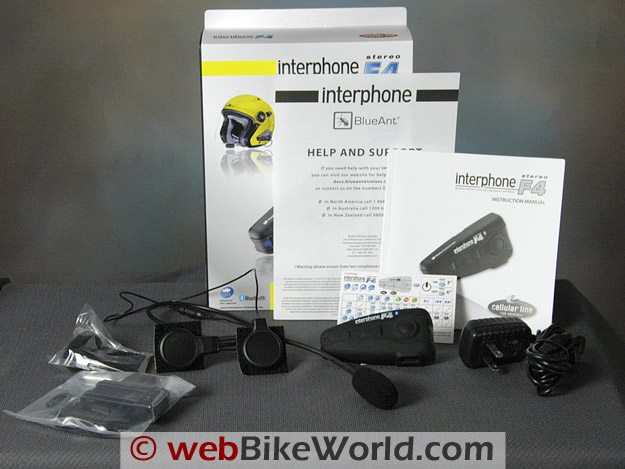
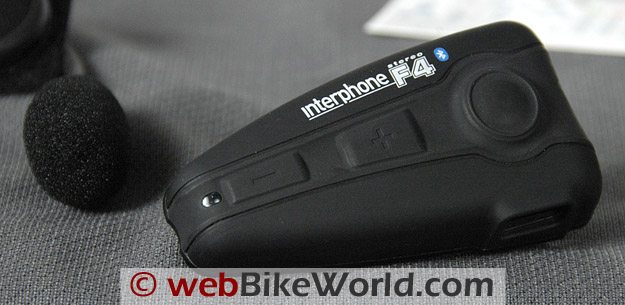
Interphone F4 single kit components.The Interphone F4 Motorcycle Bluetooth Intercom
Where, you may ask, did the “F4” designation come from? What happened to F1 to F3?
Well, I haven’t asked the Interphone folks directly, but I do know that we reviewed two versions of the original Interphone, which perhaps can be considered as the F1 and F2 versions.
The first Interphone Bluetooth intercom we reviewed was a single-speaker unit. It worked very well but it had some problems with the design of the microphone; specifically the method used to connect the microphone to the speaker to form the headset unit.
A second version of the Interphone system was developed, with a stronger connector and a second speaker. This design proved to be successful and the family resemblance can be seen in the F4, which builds on the earlier technology.
This brings us to the Interphone F3, which is a new system that appears identical to the F4 shown here.
The F3 is a rider-to-passenger Bluetooth intercom that can connect to a cell phone, GPS or Bluetooth-enabled music system but does not include the bike-to-bike functionality of the F4.
The current Interphone F4 system includes all of the previous connectivity features plus an incredible 500 meter (claimed) bike-to-bike communications capability.
We didn’t break out a measuring tape, but I can easily say that the F4 definitely has the farthest-reaching bike-to-bike capability of any system we’ve tried (to date) here at HQ.
But the most outstanding feature of the Interphone F4 is the sound quality, which is, I think, excellent.
It’s loud enough, clear enough and has a Digital Signal Processing (DSP) function, along with A2DP stereo capability which works very nicely with any of the stereo Bluetooth-enabled music and other devices we’ve thrown at it.
It’s also even easier to use than the original and the F4 quickly and seamlessly connected with every Bluetooth device we tried — including the older Interphone systems.
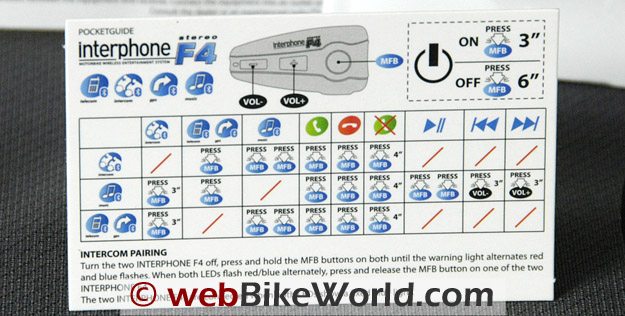
Interphone F4 “Pocket Guide” or cheat sheet. Can you figure it out?Features
Bluetooth intercom systems have evolved to a point where there are standard procedures for pairing with other Bluetooth devices, connecting in intercom mode, pairing and even for turning the systems on and off.
The F4 is very easy to use and the instructions, while not perfectly clear, are easy to understand and, unlike many of the earlier Bluetooth intercom systems we reviewed, everything worked on first try.
Some of the features of the Interphone F4 include:
- Full duplex communications with Digital Signal Processing (DSP).
- Stereo speakers with automatic “speed noise” compensation.
- Ability to pair with up to 8 different Bluetooth devices (i.e., store up to 8 device pairings in memory; the system will not simultaneously communicate with that many devices).
- Can pair to two cell phones during any given session.
- A pair of active F4 intercoms can carry on simultaneous cell phone conversations (e.g., rider and passenger).
- Pairs with Bluetooth-enabled GPS, cell phones, music devices, etc.
- Pairs with other earlier Interphone Bluetooth intercoms.
- Claimed 10 hours of talk time and 700 hour standby time (battery not removable).
- Meets excellent IP-67 waterproof and dustproof standards (More on IP standards). IP 6 = Dust Tight; 7 = Immersion up to 1 m.
Functions
We mostly use intercoms for rider-to-passenger communications with occasional bike-to-bike use when evaluating new products.
Other than for evaluation, I have never made or received a cell phone communication while riding a motorcycle and don’t plan on it any time soon.
I have, however, pulled over off the road in a safe spot to make or receive a call, which is distracting enough in itself. As mentioned above, the F4 will pair with two cell phones if anyone is so inclined to do such a thing. But the capability is there, although we did not evaluate it.
Besides Bluetooth pairing with two cell phones per F4 module, both the rider and the passenger can independently pair their units with their own cell phones.
I’m not sure I want to see a pair of people on a motorcycle, each talking on their own cell phone conversation through the F4, so be careful out there!
We did confirm that a rider and passenger F4 system can indeed connect individually to separate cell phones and receive and make independent phone calls.
I guess if you really want to get wacky, the rider could use his or her cell phone to call the passenger on that cell phone, but that’s near insanity!
The system also supports voice calling and answering, which worked without problems on a couple of cell phones we tried.
To activate the system, the main button on the F4 is pressed once and if it’s paired with a cell phone, the cell phone voice instructions will be heard in the F4 speakers.
We also paired the F4 with no problems to cell phones, MP3 players and a GPS system using the separate Sony Bluetooth adapter that turns any device with an output jack into a Bluetooth-enabled device.
If the F4 is in intercom mode, the discussion will be interrupted for a cell phone alert or GPS instructions (if the GPS uses the telephone-style pairing mode profile; most GPS systems with built-in Bluetooth use this profile).
If the system is streaming music, it will be interrupted also for the cell phone alert or GPS instructions and will return to the music when the call is complete.
The sound quality is excellent to outstanding and the volume can be raised very loud.
The speakers are approximately 8 mm thick, which is slightly thicker than other motorcycle intercom systems, but which probably accounts for the excellent sound qualities.
We realized that placing the speakers as close to the ear as possible is important for a motorcycle communications system, so some helmets with deep ear pockets may actually not be the best solution for mounting speakers.
An AGV K3 helmet, with very shallow ear pockets, was better than the older Arai Quantum II because the AGV held the speakers closer to the ear.
The Interphone F4 can also remotely control the MP3 player, depending upon capabilities of the player itself.
The system also supports the A2DP (Advanced Audio Distribution Profile) and AVRCP (Audio/Video Remote Control Profile) profiles, although from my non-electronics background perspective, other than hearing good-sounding stereo, I wouldn’t know one from another.
Everything just works, and I believe that’s what most riders will care about.
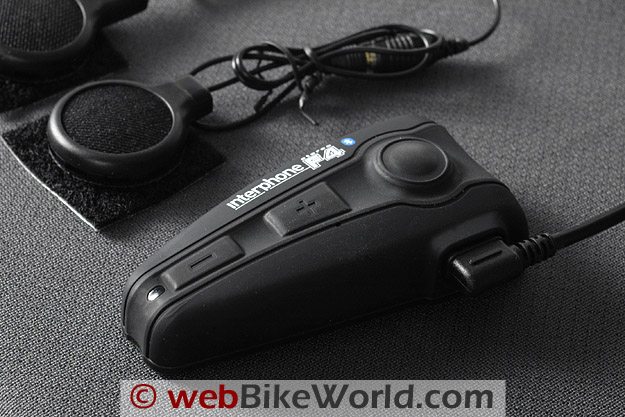
In the Box
The Interphone F4 is sold as either an individual unit or a twin pack. We have two individual units, and of course two units are required for rider-to-passenger or bike-to-bike communications.
The package includes the F4 intercom module; the headset (microphone and two speakers); two different mounting clips, a screwdriver and a couple of spare parts.
Also includes is an extra foam microphone anti-wind cover a pair of extra helmet speaker mounts; a small battery charger (110V in North America) with a dual connector to charge two F4 modules at once with a single wall plug; and the instruction manual with a separate pocket guide.
Instruction Manual
The 143-page manual is divided into 12 sections of roughly 10 pages each. Each 10-page section is printed in a different language, including Italian, English, French, Spanish, German, Portuguese, Dutch, Russian, Polish, Swedish, Finnish and Japanese, in that order.
I folded over the corner of the English section and it’s easy to open the book to refer to that section if needed.
Interphone includes a small index “cheat sheet” card (called the Pocket Guide, photo above) that I haven’t been able to decipher but the system is easy enough to learn, so not being able to figure out what the card is telling me hasn’t been a problem.
Initial Charging
The first thing a new intercom owner must do is to give the system its initial charge. The 110V dual connector outlet provided in each single unit box is a compact unit and it took about two hours to charge the pair.
An interesting note about the charger is that the prongs are on the back of the head.
But the head is so small it fits between other electrical outlets in a surge strip, rather than taking up the space of two or three outlets on the surge strip, which often happens with electronic gear.
The LED on the module glows steady red when charging and then turns green when the charge is complete (corrected from original version which stated there was no green light).
Initial Pairing
The Interphone F4 pairs with what is now pretty much the standard procedure: when the system is off, press and hold the on/off button for about 8 seconds. The small LED will flash red/blue and the system is in pairing mode.
Do the same for the other Bluetooth device and when that device is in pairing mode, simply wait until the quick flashing lights go out and the systems are paired.
The F4 paired quickly and easily with every Bluetooth device we tried, including an MP3 player and GPS using the Sony Bluetooth adapter. It does take about 35 seconds to initially pair the two F4 units however, so be patient! Various pairings are illustrated in the video below.
Intercom Function
Once the two F4 units are paired, one can “call” the other by pressing and holding the large main button for about 3 seconds. A tone will be heard in the speakers (illustrated in the video) and then full-duplex communications are enabled.
The minus and plus buttons are pushed to raise or lower the volume (or to control the MP3 player).
Our system volume was set to mid-point, which we didn’t realize at first, but pressing the “+” button will raise the volume by degrees until it’s raised to its limit, when another tone will be heard in the speakers, indicating that the maximum volume has been reached.
Whether paired with another unit or not, the F4 is turned on by pressing and holding the main button for about three seconds.
Pairing With a Cell Phone
The same pairing procedure as described above is used to pair the F4 with a cell phone. Most cell phones (and the F4) will “remember” the pairing and when it is turned on, the F4 paired almost instantly with my LG Glance after they were initially paired, as illustrated in the video.
Other Features
The F4 instruction manual clearly describes how to use all of the functions, so I won’t duplicate it, but here’s a quick overview of what the Interphone F4 can do:
Cell Phone – Answer the call, end the call, refuse a call (press and hold the main button for 4 seconds), use the cell phone’s VOX instructions function (if available on the cell phone), volume adjustment.
Intercom – Enable, disable, volume adjustment. If paired with an active cell phone, a cell phone call (ring tone) will take priority (same when listening to music).
Stereo A2DP – Pairs with MP3 players, cell phones with music capability, etc. Volume controlled by +/- keys on F4. MP3 device can be remotely controlled if available on the player.
UPDATE – More on A2DP Pairing: Several readers asked if the F4 will simultaneously pair with an MP3 player, phone and GPS. It can hold up to 8 Bluetooth pairing connections in memory
This is described in Section 3.6 of the instruction manual under the “N.B.” note: “In telephones equipped with musical players, and therefore which include a stereo (A2DP) profile, the telephone + stereo (A2DP) function coincides.
As such, it may not be possible to connect a further Stereo (A2DP) player.”
Since A2DP is uni-directional, only one A2DP device will work at a time. For example, if the GPS has A2DP and the cell phone has A2DP, they may not function together. This is also true for a cell phone and an MP3 player. This is a drawback of the A2DP protocol.
We did not have access to a GPS that can pair with a cell phone, so we’re not sure how it might work with various GPS units. If any F4 owners can enlighten us on this, it would be appreciated.
Other Functions – Note that the instruction manual, in sections 3.5 through 3.10, describes different combinations of cell phone, intercom and music listening procedures as follows:
Telephone; Intercom; Stereo; Remote Control; Telephone + Intercom; Telephone + Stereo; Intercom + Stereo; Telephone + Stereo + Intercom; Telephone + Telephone; Telephone + Stereo + Telephone; Voice Response; Voice Calling.
Apple iPhone and iPod – Interphone also has a Bluetooth adapter specifically designed for the Apple iPod and iPhone; it’s called the iLink Stereo and it allows Bluetooth streaming to the F4.
What these sections really describe in general is the rule that the system doesn’t allow a simultaneous intercom communication with music in the background while taking a cell phone call!
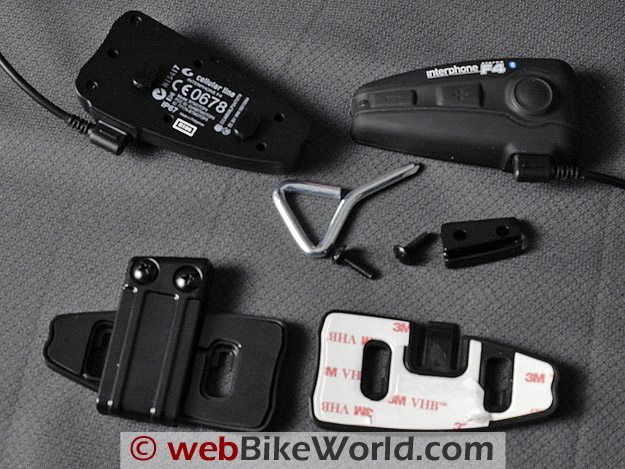
Interphone F4 intercom mounting kit. Components at the bottom are supplied for each intercom.Sound Level Comparison: Interphone F4 vs. Scala Teamset
UPDATE: This is a sound volume level comparison of the original Scala Teamset intercom communications system we reviewed in December of 2006 and the Interphone F4.
The .MP3 file can be heard by playing this 1:41 minute .MP3 file.
Constants: Both intercom systems were set at their maximum volume. The microphones were then set at the same distance from the Zoom H2 stereo recorder we use for our video voiceovers. I then stood at the same distance away from the recorder to speak into the intercom for each recording.
TThe sound volume difference between the low volume of the Scala system and the high volume of the Interphone F4, both set at maximum, is so great that we couldn’t find an input level on the Zoom H2 where the Scala system could be heard without distorting the volume of the Interphone.
So the compromise was to set the Zoom recorder was at 60% volume input level to prevent clipping from the Interphone. At that level, the Scala system can barely be heard.
The F4 can produce a very loud volume (relative to Bluetooth motorcycle intercom systems) and the sound quality is actually better than is heard on the .MP3 file when the volume is set lower.
By the way, at about 15 feet away, the Scala system lost its Bluetooth connection, while the Interphone F4 still worked at a much greater distance without any loss in volume or sound quality, as can be seen in the video below.
Mounting the Interphone F4 System
Bluetooth intercom technology has evolved to a point where attaching the devices to the helmet is the most time-consuming part of the process — which is actually good news.
It used to be that deciphering the instruction manuals and actually getting the systems to pair with each other or anything else took hours!
The mounting system used on the F4 is similar to the system used in previous versions of the Interphone.
The intercom module clips on to a base, seen in the photo above.
Two bases are supplied with each module; one has double-sided tape and can be mounted directly on the helmet, while the other has an expandable clip that can be slipped inside the helmet, between the liner and the shell.
Some helmets, like the Arai Quantum II we used for part of the evaluation, have a gap between the liner and the shell, so the clip can be used.
Other helmets, like the AGV K3, have the liner attached to the shell in a way that will not allow the clip to slide up between the two, so the stick-on module must be used instead.
Care should be taken to make sure the adhesive sticks to the surface of the helmet and that the helmet has a curvature that will support the F4 module for its entire length.
Depending upon the helmet and the liner, the microphone and left ear speaker can be located under the liner or cheek pads. By the way, for Bluetooth intercom newbies, the microphone and module are usually mounted on the left to allow the left hand to operate the controls whilst riding.
The right speaker of the F4 is attached to a long thin wire, which can usually be threaded up through the helmet liner and to the right ear.
Each helmet is different and owners may want to or need to cut a small hole in the lining to feed the speaker or wires through, depending upon their preference.
We often switch intercoms among the helmets we’re evaluating, so most of our installations are temporary, using the clip. But if you plan on keeping the F4 installed on a helmet, we suggest taking the time to get all the wires nicely hidden and secured.
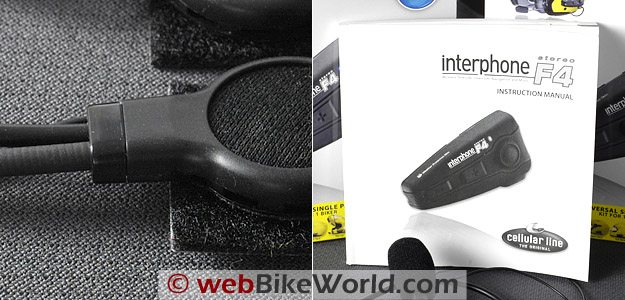
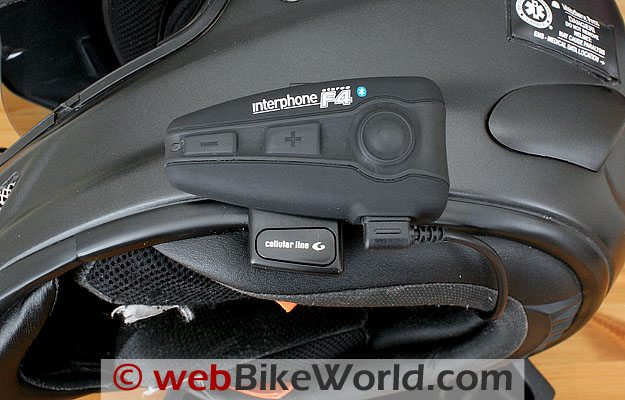
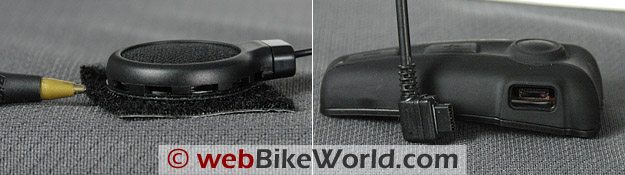
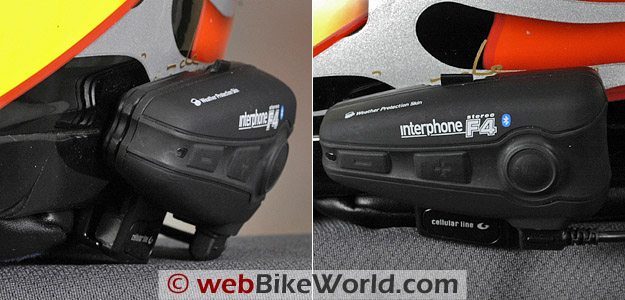 Front and side views of the Interphone F4 mounted on an Arai Quantum II helmet. Interphone F4 intercom speaker (L) and connector for headset and charging (R). (L) Interphone F4 intercom speaker wire connector, improved from original Interphone. Instruction manual.
Using the Interphone F4 Communications System
The system works so well and is so easy to use that there isn’t a lot to say. The range and the sound quality are excellent; better than any other intercom communications system that Burn, Bill and I have used so far.
AAgain, I can’t compare it to the other systems that we did not review here at “headquarters”, but there is no hesitancy in recommending the Interphone F4, especially to riders like me, who don’t know or don’t care to know all that much about the electronics technology and just want a simple system that works.
With regards to battery life, we did not verify the Interphone claims of 10 hours of talk time and 700 hours of standby time, because I probably don’t talk 10 hours on a phone in a year’s time!
Let’s just say that we’ve been using both units in a variety of situations and for many on/off, pairing and other experiments for several weeks and the modules are still running strong on the initial charge.
Update on battery life: I fully charged one battery and left the other as it was, partially discharged after using it in our evaluations.
I put them into intercom mode and left them sitting, it’s now 10 hours and 15 minutes later and they’re both still on, still in intercom mode.
I’m not sure if continuous talking would discharge the batteries faster, but I’m not going to sit here talking for 10 hours! Note: 13 hours later I noticed that the unit that wasn’t fully charged was off, the other is still on…
Remember that this may not at all be an indication of the battery life you will receive under different conditions.
We developed an extended video by adding some “outtakes” or clips showing different aspects of the Interphone F4.
We planned on trying to video a bike-to-bike demonstration to illustrate the communications range of the F4, but the distance is so great we couldn’t find a road that was long enough, straight enough and flat enough to show the end point.
So we included a brief clip in the video that we used during an experiment that shows me walking away from the video camera while talking on the F4. You can see me disappear into the distance, but that distance is only about 1/3 of the actual range of the F4!
MMotorcycle Bluetooth Intercom Wish List
OK, so the Bluetooth intercom manufacturers have pretty much met all of our previous requests for improving these devices.
Here are some ideas to take it to the next level: Rather than having various tones and beeps and flashing lights to indicate the different modes, how about a voice on a chip that speaks real words?
Press the button to turn on the intercom and hear “Intercom On”. Or how about “Incoming telephone call: receive or reject?”. Different sound chips could be sold in different languages that would plug into the intercom.
Then, of course, the next step after that would be for the rider to control the device hands-free, by voice. “Turn on MP3” or “Intercom On”. I have this feature in my car, why not in an intercom system?
Something else that many webBikeWorld readers have asked for is a separate battery, to allow longer usage when on a tour.
While that may be difficult, it shouldn’t be too difficult to add an accessory wire that might allow the intercom to be plugged in to an adapter on the motorcycle if necessary to recharge the battery while riding.
The distances in Europe may not require something like this, but in North America, you can ride for 8 hours and not even cross into the next state or province, so longer-lasting batteries are always desirable.
Here’s another one: wouldn’t it be nice if the helmet manufacturers got together with the Bluetooth intercom manufacturers and developed a standardized mounting system for external (not built-in) communications systems?
For example, suppose there was a system where the helmet had a receiver for the “clip” shown on the F4, so the F4 or any other intercom could immediately attach to the helmet and then be switched to another helmet if desired?
And finally, how about a “hub” that could allow multiple Bluetooth intercoms to connect, so multiple-bike rider-to-rider simultaneous communications are made possible?
Remember 4 years ago when we requested some new Bluetooth features and the engineers said “Impossible!”. Well, here we are and now we have them, so I don’t believe my wish list can’t also come true!
Here’s a quick survey, this time in multiple choice so you can pick more than one wish, or add yours to the “Other” category:
Conclusion
The Interphone F4 system is very easy to use; everything works exactly as described (unlike the first motorcycle Bluetooth systems we reviewed); the sound quality is excellent and loud enough to be heard even when not at maximum; and the F4 almost instantly pairs with everything we’ve tried.
AAlso, the price is right and the two-year warranty (on the U.S. units anyway) is excellent.
At this point, the only advantages a wired system might have are longer talk time and ability to connect with multiple users, but once the Bluetooth folks figure that one out, I wouldn’t want to be selling wired units.
If you’re looking for a motorcycle Bluetooth intercom system, you definitely should check out the new Interphone F4.
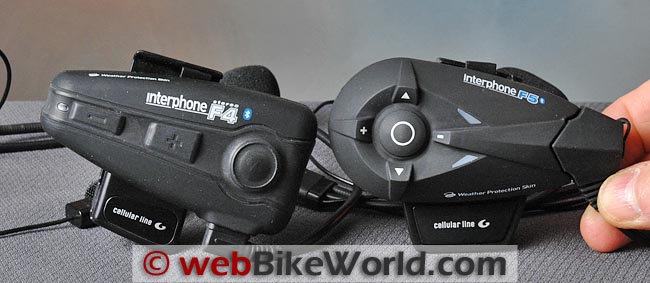
UPDATE: Interphone F5 Review
Next: Interphone F4 Part 2 Comments, Ride Report and Final Conclusions
More wBW: Motorcycle Bluetooth Intercom Page | Motorcycle Intercom Page | wBW Reviews Home
2010 Motorcycle Bluetooth Intercom Comparison and Final Report
Owner Comments and Feedback
See details on submitting comments.
From “T.P.” (August 2015): “Myself and a friend currently use Interphone F4 units to keep in touch. Next year another friend is joining us for a week’s touring, so we bought another F4 thinking we could pair all 3 and talk to each other.
But we have since found out that only 2 F4 can pair, I was wondering if we bought an F5 could we pair 2 F4 units to that so we could have 3 units paired and talk to each other.”
Reply From Interphone: “Yes, one F5 unit (no matter if F5MC or older F5) can be used as a “hub” to connect two other units.
With the F5MC these two units can be also be other brands of intercoms but not capable of conference communication.
So in the case of two F4 units, these have to be connected both in the same time to the F5. In this way all riders can communicate together
In case you readers need information in more detail, they can contact us through our international customer care form.”
From “H.S.” (November 2013): “Thank you for such an informative web site. I am sure many a rider has gained very good decision making information from the site.
One thing that I do notice it longer term performance. It is great for the makers to get an excellent review of a well developed product. What is not so great is that after some use a minor failure occurs that renders the equipment non functional.
I talk here about the light cables used on intercom systems.
These have “soft” entry mouldings, where the cable goes into a moulded plastic piece, such as the plug or speaker. Internal wire failure in these renders them “broken” after some period of usage.
We noticed this first on our Piaggio with its PICS system. Now with an Interphone F4, we are three years down the line and onto the third set of headsets (mike and speakers).
The last day I spent some time to find out why the VOX had stopped on one set and one speaker was intermittent on another.
I finally conclude that the conductors are broken where they enter the moulding, i.e. plug on the one with the speaker problem and at the speaker where the microphone does not function on VOX (or in fact at all).
These have not been subject to a hard life as we are aware of how fragile they are. Equally, these don’t see as much use as we would like, as I travel a lot with my work, so in fact they would see about 50% of the use of what it would be if I was home based.
Perhaps a longer term performance review would be good. I have not investigated the materials used, but as an Engineer my guessing is that Copper is used, but it soon work hardens and breaks.
I would think that steel conductors would last longer, but are not so conductive. They may not break so easily either, due to the higher initial strength and the lower fatigue limit.
Of course it may not be quite so easy to do – interested in your thoughts.
I dissected one of the non functioning head sets. I then tested for electrical continuity. I found that two of the wires were broken at the keyhole plug (the one that goes into the helmet mounted part).
One of these for the speaker was broken for some time, (it worked sometimes and not others) and I suspected this as the speaker would operate if the wire was moved.
The Microphone then stopped working. This wire had intermittent continuity as well, when the wire was moved at the plug. There was also a broken wire where it connected to the microphone side speaker.
But maybe I broke that in opening it up. It tends to be a rigid connection.
I would comment that the wires are very light gauge. We had a similar problem with the Piaggio PICS headsets. The suppliers tell me that there is very little problem, but then perhaps the others don’t say anything, and just get a replacement.
I trust that this is of assistance to other users, who may be experiencing similar failures, but not knowing the cause. At the price of the units they should last a bit longer I feel. Say the battery life which would be 5 to 6 years for average use.”
Editor’s Reply: In fact, the Interphone F4 is the one intercom we use continuously, despite all the other brands that we have reviewed.
So we have been using the F4’s since 2010, moving them back and forth between many helmets, they are the intercoms we use when we’re out reviewing products.
These have gotten more and harder use than just about anything else here and we have had zero problems with them.
From “R.F.” (June 2012): “I am currently using a pair of Interphone F4 units which I have had for two years but I am thinking of changing due to an irritating problem as follows.
When used in conjunction with the pillion unit and with the rider unit also paired to a Zumo 550, the first part of the messages from the Zumo are lost.
For example, if the Zumo’s instruction is “turn left in 200 yards””, I will only hear “…200 yards”. It’s as if the F4 goes into some kind of sleep mode and cannot be woken up quickly enough when a direction is announced on the Zumo. To say the least, this is infuriating.
There is a workaround for this problem which is to play music on the Zumo.
This seems to keep the link “awake” but the music sound quality is terrible and very distracting. When using the F4 as a rider only unit with no intercom, everything works fine.
My question is, have you experienced this problem with either the F4 or the Sena? I am more than willing to purchase the Sena if I can be sure that the problem will not exist.”
H.B.C.’s Reply: The situation and issue you have described is not unknown, believe me, even though it is relatively simple and related to the activation/switching of a paired device, in this case the zumo 550.
You have already identified the initial workaround in keeping the Bluetooth link between the zumo and the headset active by listening to audio, even though the “solution” is not audibly satisfying (itself another long-standing complaint regarding Garmin audio output).
Keeping the link active overcomes the very real activation and switching issues on the Bluetooth pairing that exists with many headsets and peripherals, including Garmin devices.
A major factor in this situation is that the navigation audio or music output will start, regardless of whether the Bluetooth link is active at that instance, so when the wireless streaming is enabled, the latency and switching delays cause the clipping or loss of audio; the link is lagging behind the real-time audio output.
Another factor, that you also identified is due to the device or devices going into Standby (Sleep) mode – this frees up the Headset/Hands-free profile (used by the zumo 550) for use by another paired device if needed; this mode also conserves power.
Your statement about everything working fine in Rider only mode also identifies another factor: the intercom. As an integral feature of the headset and depending on its priority, typically 2nd or 3rd, using the intercom will or can impact other audio services.
Even when higher priority audio (phone or navigation) become active, system switching is needed – so again, a slight delay is typical. In essence a finger can be pointed at both the zumo 550 device and the F4 headset — between the two, the situation is very real.
On the more positive side, the newer zumo 660 and 665 (and related family members) when paired with newer Bluetooth headset, especially those running Bluetooth 3.0 and using Multipoint connectivity, work much better as a combination.
I experience very little, if any, clipping of audio from the newer zumo devices whether the link is active or not.
Now Garmin may have also implemented an audio buffer or timing delay as well, as other electronic devices use to minimize clipping or lost audio.
As identified in the Interphone F4 Part Two posting, some very minor switching delays was experienced, but I can’t state specifically if there was any clipping experienced.
But I do know that the new Interphone F5 (review) is free of this issue when used with the zumo 660 and 665 and I have never experienced this situation with the Sena SMH10 (review), original or SMH10B version or the Sena SMH5 (review).
From “T.S.” (April 2012): “I have had a very poor experience with the Interphone F4. This was compounded by abysmal tech support which never followed up on my contacts until I complained to my supplier and ultimately to Consumer Affairs.
I will detail my problems later but first on a tech and user level I was impressed by the loudness and ease of use of the F4.
Pros: Good, loud sound. Clear pickup (people on the other end of the phone can’t tell I’m using a helmet mic).
Compact sturdy main unit. Good battery life (7-10 days on full charge used in daily commute 2 hours 45 min. with music playing)
Cons: Plugging in charge cable or helmet to unit is quite hard as it is a very tight fit. No way to charge unit while in use (could be a problem on a long ride). Poor tech support and service. Poor quality materials of fittings and cabling.
My experience: The unit came supplied with two screw-on clamp fittings and 2 adhesive fittings. As this was my first such unit and I was not sure where best to locate the unit I chose to use the removable clamp.
The first time I tried to the screw clamp to attach the device to my helmet (the day I received it), the clamp broke. I was only using minimal pressure screwing it in and the screw mounting pulled straight through the plastic bracket.
I then attached the second mount so loosely for fear of breaking it too, that it moved around the rim of the helmet.
This one lasted about 3-4 weeks at which time the pressure retaining clip at the top got loose so that the device did not lock into place, the clip then broke within about 2 weeks.
Looking at that clamp unit I noticed cracks around the plastic which retains the both brass nuts that the clamp bolts screw into.
These cracks suggest to me that probably within a short time one or both of those would pull through the plastic in the same way as the first. This suggests that there is a materials problem with the units.
About one month outside the warranty period I started having problems with one speaker cutting out intermittently.
This got so bad over a period of about 3 weeks that I decided to replace the speaker/mic unit and installed the boom mic and second set of speakers which came with the unit.
I did not even attempt to contact tech support due to my previous traumatic experience with them.
After about 2 months of use this also has started having the same intermittent cut-out. I would write like to write to the General Manager of Blue Ant but the only number contact they give out is the tech support number and they are useless….(more information about tech support issues with BlueAnt).
Editor’s Note: Couple of things: Many/most intercoms of that generation did not allow charging while in operation.
Some newer systems allow intercom use while charging, but Bluetooth 3.0 on the newer systems has resulted in greatly improved battery life, making this issue less important.
Also, on-board USB ports are now available for motorcycles; see our Waterproof USB port reviewand 3BR Waterproof Power Port review.
Also, it sounds like you are from the U.S. and got caught up in the BlueAnt issue, they stopped carrying and supporting Interphone products. A new distributor/importer has just started up in the U.S., and so far they have done a good job at promptly answering all of our Interphone questions.
From “M.P.” (January 2012): “I read your 2 part review of the Interphone F4 intercom and wanted to offer my personal experience.
I ride a Honda ’08 Fireblade and use a KBC VR2 helmet to which I’ve attached the Interphone F4 Intercom purchased almost 2 years ago.
I only mention my bike and helmet so that readers can appreciate I’ve not used the F4 intercom in a low noise environment such as behind a fully faired Goldwing with minimal engine noise and at a cruising pace.
No, I tend to ride at a reasonable as in legal maximum speed and hypothetically sometimes above that, with a relatively low fairing I encounter a fair amount of wind noise outside my helmet.
The KBC helmet isn’t noise proof, though I don’t encounter the high pitch whistling from visor pods (such as an an Arai) but inside the helmet isn’t exactly like the “cone of silence”.
For this reason, the clarity of the F4’s microphone and the volume of the paired speakers are important factors in it’s satisfying my requirements.
The installation of the microphone and speakers with their respective cables required the usual removal of helmet liners and establishing the best location for these within the somewhat restrictive confines of a modern full-face helmet.
The KBC helmet has minor indents for the wearer’s ears, which I found sufficient thanks to the relatively thin speakers.
The microphone installation was mildly more difficult as I needed to be able to remove and fit the helmet without knocking it our of place, but that too was achieved within a half or so.
I found the fitting of the mounting bracket was a simple task and the installation and removal of the actual intercom is a breeze.
Installation the speaker/microphone lead into the F4 is not as straight forward however as it lacks a guide rail or slot to better locate the plug within the recess. After some fumbling each time its removed to charge, I have it connected again.
The owner’s manual is well worded and easy to follow, and I quickly had the F4 paired with both my IPOD Touch and Nokia mobile via Bluetooth.
The volume control buttons are basic enough, “-” for lower volume and “+” for louder and I was ready to go.
I had my wife ring me while wearing the helmet and listening to the IPOD and was very happy with the alert beeping to advise me of the incoming call and after pressing the large easily located button was pleased to her the phone call clearly through the speakers while the IPOD was automatically muted.
Upon ending the phone “test”, the music recommenced after a momentary silence.
So I was now ready to go for a ride to see if the F4 could cope with the real world, with all the engine and wind noise, possible rain and most importantly, all the hazards that we motorcyclists encounter on the road.
I will take the chance to put forward the disclaimer that any distractions from the focus we as riders require to ride safely and avoid ‘single rider’ accidents, you know the ones where our expectations exceed our capabilities, so I recommend that if while riding a phone call comes in, pull over!
I also should warn that listening to music may actually effect the way you ride, I know it definitely does for me! If I’ve got the IPOD on shuffle and monitor my riding I notice that my riding varies depending on the type of music I hear.
Songs like Steppenwolf’s “Born to be Wild” or AC/DC’s “Hells Bells” tend to promote more aggressive riding where as classical music like Cavatina or Rodrigo’s “Concerto de Aranjuez” will have me slowing down and riding a more flowing line.
The F4’s volume is sufficient to overpower the wind noise and I can enjoy the music up to the maximum speed limit here in Australia of 110 kms/hr.
The first phone I received while riding was on a quiet stretch of road with no traffic so I decided to answer it while continuing to ride on the freeway and was pleasantly surprised that the caller could hear my voice quite clearly and didn’t notice I was in fact riding a motorcycle at the time.
I could hear them just as clearly as the music so tick that down as another selection criteria achieved.
As I couldn’t convince my wife to get back in the pillion seat (I can’t blame her considering my sportbike choice) and as the friends I regularly ride with won’t buy the same intercom and as unfortunately other brand’s intercoms won’t “talk to each other”, I cannot offer any user insight into what range this device has.
But I have heard of exceptional “line of sight” distances working between these and I have no reason to suspect it might not be capable of these.
Based on the distance I can walk from my IPOD and still have music streaming clearly to it, I’d love to be able to test this device between riders.
I can offer very positive feedback regarding the functionality of the weather proofing of this device as I’ve ridden in torrential rainfall and not yet experienced any issues with shorting.
Now for the feedback scores:
- Design: 9/10
- Fitment: 8/10
- Build quality: 7/10 (loss of points as the bracket that secures the helmet onto the mounting plate broke after the helmet rolled on it’s side a few times)
- Functionality: 10/10
- Battery Life: 10/10
- Recharge times: 10/10
- Ease of user: 9/10
Pros – Battery life is exceptional! I’ve ridden for 8 hrs in a day and left the music and F4 powered on and the IPOD ran out of batteries while the F4 blue light was constantly blinking well into the evening.
Weather proof to a significant level excellent audio for a device of this price range. Charger allows you to charge multiple devices, so couples who use the intercom all day can recharger quickly with just one outlet.
Cons – The mounting bracket plate needs to be of a stronger material OR use the mounting 3M Dual lock adhesive mounts instead. Inserting the speaker lead plug into the F4 is a try and repeat process until the right angle and location within the slot if achieved.”
From “A.B.” (January 2012): “For your awareness and that of your readers, BlueAnt has discontinued support for the F4 system. I purchased a pair approximately 18 months ago and have been very pleased with the unit.
I have found your review of the device to be spot on.
Unfortunately, the wire connection between the transmitter and the speaker/microphone assembly has developed a stress failure at the connection base.
I went online to the BlueAnt website and called their customer support number in an effort to get a new boom mic part kit (or flat mic kit). They no longer stock either nor will they in the future.
The F4 model has been discontinued and will no longer be supported.
As such, I would recommend that buyers seek an option from another vendor. Though an excellent unit, the F4’s lack of company and part support make it a poor choice for long term use.”
Editor’s Note: We just received a set of Interphone F5 intercoms for review, so stay tuned.
From “W.K.” (January 2012): “Just wanted to tell you that I found your reviews very handy. They were a great help for me when choosing a new Bluetooth communication system. At the end I bought the Interphone F4 set which works pretty well but with some remarks…
About one of those I wanted to hear your point of view: I noticed that when listening to music (from my Blackberry) on my F4 system it will now and then stutter.
This is most likely to happen when near traffic lights which have (in Holland they have..) detection systems under the asphalt. They somehow disturb the Bluetooth signal. And sometimes it just happens on a highway… Very annoying.
The strange thing is that is doesn’t happen when I listen to Bluetooth audio on my Blackberry using my Bluetooth stereo headset from Nokia. I guess it has a better Bluetooth audio stack? Anyhow, did you ever hear something about this problem? It tends to spoil the fun a bit…”
Editor’s Note: I haven’t experienced this problem, perhaps some of our readers have?
From “C.B.” (8/10): “This is the best of the lot by far. I have three complaints. The first is the cryptic cheat sheet. I’ve shown it to many people and they are all dumbfounded. So it’s good to know that I’m not an idiot!
Secondly, while the sound quality is excellent, the volume just isn’t loud enough.
I just completed a 4000 miles trip and used the F4 at full volume all the time which was barely adequate at highway speed. It is admittedly better than the others I’ve tried but still not quite there.
I should add that I was wearing a Nolan 103 with ear plugs and riding behind a massive windshield that provide a very nice and quiet ride.
Thirdly, I can’t recall off top of my head if the F4 has noise cancellation in the mic. If it does, it’s completely inadequate. If it doesn’t, it needs it. I know a lot of people are against talking on the phone while riding.
Well, I want it! I commute to work on my bike and need to be able to talk on the phone. Frankly, I feel that if one cannot talk on the phone while riding he should reconsider riding altogether. Just my two cents!”
Editor’s Reply: There may be something wrong with your system — we have two pairs and they are very, very loud. The system can’t be placed at the highest volume or it’s too loud and we wear ear plugs when using them and not behind a fairing either.
Also, mic sensitivity depends greatly on correct and exact placement of the mic; the amount of wind noise coming from under the helmet; and it can be affected by the vent in the chin bar.
From “H.L.” (6/10): “After reading the reviews on this site of the F4, Scala, and Sena, I bought the F4, primarily for my spouse and myself. But a 2,200 ride from New York to Georgia came up and I used it with another rider the whole time.
I haven’t taken the time to fully learn the system, but bike to bike it worked great, including in lots of rain.
The range seems is less than hoped for, especially in twisty riding, but the sound is loud and clear. When a disconnect occurs, you just hit the button on one helmet when near the other helmet (yards) and it reconnects.
We mounted it with the clamp to a Shoei RF1100 and an HJC full face that’s a couple years old. Installation is easy once you learn how to disassemble your helmet.
The battery lasted all day, eight hours, and the two on one charger is very convenient. So far, so good.”
From “N.W.” (4/10): “I did get the Interphone F4 after sending back the Scala G4. I must say I like the F4 is much better than the G4.
When I am using the F4 I feel like I am still using the (Scala Rider) Q2, because to me they operate almost the same.
There are a few differences like the helmet clamp, the place of the volume buttons, the more advanced speakers, and the AD2P technology. To me the F4 is just an upgraded Q2 and I love it.
The only thing it does not have is an FM tuner, but I can just use my HTC Incredible which has a FM tuner, when it finally comes out. Everything I have tried to pair up to it has worked with no problems.
Zumo 550 still sounds terrible because the unit does not support the AD2P technology but that is ok, I mostly just use my cell phone or iPod touch for music. Both cell phone and iPod work well together, both connect to the F4 at the same time as promised so I am happy about that.
I don’t have a problem finding the volume buttons with my gloves on and riding. I started wearing earplugs and I can still hear the music if I have the volume all the way up. I have not had a chance to try the bike to bike communication yet but I am sure it will work well. This unit performs the way I hoped the G4 would have.”
From “XX” (3/10): “Thanks for the thorough review as always. I ordered this product and can’t find a way to install it on my Shoei X-11.
The helmet seems to have no extra space. Inserting the speakers by the ears (where there is no padding) intrudes on ear space to the point that I can’t comfortably wear the helmet.
I installed it on an old Arai that has speaker indentations in the cheek pads and noticed that the volume was low (due to the Styrofoam cheek pads probably).
Has anyone mounted this on a Shoei X-11?”
Editor’s Reply: As we noted, the mounting system on the F4, the Sena SMH10 and the new Scala Rider G4 are all pretty sturdy, which means thick, which means they won’t fit between the liner and shell on many helmets.
Each intercom comes with a stick-on mount to attach the headset to the outside of the helmet. Not sure if that is the best solution either, so I think the manufacturers are going to have to come up with better solutions.
From “J.O.” (2/10): “Greetings… upon receipt (of the Interphone F4 system), I charged the units and mounted them. All straight forward as per webBikeWorld and the F4 manual. So…these f 4 units are new out of the box, on initial full charge, paired in rider passenger intercom mode.
- Battery Life Test: Enabled the intercom at 6am. Disabled the intercom it at 9pm. It was still strong with no signs of low battery. That’s 15 hours on, jabbering most the time except for 1-1/2 hours at lunch. So, I’m thinking 13-1/2 + hours in full duplex mode anyway, on a new battery on a full charge of course.
- Music Test: Non Bluetooth music player with wiRevo Bluetooth unit (review) paired instantly, worked as advertised.
- Cell Phone Test: Bluetooth Motorola paired instantly, worked as advertised.
- GPS Test: Are you kidding? I ain’ts gots no stinking GPS…
- Sound Level: KBC FFR helmet (review) with rider wearing 30dB earplugs and HJC SyMax helmet (review) with passenger wearing 32dB earplugs, good to at least 100mph…probably faster than that but we only bumped to 100 just to see if the sound was compromised.The volume was never an issue; we had every bit of volume we wanted.
- Sound Quality: Same helmets and earplugs, perfect sound level and quality… wow… better than anticipated. With visors down the intercom is crystal clear and the cell phone is crystal clear and the music is stereo quality.With visors up the wind noise made it hard to hear above 30mph. With visors down, perfect so far. I’m thinking if we were using open face helmets we would be sending these back because of the wind noise from the mic with the visor up.But since we ride with closed face helmets with the visors down…yeeeeeehaaaaa!
- Distance Test: In hindsight I should have clicked off the tenths on the odo. O well, gut feeling — it was at least 3/8 mile unobstructed and it had more distance to go because we didn’t loose pairing.
Just a note… the KBC FFR is an XXL so not much room for speakers. I used the supplied Velcro to mount the speakers and mic. I had to fuss with it to get the speakers lined up to the ear canals.
Seems the speakers needed to be mounted right on top of the chin strap screw.
The HJC SyMax is XS so there is a deep gap between the ear and the helmet shell. I used Armaflex foam tape to build up the speaker holes to move the speaker close to the ear canals.
Then I used the supplied Velcro to mount the speakers and mic. It took some doing to get the speaker location right but since we used these helmets for intercom (anyway), we had a hand up on 1st time installers.
The next day I mounted the interphone on a XS Shoei Multitec (review). Very easy and fast. Used Velcro, everything lined up on the 1st try. The kit components seemed to be quality, even a spare mic wind sock was supplied.
There you go — thanks to webBikeWorld. I was not for webBikeWorld, I would not be broke!”
From “D.B.” (2/10): “I’ve been a fan of webBikeWorld for years and have always found the reviews informative and have based many purchase decisions on them.
The Interphone F4 was one of these decisions based on the glowing recommendations in the review.
Prior to ordering the product, I did contact BlueAnt to specifically ask about mounting the speakers in my Shoei Syncrotec helmet since the helmet has indentations on both sides to accommodate the movable chin guard locking mechanism.
In several correspondences withBlueAnt’s sales manager, he was fairly certain that the system would install in my helmet and if there was a problem, there was a 2 year no questions asked guaranty.
Based on that assurance, I went ahead and ordered the system.
To make a long story short, the way my helmet is configured and with the glued in cheek pieces, there is no way I can comfortably mount the system, which I passed on to (the BlueAnt representative) and asked to return the product.
(Snipped D.B.’s narrative on problems dealing with BlueAnt customer service when trying to return the product – Editor).
Advise readers that how the speakers are installed, especially with the mike boom attached to one of the speakers, is critical to the type of helmet you’re wearing.
I am a current user of the Scala rider and have been for several years.
Cardo does take customer support seriously, replacing several components that have failed over my years using the product without even having to return the broken piece first.
I think you guys provide a valuable resource and I would have, based on your review, been happy with the product if I could have actually used it.”
Editor’s Reply: My advice is to purchase gear through one of our affiliates, who have excellent return policies and procedures.
From “K.E.” (1/10): “If you use an iPhone 3GS, you can voice control music and calls once you activate the main button on the F4.
I agree with you that a universal mounting system on helmets would encourage more Bluetooth use – especially if it made the unit look more integrated to the helmet.
Lastly, a clamp on remote for your bike instead of touching your helmet would be desirable so you can keep your hands on the bars where they belong. Parrot has the remote idea in their system.”