


The Chatterbox XBi system isn’t as new as the XBi2.
But for what it does, it is a contender for top of the pile in the wide-open Rider-to-Passenger intercom category.
A really good motorcycle headset system, everything just works including the excellent stereo audio sharing features.
While perhaps seen as a lesser offering compared to the XBi2…it is not.
The XBi has its own well-defined role and place in the market, backed up by its solid performance and versatility.
This evaluation is a companion piece to the ChatterBox XBi2 Bluetooth Rider-to-Rider review and Part 5 of the ongoing 2009 webBikeWorld “Bluetooth Extravaganza”.
ChatterBox has been making motorcycle and recreational vehicle communications systems and radar detectors for a number of years.
The company manufacturers transmitter and intercom systems, alarms and radar detection systems along with accessories that complement their other products.
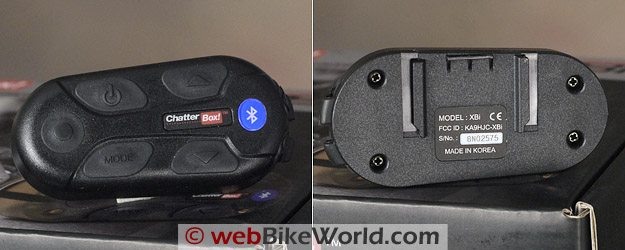
Chatterbox XBi intercom module.System Overview
The XBi system is marketed as a premier rider-to-passenger communications system.
The intercom capability is key to such a system; when the rider and passenger are each outfitted with an XBi system, full-duplex (two-way) communications are there, just waiting to be used.
Featuring CDMA technology, the intercom provides crystal clear audio, its only limitation being range. The intercom is activated by the system automatically or manually by using the Intercom button.
Each system can be paired individually to two devices at the same time, but of course only one input or device can be used at a time.
One feature exclusive to the XBi is its ability to stream music from one module to another paired module. In addition, each module can be used by itself as a standalone system.
Chatterbox intercoms are sold as either an XBi or XBi2 module and then an open-face or full-face microphone/headset must be chosen, which provides flexibility when ordering (see Summary Table below).
Intercom range is listed as 10 meters (33 feet), which equates to Bluetooth Class 2 transmission power. The XBi2, on the other hand, has Class 1 power, boosting its range up to 500 meters (1640 feet).
Equipped with A2DP technology, the Chatterbox XBi unit allows stereo audio to be streamed from any compatible Bluetooth source on a device-to-device basis.
Or, by using a compatible Bluetooth Adapter (BTA) such as the iCombi AP21 or AG12 from non-Bluetooth devices (review coming soon).
A 3.5 mm stereo input jack is also available for wired connections.
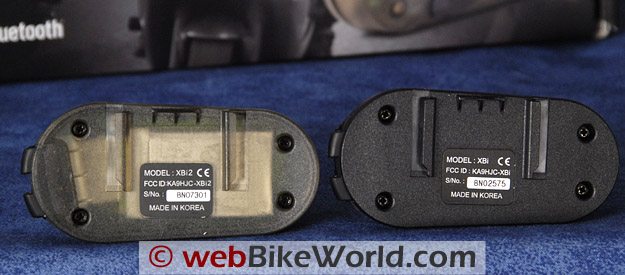
How to tell the difference? The Chatterbox XBi2 (L) has a clear base.Chatterbox XBi Bluetooth Profile and Controls
The XBi system supports the Headset Profile (HSP); the Hands-Free Profile (HFP); and the Advanced Audio Distribution Profile (A2DP) but does not appear to support the Audio/Video Remote Control Profile (AVRCP).
As with the XBi2, the Intercom Profile (ICP) may be supported as well for intercom and/or potential two-way radio use, but I haven’t been able to confirm this yet.
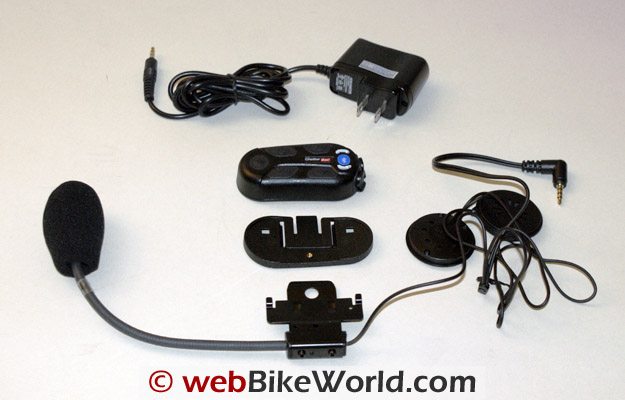
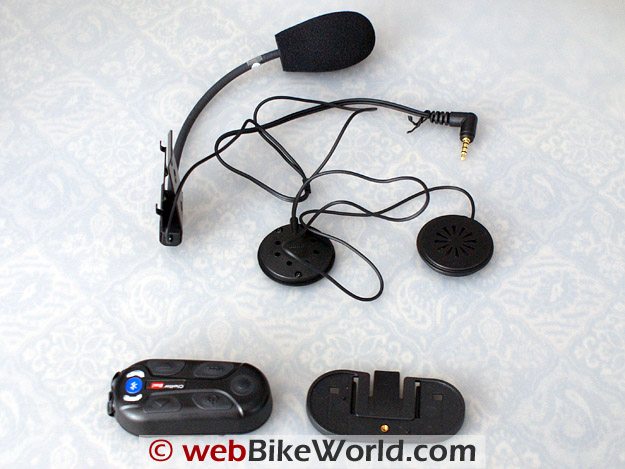
Both open-face XBi kits contain a Bluetooth module, a light metal clip bracket, a plastic base plate, an integrated headset and boom microphone assembly, and an accessory bag with mounting pads for the speakers and microphone.
Also included are three small screws, a bi-adhesive cutout and two plastic clips for securing wire leads along the bottom edge of a helmet.
A 110-240V AC adapter, the small 15-page guide and a popsicle stick for gently pushing wiring up into liners round out the packing list. The replaceable Lithium-Polymer battery is pre-installed.
The solid black XBi Bluetooth module has five controls on its face:
- Intercom (front) – activate/deactivate Intercom and stereo audio listening;
- Power (top front) – unit On/Off, Bluetooth phone activation, Bluetooth pairing and Intercom pairing (with Mode button);
- Mode (lower front) – activate/deactivate stereo audio broadcasting, intercom pairing (with Power button);
- Volume (top and lower rear) – volume Up and volume Down respectively.
Two 3.5mm four-element connection ports with tight weather seals dominate the back edge of the XBi module.
The lower port is for the headset connection and the upper one does double duty as the DC charging point and the auxiliary connection for wired devices (MP3 player, FRS/GMRS radio, etc).
Helmet Installation
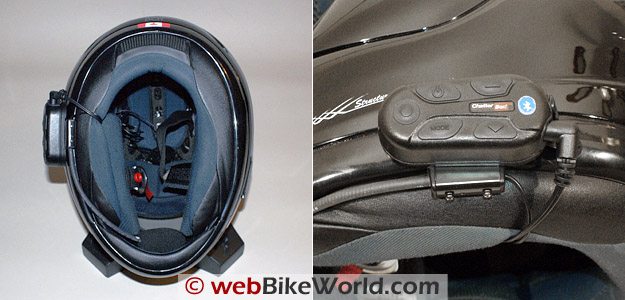
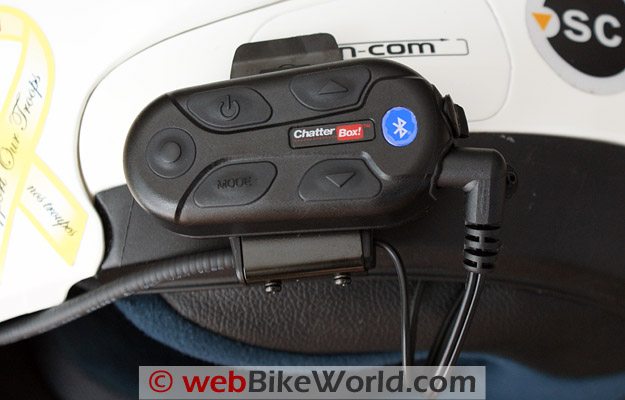
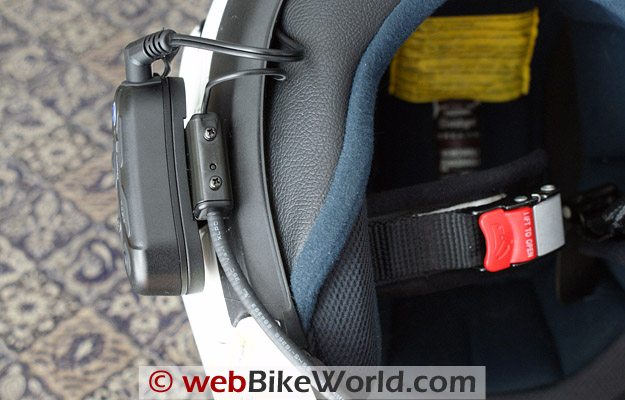
The metal clip and plastic base plate assembly is strong and should work well on most full-face helmets. This mount worked really well with the XBi2 systems on the Arai XD helmets (review) so I have no concerns.
Similar to my observations with the XBi2 system, the clip might work on some flip helmets, but if the bottom edge is thick or sharply curved the bi-adhesive cutout pad is probably the better solution.
At 3.5 cm in diameter the speakers are small and fit well into the recesses of most helmets. Just be sure they are centered on the ear and use the spacer foam pieces as needed to get them close to the ear.
This effort will make sure that audio is optimized in terms of clarity and ability to keep volume levels minimized.
The XBi intercom kits I have are both open-face kits with the boom microphone assembly, unlike the XBi2 kits where one of each type was provided.
The microphone is the same for all the kits and while it is a bit thicker than I like, performance cannot be faulted.
The microphone boom is easily contoured to provide good positioning inside the large vent recess of the Arai XD, even with the windsock and it works well inside the Nolan N-103 (review) as well.
My issue with the rather bare thin-wire microphone used with the XBi2 evaluation is that it requires a backing pad; the assembly sits out further and is thus more obtrusive.
As noted with the XBi2 systems, even with the front vent partially open, the microphone worked just fine in blocking out most of the ambient noise and sensitivity is not an issue.
Chatterbox XBi Intercom Configuration and Use
The Chatterbox XBi system is really focused for use in a rider-to-passenger configuration so I wanted to describe this set-up first.
To take advantage of the intercom and stereo music sharing features, one XBi module is designated as “Main” and the second as “Satellite”, accomplished by undertaking a short assignment (no homework required and no exam — woohoo).
The start state is with both units off.
Turn on what will be the main unit and once the red with periodic blue light sequence is seen, press and hold the Power and Mode buttons simultaneously until the LED flashes RED rapidly; when it slows down, release both buttons.
Immediately turn on the soon-to-be Satellite unit and repeat the simultaneous action with the two buttons on this module.
Although the manual states that the second unit LED will flash red every second, mine flashed once and then shut itself off…obviously a very fast pairing, which it should be.
The procedure was confirmed when the main unit shut itself off five seconds later.
If pairing is successful, and it never failed to work for me, when the systems are turned on, Main first, then the Satellite, they connect automatically and the intercom is live. Just remember, they do need to be within range.
Open-face microphone and speaker kit. A full-face unit is also available; one intercom module and one headset kit must be purchased for each helmet.Stereo Audio & Sharing: Vive la différence
Unique to the XBi model is a stereo audio sharing capability. Just don’t forget to connect a stereo audio device by wire and/or Bluetooth to one or both of the paired units first, as one of them becomes the source for the respective music device.
To activate the stereo audio in the source headset, give the Intercom button a quick press; within seconds a four-tone signal is heard followed by audio, in stereo.
Another one-second push of the Intercom button deactivates the input, confirmed by a two-tone signal.
To initiate the audio sharing or stereo audio broadcasting, press and hold the source Mode button for four seconds. When a three-tone signal is heard, release the Mode button and enjoy the stereo audio in both XBi headsets.
Either unit can deactivate the broadcast; press the Mode button for one second and after a single-tone signal, the session terminates.
With the broadcast terminated, an Intercom session can now be initiated; just press the Intercom button for one second.
This feature works superbly. Basically each user can have their audio playing and if they want to share something, it can be done (easily) or stopped for an intercom session and then resumed. It’s simple and it works.
Only when I was in a noisy electrical environment or reaching connection limits was any static heard or breakup of the stream between the headsets obvious.
Only one other system I have evaluated was able to emulate shared audio somewhat, and that was in mono. In my humble opinion and at this point in time, Chatterbox defines and sets this standard — well done!
Chatterbox XBi intercom module, mounting bracket and headset.Undocumented Features or Foibles?
Continued experimentation with the system brought about some other discoveries that don’t seem to be documented — or should not work — at least according to the manual.
The usual test setup was used, which consisted of both XBi systems, the HTC Touch and the Kyocera BT phones and the zumo550 and BMW Navigator III+ GPS units.
- Audio Stream Interleaving – in using both units, with a stereo peripheral connected to both, one by wire and one by Bluetooth, both active audio streams can actually be heard interleaved on the Satellite system headset.
- MP3 Sharing – I was able to confirm that basically any connected MP3 stream can be shared from either the Main or Satellite, it only takes the right sequence of pushes between the Intercom and Mode buttons to make the changes.
- Phone Audio Sharing – according to the Stereo Audio Broadcasting rules in the manual this shouldn’t work, but it does. If broadcasting is active when a call is received, both parties can hear the incoming call but only the Main headset can answer via its microphone. If a call is placed out the audio will remain on both headsets, but again only the Main microphone is enabled.
Once the incoming or outgoing call is terminated, the Satellite system resumes any current music stream via broadcasting immediately but the Main headset has to toggle between Intercom and Mode to restore the music audio.
The easiest way to restore the music equally is to toggle the Intercom, cancel it and then toggle the Mode button…this worked consistently.
Other Pairings With the Chatterbox XBi
Fully capable of functioning as standalone systems, one or both XBi units can be paired individually with other devices either via Bluetooth or the auxiliary port.
With the power off, press and hold the Power button, the LED goes steady Red, then six seconds later flashes blue and pairing mode is now active.
Put the Bluetooth device, say a mobile phone, into its search or pairing mode and wait for the XBi to be found.
With the XBi recognized and a PIN provided if required, the pairing will be completed.
Both XBi units paired with everything I served up, including the HTC Touch PDA, a Kyocera X-tc and Virgin Mobile and Motorola i335 mobile phones.
Also the usual two GPS devices (zumo 550 and BMW Navigator III+); and of course, the two Chatterbox iCombi Bluetooth adapters.
If service options are presented on the device, check the ones applicable (Headset, Hands-Free, Stereo Headset, Serial, etc) as desired and save off the partnership. Typically after a few seconds the two devices are connected.
Conditions and Priorities
The Chatterbox XBi manual specifically identifies the need to always pair stereo audio sources to the XBi before pairing a mobile phone or phone(s).
While the system can support two Bluetooth devices simultaneously (one under the hands-free profile and another under the stereo profile), only one audio stream can be active at any one time.
It is important to note that the intercom is not available while stereo audio/sharing is active and stereo audio/sharing is not supposed to be available during phone use.
The unique features of the Xbi have resulted in a slight priority reordering: the phone/GPS, the stereo audio/sharing and lastly, the intercom.
Next: Chatterbox XBi Review Part 2
Also: Chatterbox XBi2 Review | Chatterbox iCombi BT Adapters
Owner Comments and Feedback
See details on submitting comments.
From “B.S.” (9/10): “I have read your review of both XBi and XBi2. While you clearly mentioned the battery life of of XBi2, I don’t find it in XBi review.
I wonder if the battery life of XBi is longer than the XBi2 due to less transmission power in intercom mode or perhaps they have different capacity of battery? The XBi will certainly cover most of my needs, but occasionally it is nice to have longer range intercom of XBi2.”
HBC’s Reply: I didn’t notice much difference between the XBi and the XBi2 per se when using the Intercom feature consistently (limited range from the XBi and long range from the XBi2). I did note that when Audio Sharing was enabled for any period of time, battery life did drop slightly faster than when just using the intercom.
Appreciating the above statements, either model provided five to six hours of mixed use before I would get the power warning tones. For what its worth, the replaceable battery for both the Xbi and the XBi2 are the same PN – CBXBIBATT, rechargeable Li-Polymer, 3.7V, with a 520mAh rating.
From “G.R.” (1/10): “I just wanted to supply some input on the Chatterbox XBi (not the XBi2). On initial purchase and installation into my helmet I was impressed. Installing into my Scorpion EXO-700 was a breeze.
The only issue I had was that there is not much room in the ear ports of the helmet for the speakers. This caused two issues. Firstly, the speakers would not stay in place even with the provided Velcro. Secondly, the speakers would make contact with my ears and cause pain after 30 minutes of riding.
Another problem area was the volume. My experience was that at speed (ie. 70 mph) the volume on the unit would not go high enough. This may be more of a problem with the helmet than anything as EXO’s can be pretty loud.
Also, the battery life while using a Bluetooth transmitter for an iPod seemed rather low. On a fully charged battery I would only get 1 hour out of the XBi unit. I believe this differs from the companies claims. I hope this information helps a few people.
Also, I was wondering if you were going to do a comparison article on the GPS units that are currently available. I see that there are a number of individual reviews, but I think with the popularity of GPS units, it would be nice to see an editors opinion that compared value vs. features of all of them.”
Editor’s Reply: We’re hoping to publish a Garmin zumo 550 vs. 660 in 2010; we’ll be publishing a follow-up on the zumo 660 and if TomTom releases an updated GPS, we’ll review that also.
From “C.M.” (10/09): “Just bought the XBi based on your review… So far so good. Have a Shoei Multiec helmet and have attached it to inside this. I have the full-face microphone on top of the cheek pad and the ear pads within the right places inside the helmet. Everything is tucked away and looks really neat.
I have my iPod and Sony Bluetooth receiver (again based on your website!) which streams stereo to Chatterbox (in excellent quality) and then my phone streamed through zumo 550. It all works a treat. As soon as call is ended, music pops back in. It’s all very slick.
A few initial problems with the zumo not detecting headset but i think that’s zumo’s problem not Chatterbox. I haven’t done any high speed communications yet, as soon as I have I’ll let you know how I get on.
BTW – your website is great. Best place to go for any equipment as far as I’m concerned. I’m based in Dublin, Ireland.”
From “T.B.” (10/09): “I think you missed a very important limitation of the chatterbox xb intercoms. You mention the ability to attach (via Bluetooth or cord) up to two devices.
What you fail to mention is that the intercom itself counts as one device, and access to any second device is only via a manual switch. For example, if a GPS is connected, the rider can only listen to the intercom or the GPS but not both.
If listening to the intercom, the rider will miss any sounds from the GPS and vice versa. There is no indication the GPS has communicated at all!
I just purchased two Xbi units. While I am happy with the sound quality and the intercom, I am extremely disappointed with the functional limitations. I confirmed these limitations with the Chattterbox technical support staff.”
HBC’s Reply: Even though I’m not sure if you have the XBi model or the newer XBi2, my response is the same because both models are separated by only one or two unique features highlighted in the articles.
All the articles, including the Chatterbox postings, state that only one audio stream will be heard at a time based on system management of the coded priorities, based on this generic assignment: Cell phone or GPS feed is Priority One, Intercom is Priority Two and the Auxiliary Audio is Priority Three.
Refer to the XBi article, Part One (above): “Each system can be paired individually to two devices at the same time, but of course only one input or device can be used at a time”.
Also in Part One, Conditions and Priorities, “The Chatterbox XBi manual specifically identifies the need to always pair stereo audio sources to the XBi before pairing a mobile phone or phone(s)… While the system can support two Bluetooth devices simultaneously (one under the hands-free profile and another under the stereo profile), only one audio stream can be active at any one time… It is important to note that the intercom is not available while stereo audio/sharing is active and stereo audio/sharing is not supposed to be available during phone use… The unique features of the Xbi have resulted in a slight priority reordering: the phone/GPS, the stereo audio/sharing and lastly, the intercom.”
I am puzzled over your comment about not hearing the GPS audio if the Intercom is active; this capability is not claimed or documented by Chatterbox or identified in the articles.
For most communications systems, Chatterbox included, the typical priority listing is: Priority One – Mobile Phone and/or GPS; Priority Two – Intercom; and, Priority Three is typically any other audio, i.e. the auxiliary input.
If the system is working properly, Phone or GPS audio has priority over the Intercom and as such, the system should mute or interrupt the lower priority audio, provide the higher priority feed. and resume the lower priority audio when the other session is done.
Having said that, the XBi model, given its stereo audio broadcasting or sharing feature, puts the Intercom audio as a lower priority for management purposes, so manual initiation of the intercom is needed, by interrupting the sharing feature and activating the intercom feature.
You should not get both streams unless there is a glitch somewhere or as I found during my evaluations, there are some system anomalies or undocumented features, both of which were subsequently confirmed by Chatterbox and identified in the submissions.
What you call ‘functional limitations’ are pretty much the ‘limitations’ of most popular systems on the market — Bluetooth, wired or hybrid.
The hybrid BikerCom has a multi Input/Output control box but still only provides one ‘active’ audio signal to the headset based on system priorities that control or manage all connected (wired or wireless) devices…
Having said that, there are systems on the market that can, depending on the type of connection, maintain lower priority audio when a higher priority audio signal is detected. In this instance, the lower priority audio is reduced (background) with the higher priority audio heard at the established level (like the AKE systems).
As well, some systems allow input or connection priorities to be changed, depending on which Bluetooth connection is used or physical port is used (BlueVirtu BAT-01 system).
If you truly want multiple audio connections fed via a wireless connection to a headset, such as a small mixer or multi-IO box provides, then another type of system will need to be sourced, or the necessary pieces put together, as many have actually done.
To specifically address your point about not hearing the GPS while the Intercom is active: if this is the case for the Chatterbox XBi or XBi2, then you may be experiencing the issues I found or perhaps the configuration needs to be re-done.
Hopefully the information above will help – let us know if you get the issue resolved.
From “B.J.” (9/01): “I was reading the XBi review (since I own one) and I am curious about one of the features HBC mentions in his review. Particularly the part where he mentions you can plug auxiliary audio or GMRS/FRS radios into the charging port. While it seems reasonable to do so as the port uses a standard 1/4″ stereo plug, I don’t see any mention of this in the manual. I’d like to find out more about this if I could.”
HBC’s Reply: The feature is specifically identified in several sections of the manual and all media…but perhaps you have an early version, although my understanding was that the XBi and XBi2 series units always had the capability. Anyway, following will hopefully provide the information you are seeking.
Both the XBi and XBi2 (which is based on the XBi) have the ability to connect by cable an optional music or other device by using the multi-function DC Charging/Input port. Using industry standard 3.5mm connectors for everything is a very good solution. So, a standard 3.5mm stereo cable will work fine for most devices (i.e., music).
I have not yet been able to confirm with ChatterBox if they have actually have a kit (with PTT) to use with a GMRS/FRS or other common radio system – hopefully this information will be provided soon.
The manual does make mention, in one or two spots, of the dual purpose of the DC/input port and the module’s ability to support a connected device via that port.”