

The Signal Dynamics LED Motorcycle Brake Light Bar
Improving the brake light visibility of motorcycle brake lights is important.
I recently installed a “Signal Dynamics” LED motorcycle brake light bar on my BMW K75.
And I also added a pair of “Life Brite” LED motorcycle brake light flashers above the license plate at the rear.
I believe these products will improve the ability of vehicles following my motorcycle to see and recognize that my brake lights are on when I am braking.
This modification can probably be done easily to many different types of motorcycles, so it isn’t something that is meaningful to the BMW only.
(Editors’ Note: See our updated article “Multistrada LED Brake Light Installation” for more information on installing the Life Brite LED brake lights and the Signal Dynamics LED brake light bar).
My goal was to both attract attention to the fact that my motorcycle is stopping and my brake lights are on, and also to increase the amount of overall brake light power on my bike.
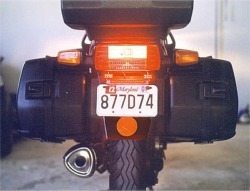
What I did was lower the license plate by 13/16″, mount the Signal Dynamics light bar above the license plate, and the 2 Life Brite modules above the light bar, one each located above the two original license plate attachment holes.
This turned out to be a fairly easy process.
My theory is that the small blinking Life Brites attract attention to the rear, then the standard brake light boosted by the Signal Dynamics brake light bar do the rest.
I found the Signal Dynamics motorcycle LED brake light bar at my local dealer, who sells Harley-Davidsons and BMW’s, but it can be ordered directly through the Signal Dynamics website.
This product is a 6″ wide metal bar with a 5″ long by ½” wide LED light array.
It is designed to be both a running light that is on whenever the bike is running, and also as an additional brake light that activates with a bright steady glow whenever the brake lights are on.
I was intrigued at how bright the LED’s were when the light was activated on the counter display.
The unit has two holes on either end, and is designed to fit above the license plate on most motorcycles, simply by fitting the light bar over the top of the license plate and replacing the existing license plate bolts with the ones supplied in the kit.
I had a slightly different idea though, so I bought one and took it home.
While searching the web one night, I also found a company called “Life Brite“). They make a variety of small LED’s, each one about the size of a domino, in either yellow or red.
The red ones are used as auxiliary brake lights; one style comes on when the brake lights are on and has a steady glow; one variety flashes for 5 seconds when the brake lights are activated.
The lights then glow steady as long as the brake lights are on; and there is also a pair that flashes continuously as long as the brake lights are activated.
I purchased the pair that flashes for 5 seconds and then glows as long as the brake lights are on. I also purchased a pair of their laser-cut, sheet metal mounting tabs sold on the website to use to mount the units.
Tools Needed
- Good quality scale (ruler)
- 1/8″ drill bit
- ¼” drill bit
- Drill
- Soldering iron and solder
- Electrical tape
- ¼” heat shrink wrap tubing (inside diameter shrinks from 3/16″ to 3/32″, can be found at either auto parts store or Radio Shack)
- #2 Phillips screwdriver
- 3/16″ flat bladed screwdriver
- 5/16″ box end wrench
- (2) ¾” long stainless steel XXX head screws to use in place of the screws that come with the Signal Dynamics LED light bar.
Mounting the Lights
First, I unbolted my license plate and cleaned the plastic mounting area that comes standard on the K75.
The next step is to drill two 1/4″ holes, located 13/16″ directly under the existing license plate holder holes.
To do this, you must first drill a pilot hole, or the 1/4″ drill will “walk” over the plastic, and you won’t be able to correctly locate the holes. I used a smaller 1/8″ drill bit to drill the pilot holes.
Before you drill, though, place a scrap piece of wood behind the license plate holder, to help prevent the drill from going beyond the thin piece of plastic and into the fender itself.
On my bike, the Signal Dynamics unit fits exactly over the original license plate mounting holes. The unit comes with a rubber backing to help prevent vibration.
I found that the 1″ long stainless steel screws that came with the Signal Dynamics unit were too long to use for my purposes (probably because they are designed to be used for mounting the unit over the license plate also).
So I went to the local hardware store and got two ¾” long replacements.
I used the same washers and nuts that came with the Signal Dynamics unit.
I mounted the Signal Dynamics light bar into the original license plate mounting holes, and also slid on the sheet metal mounting brackets for the Life Brite LED’s over the mounting screws in back of the light bar and the plastic original license plate mounting area.
The sheet metal brackets have a slot in them, so that the Signal Dynamics light bar mounting screws can go through them at the top.
The license plate mounting screws in their new location can also be slid through them on the bottom. This nicely locates the brackets and prevents them from moving around.
The license plate can now be bolted into the new holes that you have drilled, using your existing license plate nuts and bolts.
You may have to widen the holes in your license plate slightly to fit; mine were just barely wide enough for the original mounting location, so I used a pair of tin snips to cut away a section in each hole in my plate to make it slightly wider.
That’s about all there is to it to mount the units; the hardest part is making sure everything is lined up and getting all the washers and nuts on the back, it may take some maneuvering with your fingers to get everything going right.
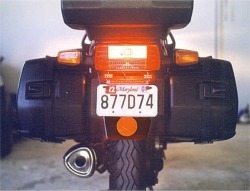
This photo shows the mounting of the units, but doesn’t come anywhere near doing justice to how bright the LED’s actually are.
I think the overall photo got washed out due to my poor photographic skills.
I should have zoomed in a bit closer; it’s hard to see the Signal Dynamics light bar directly above the license plate, but I think you can get an idea of how tidy the actual installation is.
Wiring the Lights
Note: Since this article was written, I’ve found Posi-Lock connectors. These devices make wiring projects so easy, it’s actually fun.
They’re vibration proof and waterproof, and involve no soldering or messing around.
I would definitely use Posi-Lock connectors again if I was going to do this job over, but the following information was included in the original article.
First thing I did was to slide a piece of the heat shrink tubing over the black, red and white wires of the Signal Dynamics unit.
I used my wife’s hair dryer to shrink the tubing down once in place.
It took a while to get it hot enough to shrink. The wiring comes directly out the back in the middle of the unit; I wish they had used some heat shrink tubing at the factory to hide the red and white wiring, I’m not sure why they didn’t.
Anyway, it’s pretty easy to do this yourself.
There are 3 wires on the Signal Dynamics unit; black is ground, red is power to the brake light, and the white is power to the taillight. There are instructions in the kit; you should always follow them.
It is a matter of splicing the LED unit’s ground wire to the bike’s ground wire (the brown wire on my bike).
Then connect the red wire to the brake light bulb wire (yellow and gray wire that goes to the connector in the middle of the brake light bulb, on my bike – the brake light is the upper light bulb, and the taillight is the running light, and is the lower light bulb).
Finally, the white wire connects to the taillight (black and grey wire that goes to the bulb on the bottom).
To wire the Life Brite LEDs, the 2 LED units come from the factory spliced together, so it’s a matter of simply splicing the black wire to the ground (brown wire) and the red wire to the power wire (yellow and gray) of the brake light (the upper bulb).
I soldered all connections and wrapped in electrical tape (again, if I did the job over today, I’d use Posi-Lock connectors).
Using the Lights
Mine work great — I followed my bike with a friend driving it, and you can really notice the added brightness of the Signal Dynamics light bar, and the twinkling LED Life Brite modules really attract your attention.
The only thing I noticed is that when I start the bike, the BMW taillight bulb monitor on the dash panel comes on.
I always check the brake lights to make sure they’re working before I start out on any ride anyway, so what I do while the bike is warming up is to go to the right side of the bike and step on the foot brake while I peer around the back of the bike.
I hold the brake until the Life Brite LED’s stop blinking (5 seconds) and I make sure all the brake lights stay lit. Touch the front brake, and brake light bulb checker will go out on the dash panel, so you’re good to go.
Publication Date: 2000 (?)
Other WebBikeWorld Motorcycle LED Brake and Tail Light Reviews