


A “well done” and big “thumbs up” to Blutek for Generation II of the Blutek Helmet and Bluetooth System.
But, don’t rest your laurels Blutek – a little more attention to graphics work and finishing is warranted.
And allowing both users to initiate an intercom session (and Class 1 power to really beef up the intercom capabilities) would be icing on the cake.
An extremely viable and reasonably priced option to the other ‘integrated’ helmet systems on the market and who should now be checking their sixes.
See Also: Bluetek Bluetooth Helmet Review Part 1
Part 2: The Bluetek Integrated Bluetooth System Overview
To qualify a comment about simplicity that I made in Part I, the main objective of the Blutek Bluetooth system is to allow users to take or make quick calls and deal with emergencies.
It was not meant to be used for long conversations, i.e. – conducting business, or host a multitude of devices that so many of us now accept as the norm.
Safety first was the driving force in providing a system that could be operated virtually hands-free and safety first was also the determiner in providing a single speaker in the helmet.
The single speaker approach also largely mitigates conflict with local, and state or provincial laws that prohibit the use of a dual-speaker headset.
The helmet boxes contained the new Generation II systems. The Blutek representative had let both the Editor and I know that while the boxes would contain Gen II helmets, the updated system had not made it into those boxes.
But within two days of receiving the helmets, the new instructions were received via email – good support.
Note: As of 2010, Bluetek is apparently no longer in business.
Features
The Blutek Bluetooth standard is version 2.0, rated as a Class 2 device for pairing or communication, providing a range up to 10 m or 35 ft.
The system supports Hands Free Profile (HFP), Head Set Profile (HSP), Advanced Audio Distribution Profile (A2DP) and Intercom Helmet to Helmet Profile or P2P (ICP).
More basic than many other offerings on the market the Blutek system still provides the protocols and functions needed, allowing the system to interface with a wide range of mobile phones and portable music devices.
Other features include voice activated dialing (very useful if supported by the mobile phone); self-leveling volume; a noise cancelling microphone; a multi-function control button; and, battery life for up to eight hours of talk or music time or 180 hours of stand-by time.
The Control Knob mounted on the left side of the helmet is the only external indication of the Bluetooth system found within – everything else resides in the helmet.
The single earphone is actually located in the left chin strap so it sits close to the ear but not directly in line. This by itself addresses another important safety issue.
The Tour
The heart of the actual system is found within the so-called “Bluetooth Cell Discretness”. This small housing is located in the rear left liner of the helmet.
Pushing back the neck-roll reveals a small rectangular cover that seals the housing. Inside the housing is the (removable) battery and the main Bluetooth system itself.
The battery is packed separately with the AC charger and Bluetooth Instruction Kit manual. To install the battery, push up on the neck roll to access the housing and remove the cover. The battery compartment slot is visible at the back of the housing.
Orient the battery with the label forward and the pull tab to the rear, then push it down firmly until it seats.
Replace the top cover, lift the soft charging port cover and insert the charging plug of the AC charger. The Red indicator inside the Control Knob panel will come on indicating that the system is charging. This light will go out when the unit is fully charged.
The initial charge for both units took 4.5 hours.
With the heart of the system tucked away, the large silver button on the left side of the helmet is the single control for headset functions. As such, the subtle nuances in manipulating the Control Knob must be appreciated.
It takes a bit of practice to perform the desired function with medium and heavy weight gloves on, but it can be done.
To turn the system on, push the Control Knob in for two to three seconds – a short low tone followed by a short high tone is heard and the Blue indicator will flash slowly.
To turn the device off, press the Control Knob for five to seven seconds – a short high tone followed by a short low tone will be heard as the unit powers off.
Adjusting speaker volume, given the multi-function sensitivity of the Control Knob takes a light touch, especially with medium to heavy-weight gloves on. Flicking or rocking the Control Knob quickly clockwise will Increase (+) volume. Moving it counter-clockwise will Decrease (-) volume.
An alarm tone will let you know when the maximum and minimum volume levels are reached. Just be careful that you don’t actually rotate or hold the Control Knob in any one position while adjusting the volume.
Doing so can result in the system entering one of two configuration modes. As I said before, a bit of time playing with the system works wonders.
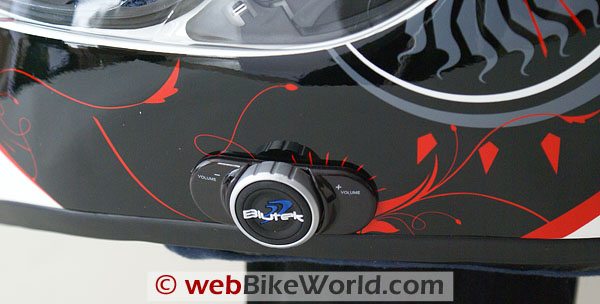 Blutek Bluetooth Intercom Controller.
Basic Pairing
Pairing the system with a mobile phone or other Bluetooth peripheral is pretty much the same as with most Bluetooth systems.
With the system off, press the Control Knob for five to seven seconds which puts the system into ‘Pairing; mode, indicated by an alternate flashing pattern from the Blue and Red indicators.
Put the mobile phone or other device into its “Pairing or Discovery” mode. Depending on the peripheral device, once the basic link is made, the device, in this case the HTC PDA offers up a connection to the ‘bluehelmet’ device for authentication.
As requested, the default pass-key code of “0000” was entered via the Bluetooth pairing menu.
With this code accepted, the two devices connected via a secured link, indicated by the Blue indicator reverting to its slow flashing mode.
An audio tone is usually also generated in the helmet speaker.
With the Sliver helmet, it took three attempts before the phone would accept the default pass-key, but once it did, everything worked fine. The Fire Dancer system and its HTC partner worked seamlessly the first time.
This was a theme repeated throughout the evaluation period.
Depending on the external device, the user may have the option of selecting “hand free” and/or “stereo headset” modes. This is because the Blutek system supports both profiles even though it only has a single mono speaker.
Remember that some phones do not require a pass-key. Nor is any other action typically required if a Bluetooth Adapter (BTA) or dongle is being paired.
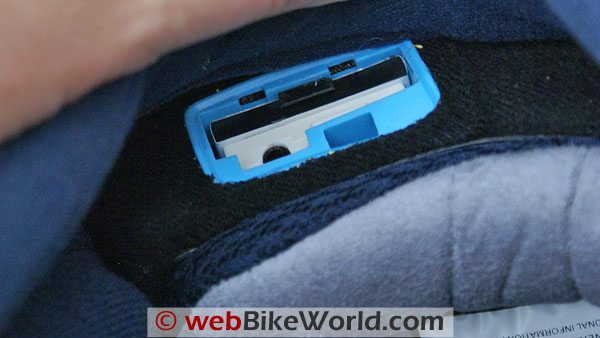 Battery holder inside rear of helmet liner.
Intercom Setup
My first attempt to utilize the Intercom function was a complete failure for reasons still unknown and despite some serious troubleshooting.
But, after letting everything sit for a couple of days and working on other things, the next attempt, starting from scratch, worked perfectly — go figure.
So, the process is – turn the first or Lead system on until the Blue indicator is flashing. Then turn and hold the Control Knob either clockwise or counter-clockwise for about five seconds until the Red and Blue indicators both flash, which indicates “Inquire” mode.
With the second system turned off, press its Control Knob for five to seven seconds, initiating the “Pairing” mode.
If both systems are within range, pairing takes place in ten to fifteen seconds.
If a connection is made the Blue indicators on both systems revert to their slow flashing mode. This will be followed by a series of tones in both headsets as the Lead system automatically initiates an intercom session to the second unit to test the link.
This validation activity is a simple but appreciated feature and one that should be implemented by other Bluetooth systems.
While I don’t expect a full built-in test environment (BITE) some simple initialization checks or tests, like the one used in this system, would help, particularly as Bluetooth systems evolve and/or become more complex.
What I perceive to be the only real limitation of the Intercom feature, other than its limited range, is that only the Lead system can initiate a session, although either system can terminate a session.
I had hoped that maybe this was an error in the instructions, but it is not.
To initiate an Intercom session, the Lead system Control Knob is given a quick push, which results in a pair of tones being generated, followed by a third higher tone, and after a couple of seconds, a series of call tones or rings will be heard by both headsets.
If the two systems are within their operating range, the second system typically accepts the session and answers (opens the link) after the third ring. The second system user can manually answer the call request by pressing the Control Knob briefly.
Appreciating the one to one limitation, when a session is initiated by the Lead system devices connected to the Lead system are automatically disconnected so that the Intercom session can proceed. Once the initiation request has been received by the second system, any of its connected peripherals will be disconnected as well so that the Intercom link can be made.
Although not a given for all systems with all peripheral devices, the Blutek systems worked almost flawlessly in restoring a peripheral audio session once the intercom session was terminated by either system.
As noted earlier, the Sliver unit was sometimes reluctant to resume a previous audio session while the Fire Dancer always reconnected.
User Observations
Some limited riding served to validate that the Intercom range is very limited, at or less than the 10 m or 35 ft range.
Around 20 feet the link becomes very noisy and audio starts to break up badly. In heavy traffic, the communication environment would likely deteriorate even more.
Audio through the single headset speaker is pretty good, not hi-fi of course, but it is very clear and there is a fair bit of volume control available from the Control Knob, plenty for most riding conditions, although I haven’t had a chance to test the audio at sustained highway speeds – yet.
Again, remember to rock or gently twist the dial for best results in adjusting volume.
I did find that when the systems were turned off and then back on that the volume settings reverted back to a rather loud default setting…something to remember.
If the mobile phone supports auto-answering and if the pairing menu has been set up for the hands-free mode, any current music session is disconnected or muted and the incoming call automatically transferred to the headset after the set number of rings or within a specified time period.
Terminating a call can be done in two ways. The safest way of course is to have the caller hang up so that the call is terminated automatically by the system without intervention by the user.
Alternatively, giving the Control Knob a quick press usually results in the call being disconnected.
Two observations here…first, it is best to let the other party hang up, preserving the hands-free environment for the rider/user.
Secondly, sometimes the quick press of the Control Knob resulted in all connections being lost or if the Control Knob was given an overly long push, the system powered down.
This issue did not arise all the time, but it did happen on occasion, usually with the Sliver helmet of course.
The reject a call and last number re-dial (useful when you realize you just rejected a call from your significant other) features work as advertised.
The re-dial feature was tested early on during this evaluation when I was trying to see if the second user could actually initiate an Intercom session. They can’t – pushing the Control Knob only activates the last number re-dial feature.
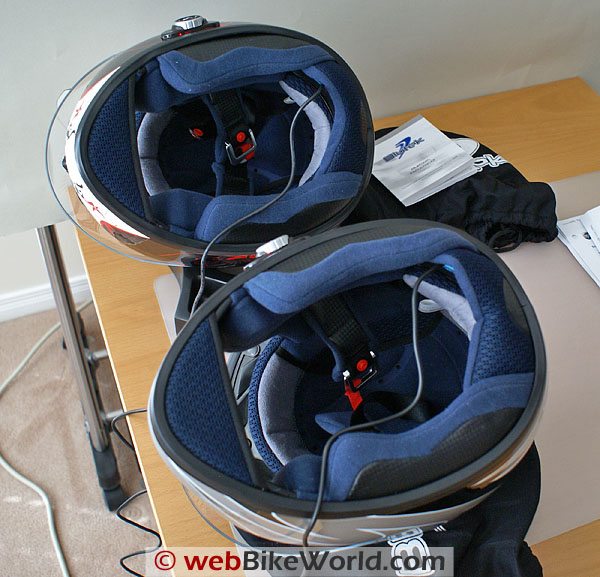 Bluetooth helmet battery recharging
The Bottom Line(s)
- Packaging: Very Good. The whole system is attractively contained within a helmet, a great disguise! The only other packaging is a small plastic bag containing the battery and the (outdated) Kit Instructions.
- Design: Very Good. The Control Knob approach is simple and functional, albeit finicky to use at times. All other components are small and well integrated within the helmet itself.
- Execution: Excellent. Most people don’t even notice the Control Knob on the left side of the helmet. The battery and Bluetooth system are hidden inside the left side liner. The speaker is inside the D-ring strap and the microphone under the front chin-guard liner. It is an extremely simple and functional installation.
- Features: Good. Everything works as advertised although the Sliver unit continues to be the poor performer of the two. Compared to most other Bluetooth systems on the market the Blutek integrated system is very basic. The Class 2 power rating limits system to system link distances.
- Fit: Excellent. As reported in Part One, the helmets fit well, work well, and the Bluetooth is just as accommodating. With no external mountings, less the Control Knob, to worry about and no internal fittings to intrude, this is indeed a well fitting system.
- Setup and Configuration: Very Good. With a quick read of the Gen II instructions, a charge of the batteries and a quick tour of the helmet components, both units were up and running without any issues, less the missing lid for the Sliver Discretness. The single main control can be finicky, but with some use, it is mastered, even with heavier gloves on.
- Performance: Good. Audio output from the single mono speaker is crystal clear and volume levels are full adjustable. Device initiation is typically fast and reliable and connections made without much prompting. The Intercom works well, although allowing only the Lead to have initiation control is problematic. The other detractor is the limited range of the systems when using them in a rider to rider configuration.
- Ease of Use: Very Good. Once the multi-faceted Control Knob is understood, it is all very simple. With the Control Knob somewhat mastered, the next hardest thing to do is installing and charging the battery. Challenges are few and successes are many.
- Reliability: Very Good. Even with the Sliver being cranky (possibly related to the age of the user), both systems on the whole are fault free and work as advertised. Downtime has been limited to necessary recharging sessions and the odd reset required by the Sliver and its partner HTC Touch, something I suspect is related to the current Bluetooth firmware on the Touch.
- Maintenance and Support: Very Good. Maintenance has been limited to charging the batteries, the life of which has been excellent – close to the claimed eight hours claimed. The Blutek representative was quick in providing updated instructions and has been equally diligent in responding to questions posed during the evaluation – this is a good sign.
- Cost: Excellent. At $309.95 and $289.00 USD for the pattern and solid helmets respectively, you get a very (very) good full face helmet and a fully functional and integrated Bluetooth system. The Blutek helmets are a good deal.
- Value: For the suggested retail price the helmet system represents very good value for the consumer who is looking for a good full face helmet and a good simple Bluetooth system.
Conclusion
Having now completed both parts of this evaluation, the helmet, and the Bluetooth helmet system, I can state without any hesitation that the Blutek helmet system represents quality and excellent value for the money.
Lightweight and comfortable, the helmet is pretty darn quiet. The Bluetooth system is well designed, skillfully executed and integrated with the helmet and the necessary user interface is easy to use with some practice.
Even though the Sliver unit is prone to dropping connections or slow to initiate pairings, and arrived without its housing lid (a replacement is on its way) both systems have otherwise worked as advertised.
Appreciating the simplicity of the Bluetooth system, including its single mono speaker, I think Blutek is really on to something.
Also: Bluetek Bluetooth Helmet Review Part 1 (Includes the Product Summary table and Owner Comments)
NOTE: Owner Comments are in Part 1.