

Well designed, fully featured Bluetooth version 2.0 communications device.
With a quality mono two-speaker headset, its trim and lightweight design, multiple functions and ease of use, this is a big advancement in concept, execution and potential.
Pairing integrity, a function that is key to overall system performance, is not as reliable as the other features.
However, considering the Bluetooth communication device evolution baseline, this is a definite advancement.
The Only Constant is Change
It seems like only yesterday that we posted an update on three popular Bluetooth communication devices.
These included the Interphone, the latest version of the Cardo “scala-rider” Teamset and the IMC Carmos Bluetooth intercom system.
While all three have particular strengths and weaknesses, they all provide Bluetooth connectivity, especially for rider to passenger wireless communications. Only the Interphone system provides a proven motorcycle-motorcycle duplex link, with owners reporting several hundred meter range communications.
Despite glaring shortfalls and wide-spread user frustration, for better or for worse, the Bluetooth intercom market is growing fast. Many motorcyclists use them as a dedicated wireless system, while others use them as an extension of a more complex wired system.
From a technology perspective, one of the biggest advances was the release and adoption of the Bluetooth version 2.0. This version, with enhanced data rate (EDR), basically tripled the data rate from the previous standard and lowered power consumption.
Bluetooth devices are available in Class 1, 2 and 3. The Class refers to the maximum permitted power in kW. Class 1 is 100 mW, for a range of approximately 100 meters; Class 2 is 2.5 mW with a roughly 10 meter range and Class 3 is 1 mW, for an approximate 1 meter range. The Cardo scala-rider Q2 is rated at Class 1.
For many users who know and appreciate Bluetooth, the Bluetooth 2.0 new functionality alone may be reason enough to upgrade. But even with all the new releases and updates, it was/is still hard to find one Bluetooth device that met a wide set of requirements – mobile phone support, intercom, bike-bike, GPS, streaming audio and perhaps a radio.
It would seem then that with the release of the Cardo Systems Inc. scala-rider Q2, many of our requirements and frustrations have been addressed – how successfully shall be seen.
Overview
The Cardo scala-rider Q2 provides a Bluetooth headset for mobile phone communications, supporting headset and hands-free profiles with rider to passenger communications with other Q2 intercoms up to 500 m. The unit will pair with earlier versions of the scala-rider up to 10 m (33 ft.).
The device will work with up to four different Bluetooth devices, switching (seamlessly) between them. The unit can be interfaced to a mobile phone, a GPS unit for turn-by-turn GPS navigation instructions and streaming audio (if compatible), to other scala-rider Q2 headsets for communications at ranges up to 500m (1640 ft.) and, to the embedded FM radio.
As is typical with Bluetooth devices, only one audio connection at a time is allowed and while this device is truly multi-functional, it is not expandable in that there are no means to physically add other peripheral devices.
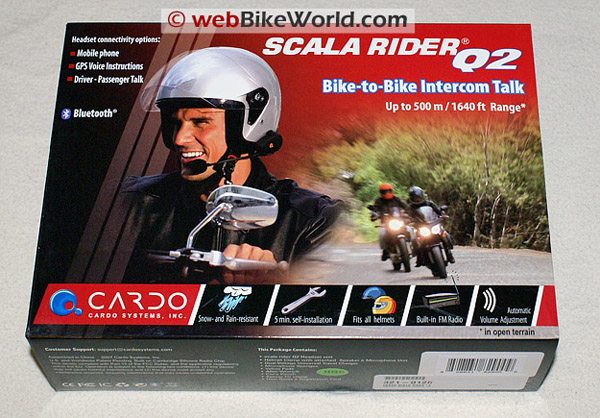
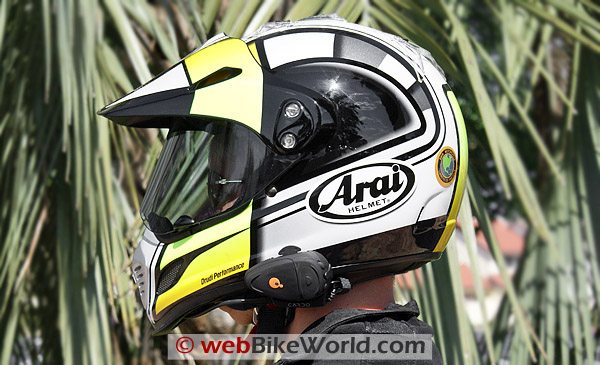
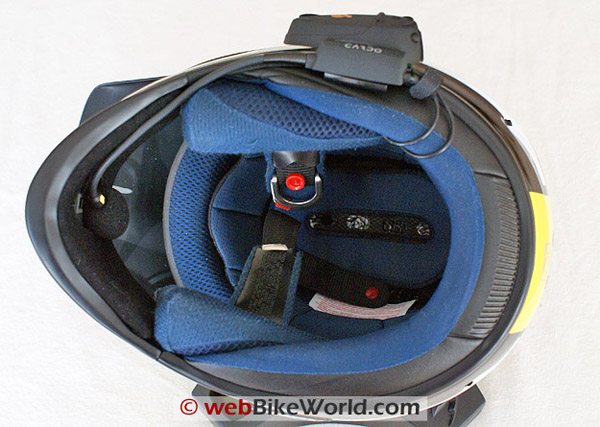
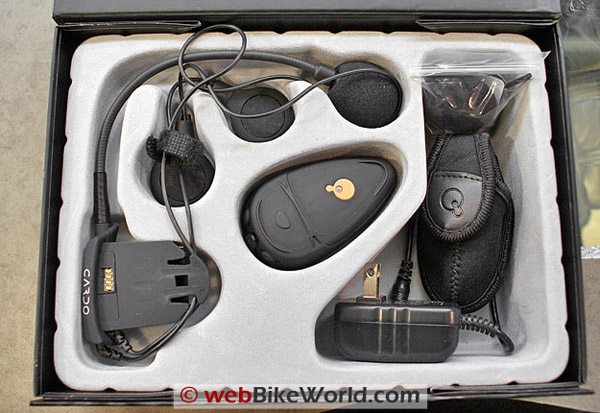
The attractively boxed kit includes the Bluetooth control module, a single component headset comprising a helmet clamp, boom microphone and left and right mono speakers. Also included is an AC/DC charger, an Allen wrench, Velcro pads, an extension pad, a small carry pouch, two additional microphone sponges and a well-written, multi-language User Guide.
Reading the User Guide is Good
After reading the User Guide, and going through all the included components, the AC-DC charger was plugged into the charging jack of the module (centered between the two volume buttons) to start the recommended five hour initial charging session. Note: the charging light may take up to 15 seconds to activate, so have patience.
While the units were charging the User Guide was gone through again. Most Bluetooth devices follow the same protocols but procedures for initialization, pairing and use often differ. What is different with the scala-rider Q2 is that there are really two main controls, CTRL (Control Button) and MC (Multi-Connection).
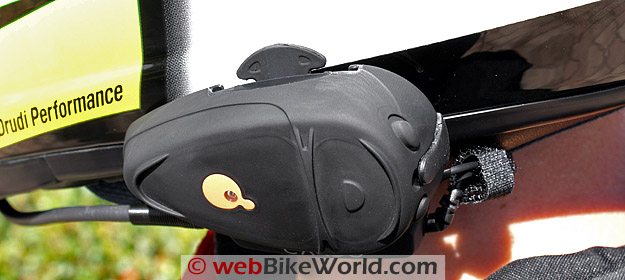
After the red “charging in progress” light went out (at the 4.5 hour mark), the Bluetooth module (identified as headset in the User Guide) was matched up to the sliding plate (identified as Helmet Clamp in the User Guide) — there is a detent on each inner side of the sliding plate that the module slides into.
With some light pressure, the four-wire edge connector on each piece slides together and the somewhat light upper tab will lock the module in place. Helmet installation was going to wait until all functions of the systems had been checked out. As it turns out, this was prudent.
Controls are simple and given their placement, easy to use when the whole assembly is mounted. The module is shaped like an arrowhead, with a raised molded line separating the face into two sections. The CTRL button/LED is located on the forward section and the MC button is on the back section.
The Volume Up and Volume Down controls are located on the back side (top and bottom edges respectively), separated by the charger input jack. All in all quite simple and well laid out. The scala-rider Q2 module is substantially larger than the current favoured Interphone unit, so there is more real-estate space for multiple controls.
Pressing the prominent CTRL (logo) button on the forward portion of the module for three seconds will power up the system with the LED flashing blue three times, then settling in to a slow single blue flashing mode.
If the headset is being monitored, a multi-tone chord will be heard as well. The same sequence is used for powering down, although the LED flashes red three times and then the unit shuts down.
Something Old, Something New
Like the trusty Interphone units, these units will be used as bike to bike intercoms, so this function was up first. Trying this functionality first would also serve to highlight what is a new, and hopefully, very useful capability — the ability to set-up with two Q2 headsets rather than one.
The User Guide refers to this as Primary and Secondary Buddy pairing. What must be appreciated here is that even though three systems can be paired (Main, Primary and Secondary Buddy configurations), only one “buddy” at a time can be reached via Intercom mode (remember that one to one relationship).
Primary Buddy pairing is simple. Turn both headsets on and make sure that the LED on both headsets is slowly flashing blue. Simultaneously press and hold the CTRL and the MC buttons on the Main headset for at least six seconds until the LED flashes a rapid red, indicating that the Intercom Pairing mode is active.
Immediately repeat this sequence with the Primary Buddy headset. Both headsets should now be flashing a rapid red. Within 35 to 55 seconds both headsets will show solid red for two seconds and then both sets will begin flashing slowly in blue — et voilà!
Although the User Guide says all this should happen in a few seconds, clearing all settings and going through the procedure again on all three systems for benchmarking purposes did not reduce the Buddy Pairing times at all. Note that after one minute, the systems will drop out of the Intercom Pairing mode.
Secondary Buddy pairing is as simple and takes just as long. Obviously a third Q2 headset is needed, which just happened to be on hand. Repeating the set-up steps above with the Main and Secondary Buddy will configure the three units so that the Main headset can talk to the Primary or the Secondary Buddy.
The system also allows Main to switch the priority between Primary Buddy and Secondary Buddy. Press and hold the Volume Up button for three seconds; one beep sets the Voice Connect to Primary Buddy and two beeps sets the priority to Secondary Buddy.
As is clearly identified in the User Guide, and appreciating the Bluetooth one to one relationship, the Primary Buddy and Second Buddy cannot communicate directly with each other.
A Pair is a Pair
With the Buddy pairing completed, some static and walkabout tests were conducted. Although some white noise is heard on the systems, typical for Bluetooth, communications between all three systems was clear with minimal VOX delays.
Initiating a Voice Connect session between Main and either Buddy is simple. Speak loudly and clearly into the microphone, let the VOX circuitry open up a link that remains open for up to 30 seconds after any conversation is finished.
Alternatively, the MC button can be used; one tap for the Primary Buddy and two taps for the Secondary Buddy. Ending a session is the same, one tap for the Primary and two taps for the Secondary. It works…most of the time.
When using a scala-rider headset as a passenger headset, the voice connect Intercom can only be initiated only by the scala-rider Q2 headset (in its Main role), while a manual connect Intercom link can be initiated from either headset.
A condition outlined in the User Guide was clearly demonstrated on more than one occasion during this evaluation: if Main attempts to start a Buddy intercom session, and that Buddy is already engaged in another audio session, i.e. phone, GPS, etc, the Main headset will hear a double beep, indicating that the Buddy is “busy”.
Optimism and Pessimism
With three systems successfully set up as Main, Primary Buddy and Secondary Buddy, optimism was running rampant. However, that balloon was quickly burst — none of the three would go into the Device Pairing Mode (LED flashing red and blue).
Following the procedure in the User Guide only resulted in the unit turning itself on and then off. A hasty email was sent off to Cardo Systems, and follow-up call made the next day to Cardo Customer Support.
After about 30 minutes on hold, a Support Representative came on the line and after walking through the issue together the problem was solved — the User Guide in the kits procured detail an improper sequence of events.
So, the correct sequence to initiate device pairing is to turn on the device and wait for the LED to flash blue three times, release the CTRL button and then immediately press it again and continue holding it down, even after the LED flashes red three times (the normal shut-down signal).
If this sequence is successful, you will be rewarded with the LED flashing red and blue — let the learning begin. The first device pairing was done with a Garmin zumo 550 GPS navigation system, just freshly updated to software version 3.90.
With several Bluetooth devices sitting around just waiting to pair (and cause interference), only the target Garmin device was left running. Setting the Garmin Bluetooth mode to “add device”, the Main scala-rider Q2 was put into Device Pairing mode.
After about 35 seconds, the Garmin acquired the signal and stepped through the normal procedures for connecting a Bluetooth peripheral. Selecting the MP3, Audio and Navigation option from the zumo Audio menu resulted in a beep from the headset, indicating success.
But after five seconds or so, the connection was lost and it kept dropping out; not a good sign. After turning the scala-rider Q2 unit off, clearing the “scala-rider Q2” device from the Garmin, and then restarting everything, a new pairing session was undertaken.
This time everything went well, with audio from the Garmin subsequently heard in the headset. Setting the Garmin audio to 30 percent and then adjusting headset volume via the Up and Down button worked well.
Mobile Phone Use
Although two relationship configurations are possible: a direct pairing between the headset and a phone; or, a three-way with a (GPS) as the facilitator /broker/host. For this evaluation, an HTC Touch PDA device (A2DP capable) was paired directly with the headset, and then subsequently configured in a three-way with the zumo 550.
No matter which configuration is used, it is important to remember that some of the phone features may not be available due to device compatibility issues. Additionally, during mobile phone activity, Buddy Intercom sessions cannot be initiated nor will they be accepted.
Setting up the HTC device for a new “discovery” and then putting the scala-rider Q2 in its pairing mode resulted in the devices connecting in about fifteen seconds: re-pairing was even faster and never failed. In this direct pairing configuration, incoming calls are answered by tapping the CTRL button once or by just speaking loudly into the microphone so that the headset/voice command connection to the phone will be initiated (depending on phone features available).
Audio clarity remained very good, even in a relatively noisy riding environment. Terminating a call is done by pushing the CTRL button once. Rejecting a call is done by pushing the MC button or just remaining quiet for fifteen seconds.
Introducing the zumo 550 into the equation provides more options, but also more complexity. The User Guide states that the GPS and headset should be paired first, followed by the GPS and phone pairing; this procedure was completed successfully on the first pass.
Never satisfied, further ad-hoc activities confirmed that the reverse process — pairing the GPS and phone first, then the GPS and headset — also worked. Undocumented luck, or device versatility?
With the GPS acting as the host device for both the headset and the phone, the zumo 550 will present a warning screen stating, “the zumo must be in a power mount or be connected to a Bluetooth headset to hear audio.” Although this requirement might be obvious, it is still a good reminder to make sure the GPS to headset link is made and the Navigation, MP3 and Phone option selected under the zumo 550 audio menu.
The sequence that is follows is that the phone hands off incoming calls to the zumo, which presents an Incoming Call screen, with call display included. By simply pressing the CTRL button on the headset, or the Accept icon on the zumo screen, the connection will be completed and the audio streamed from the phone through the zumo to the headset.
Alternatively, the call can also be rejected, either by pressing the MC button on the headset or the Ignore button on the zumo screen; either action will terminate the incoming call.
To end a call, press the CTRL button on the headset and the call will (eventually) be terminated. Alternatively, pressing the Telephone icon (upper right corner) will bring up the End Call screen and pressing the End Call icon will initiate the termination process. While the headset procedures worked most of the time, using the zumo menu icon was fail-safe.
Placing a manual call — while stopped in a safe spot, of course — is simple: Utilize the zumo 550 phone menu and place the call. The dial tones will be heard in the headset and if the party answers, you will be connected. Termination is done as described above.
If voice dial features are supported by the phone, press the CTRL button and state the name of the person being called. To redial any number, press and hold the Volume Down button for three seconds. Remember: available features depend on the phone device and then only if supported by the host device, i.e., a GPS.
The FM Option
The integrated FM radio is a nice feature, especially when traveling and no other audio sources are utilized via peripherals. The FM Radio has a range from 87.5 MHz to 108 MHz with a 6-station memory and Search and Store functions. The intercom features automatic radio muting for incoming calls.
A Creative ZEN unit (1GB) has the FM radio functionality and it gets used all the time especially to monitor weather along travel paths and for tuning in Travel and Weather Alert broadcasts. With the scala-rider Q2, the FM band is always at hand. Holding the MC button down for about three to four seconds initiates the radio.
The receiver is very sensitive so make sure the headset volume is turned down before you activate the radio. Tuning up or down is accomplished by holding the Up or Down volume button for two to three seconds.
Six station pre-sets can be tuned into the system and retained, but it is a multi-step process that should only be done when stopped. For local travel, the presets can be maintained, but when traveling far and wide, it is a hit and miss thing.
However, many Travel and Weather Alert FM broadcasts use the same frequency allocation from area to area and are good presets to have set up. During the recent sojourn to Florida having this warning capability was very much appreciated.
Audio Priorities
All devices of this sort have a priority established for multiple audio inputs. The scala-rider Q2 priority is: 1 – mobile phone audio or GPS audio (incoming/outgoing calls, GPS audio and navigation instructions; 2 – Primary or Secondary Buddy audio; and, 3 – FM radio.
If higher priority audio begins, lower priority audio is immediately cut-out and then restored after 15 to 20 seconds of silence from any higher priority audio. One feature really appreciated is that the restored audio level is brought up gradually, so there is no abrupt on/off effect. Most new systems provide or should provide this feature.
Hello: Can You Hear Me Now?
With arrival in the sunny and warm environment known as Florida and with the motorcycles off-loaded, checked out and fired up, the first day of riding was spent using the scala-rider Q2 units.
Although the sets had not been used for a week, both units were turned on and the Main MC button pushed once – within 30 seconds, an intercom link was established between the two systems (Main to Primary Buddy). Heading off along Hwy 42 towards Deland quickly revealed the two strongest traits of the scala-rider Q2: headset audio quality and range.
Through terrain that varied from flat and open to twisty and hilly sections (yes, in Florida), the audio connection between the two systems remained very good, typically up to 500 m or 1,640 ft., a distance previously only achieved with the Interphone systems.
Beyond 500 m, depending on terrain, connectivity and clarity would start to fall off, but an audio link was still maintained. On clear road stretches along Hwy 42 and US-92, conversation was possible up to around 900 m or 2,952 ft., over half a mile, very impressive.
On occasions when the link was lost due to separation distances or terrain conditions, the Intercom link is automatically re-established once the two sets could synchronize again. The scala-rider Q2 will automatically try to reconnect to its Intercom Buddy for up to five minutes before timing out.
The system uses Automatic Gain Control or AGC to automatically increase or decrease volume according to ambient noise levels and riding speeds, much like other good quality audio systems today. Manual volume control adjustments can be made via the Up and Down buttons on the unit.
The FM radio function works well, although sometimes when it was activated and then shut off, it would not restart and could only be restored by turning the headset off and then on again. The priority muting function works well; lower priority audio is instantly cut off, and then gradually restored once any higher priority activity is completed.
Battery life is good. Typically five to six hours of consistent use was possible from the units. The included chargers are small and easily carried, and recharging of the Li-Po battery is fast, usually around 90 to 120 minutes.
And speaking of recharging, the first track visit was spent taking in the initial 2008 Moto-ST race, wandering through the pits and taking in everything motorcycle racing has to offer does wonders in cleaning out the winter blahs and recharging the moto-spirit for another season.
An Imperfect World
In general the scala-rider Q2 lives up to its billing, but it is not perfect. The mounting assembly appears flimsy, but it is holding up well and the main module is easily slide on and off to transport or use on another “holding” reel.
Most noticeable is that the Bluetooth initiation function takes a long time to step through for both Buddy and Device pairing. As the device has an automatic time-out function of these modes (one and two minutes) successful pairing was often only achieved after two or three pairing sessions.
With three systems on hand for most of this evaluation, the other main concern also surfaced quickly: pairing integrity. For reasons yet unknown, these inconsistencies point to a (possible) weak point in the scala-rider Q2.
Some discussion threads regarding scala-rider system performance issues and threads concerning Bluetooth pairing with some popular GPS units, including the zumo 550, would seem to indicate that there are some issues with the scala-rider models.
But to this point in time nothing specific is known. The issue remains the subject of an ongoing investigation. Rest assured that if a revisit is required to update this assessment, it will be done.
As advanced as this unit is, none of the Cardo scala-rider motorcycle products are currently compatible with the Advanced Audio Distribution Profile or A2DP needed for Bluetooth. Being able to utilize the A2DP feature of the HTC Touch PDA and receive stereo audio in the headset would be just about perfect.
Conclusion
The excellent bike to bike capability, the ability to have two Buddies configured, the FM radio and day-long battery life keeps the scala-rider Q2 on the plus side.
While the pairing issue may be attributed to a bad production run or perhaps an early or flawed firmware release, it detracts from what is an otherwise well designed and useable multi-function portable Bluetooth communications device.
Even with this issue, the scala-rider Q2 is now at the top of our use list of the portable Bluetooth devices tested to date. We think the unfulfilled promise of Bluetooth is being addressed, but there are still some bugs to work out.
UPDATE: Cardo Systems Announces Two-Year Warranty Extension on Intercoms
Owner Comments and Feedback
See details on submitting comments.
From “J.P.” (3/10): “I … don’t think Cardo has their stuff quite together yet. I have three Cardo units, a regular Bluetooth device, the Cardo FM, and the Q2. Of all only the Cardo FM works as advertised. It has reasonable FM sensitivity, and the Bluetooth works okay. I can actually find a radio station while underway, on the Cardo FM. Not so the Q2!
The Q2 is not anything I would recommend to anyone! The FM is terrible. I can pick up one station, well two if you count my XM radio transmitter, and I live in CA so there are plenty of FM radio stations. It’s just that the unit has such terrible to nonexistent FM sensitivity.
Even tuning into my XM radio with a built-in transmitter was a real task! You couldn’t get any closer to an FM source, and still have trouble tuning it in. I mean I was no more than a few inches away from my FM source, and still it’s nearly impossible to detect. Once I did get it, after many repeated tries, I was able to lock it in, but that’s almost a moot point, since everything else is sketchy at best.
One of the customer service reps told me that I needed to straighten out the earphones in order to tune in stations. HUH? On the road you’re gonna stop every ½ hour, take your helmet apart, stretch out the earphone, tune in a station, put it all back together again? I don’t think so! …
Once paired to my Cardo FM as an intercom for my girlfriend, on the back of my bike, it worked. But it just kept toggling on and off at almost any speed. We could understand each other as long as she had her vents closed but there is an abundance of wind noise. Of course while all that is going on you get these annoying beeps in your earphones every time it tries to connect the intercom, over and over and over and over until you turn the darn thing off. Now every time I use it I get those annoying beeps even though no one is paired with me. Beep, beep, beep, beep, beep. See what I mean, annoying.
The clincher is that when we got to our destination and we powered everything off and then powered it on as we were getting ready to hit the road again, it lost its intercom connection! It looks like you have to go thru the pairing process every time you power off and on. That isn’t acceptable at all…
Even when you have nobody paired to your Q2 it keeps trying to connect to something, as you get those annoying beeps all the time. I will say that my first unit was far worse than this replacement unit, but neither work as you would expect for the amount of money I had paid for it. The Cardo FM I would recommend but the Q2? Not on your life! Very disappointed, very expensive, doubly disappointing.”
Editor’s Note: The newer generation of Bluetooth intercoms is much improved and the FM radio and intercom reception on the Scala G4 we reviewed recently proved to be excellent. I’m not sure if Cardo is still making the Q2 or selling out the remaining stock, but I would recommend the G4 over the Q2 for sure.
From “B.E.” (12/09): “I’m very disappointed in this unit, and I can’t even return it.
The first time I stopped, literally on the way home from the dealer, after paring the buddy unit with my spare helmet, someone stole the spare helmet and buddy unit.
I bought this model, as opposed to the less expensive one, for the FM radio. The radio is totally unacceptable. My radio will only detect 2 stations of the roughly 20 local stations available and one of those is religious programming. Instructions for the radio use and saving channels are less than clear but since I only have the two choices it doesn’t really matter.
The mp3 player hookup is even worse. I have heard better sound from the old time drive in speakers. Can’t hear lyrics or base. Totally unacceptable.
The phone works as advertised, but overall 1 function out of the 3 I can use is totally unacceptable. I would not recommend this unit.
I’m hoping that if I return the main unit Scala will replace it with one that hopefully functions with a radio and wired mp3. If not I wasted a lot of money.”
From “S” (10/09): “Was reading your article after purchasing and using the Cardo Scala Q2. I purchased the Q2 system with new HJC helmets in Dallas, Texas (we were on a road trip). The price seemed good and my previous experience with Cardo Scala (basic Bluetooth headset) was very good.
We decided to go wireless on our Goldwing. At first in town, the system was very good for passenger conversation. But one we went to highway speeds, the quality seemed to diminish. I heard a great deal of wind noise and my passenger could not clearly hear things at all.
We are using a ¾ style helmet, but I would have thought the system would have worked better. I will look into this further, but at the moment, not really satisfied with the Q2 system…time will tell if I have to try and sell on EBay!”
Editor’s Note: I’ve experienced this problem with several intercom systems, even on full-face helmets. Once the wind gets blowing in there, it causes a lot of background noise, which greatly diminishes the ability to hear anything. I discovered that on the full-face helmets that have air vents through the chin bar, it’s important to place the mic so the wind isn’t blowing against it.
You’d think the systems would be designed for use with 3/4 helmets, but…I guess not!
From “D.H.” (8/09): “I purchased the Scala-Rider Q2 for a recent three day trip. The units performed flawlessly… for one day only. On day two, one unit worked fine and could hear the other unit. However, the second unit had no audio. It could transmit but could not receive. We re-paired the units but the issue did not resolve itself.
Upon return from the trip, I wrote an email to Customer Support at Cardo but they did not respond for five days. In the meantime, I returned the units to the point of sale. I believe Cardo has a few issues with quality control and customer support. I’ll wait for another company to arrive with a better system.”
From “A.M.” (7/09): “I can’t believe all the great reviews on this product. We bought a pair before a 3-week motorcycle trip from (Virginia) to (Alaska) and back. They have been nothing but a constant source of frustration when trying to communicate between two riders and different bikes. There is one time they worked great for us: if we wanted to have the intercom link open all the time. Over 70 mph, it was hard to hear but at least still possible.
Here’s my issue: it was IMPOSSIBLE for me to turn off the voice activation, and EVERYTHING sets off the voice activation. I thought it was just wind noise, but we left one helmet with the intercom on accidentally in a tourpak. There is no wind inside the tourpak, but still, just road noise would turn on the voice activation. Continually. I would turn off the call on my end. The voice activation on the helmet in the tourpak would turn it back on again automatically.
Yes, I am well aware that the owner’s guide tells you how to turn off the VOX. I read that stupid manual 18 times for further clues. I did exactly what it said to turn off the VOX. We walked around camp trying it out, and it appeared like the VOX was off. Then we’d take off on our bikes, and sure enough, wind or whatever would continually turn it on again.
The manual does not make it clear if you have to turn off the VOX again every time you turn the unit off and back on again. I still can’t tell through trial and error if this is the case or now, since I have never been able to get it to turn off anyway. I have tried everything I can think of, and the continually activating VOX is so frustrating that I will not keep these units. In two weeks, the longest I have ever been able to keep the VOX from activating is 6 minutes.”
From “B.B.” (7/09): “Thank you for the outstanding information given in your articles.
When I ask TomTom why I could not connect the go 730 with my Scala Rider Q2, they answered with the following:
“Although your unit has Bluetooth capabilities, the GO 730 was not designed to be used with a Bluetooth headset. It was, however, designed to pair with cell phones for the use of hands-free calling, or our plus services. Because of this, there aren’t any troubleshooting steps that we can take to get this to function. We do apologize for any frustration or inconvenience this has caused.”
I’m very pleased with the Scala Rider Q2, the TomTom is for sale.”
From “D.W.” (6/09): “Your article and review saved me! A buddy of mine ordered the Scala Q2 (2 headsets) for our upcoming trip to (North Carolina). We have never used communication before and didn’t want to spend a lot of money.
We bought them just after I had ordered the new Garmin Zumo 660. We were told by the dealer that the Zumo 660 would not pair with the Scala Q2 headset. They were correct if you follow the instructions that come with the headsets.
But, following your directions for device pairing, we successfully paired the Cardo Scala Q2 to a Zumo 660 and an iPhone. This system is fantastic and I highly recommend this setup to anyone! It’s going to be a better experience being able to communicate to each other for our upcoming adventure.”
From “B.R.” (5/09): “FYI for anyone looking for a good communications product between the rider and the pillion. I purchased the scala rider cardo-rider teamset system and me and my wife love them, we have been on several rides and have just enjoyed the fact that we can go for a ride and still talk to each other verbally. I have tried different types of helmet communications gear and this beats them all.”
From “H.Z.” (5/09): “I read your review, thank you very much. I went and purchased the set before reading all the users’ reviews. Some are really bad. I was dreading how I was going to find the Q2 Scala.
I should like to report that the set paired very well with my iPhone and my Zumo 660 and the two are working perfectly well with good volume and good easy synchronization. I have not as yet tested any music but will let you know when I do. Many thanks for your excellent reviews.”
From “D&V W” (5/09): “We purchased the Cardo Scala Rider Q2 about 3 weeks ago and are amazed at how great they are! They were easy to install and already matched to each other, so no problems with turning them on and having instant communication.
We had the more expensive (and bulky) Chatterbox and were never able to get them to link up properly and even when they did, reception was spotty and the wind and engine noise made it very difficult to hear.
With the Q2, we never lose contact, even at a distance and no matter what speed we run, it’s clear as a bell. I highly recommend this to anyone wanting bike to bike communication.”
From “J.C.” (2/09): “Let me congratulate you on an excellent website; I never purchase an accessory without checking for a webBikeWorld review.
I have owned a pair of Cardo scala-rider Q2 intercoms since they first became available. I use them as an intercom with my wife and as a cell phone headset. I have nothing but praise for the units, as they have worked flawlessly for me.
However, after my first attempt to use them I was totally dissatisfied with the lack of volume and clarity and intended to return them. “Fortunately”, the online retailer would not accept a return and I was forced to try them again.
What I determined was that placement of the speakers is critical and that a centimeter of movement can be the difference between excellent sound and uselessness. Getting the speakers positioned at exactly the height of the ear openings and slightly forward optimized the sound for both me and my wife.
We both use foam earplugs when we ride and have no trouble communicating at any reasonable highway speeds or below. I have also used the Q2 as a cell phone headset and found that others have no clue that I am riding a motorcycle during our conversations.
I have found this to be the case when using both AGV and Caberg full-face helmets and with both Palm Treo and Samsung Upstage telephones. In fact my only, very minor, issue with the Q2 is that it doesn’t seem to work as a music headset with the Samsung Upstage.”
From “HGG” (2/09): “I have had two (Scala Q2) units used for rider to passenger operation for about 6 months now. We don’t use GPS or phone connections, so basically used as an intercom with occasional FM radio use.
We wanted to get away from the cable connection and this set up is excellent for that. I found it easy to attach to my HJC AC3 helmets but the boom mike is a little short and the mic doesn’t come around in from of my mouth.
On the intercom side, the communication between myself and passenger is good at the speeds I travel. We use open face helmets with some noise, so the volume has to be turned up. We have found that the voice activation doesn’t seem to work very well. I have an HD with moderate loud exhaust pipes and we have synched up with the bike running and without and it seems to make no difference.
I now use the manual push button for activation. And we are experiencing false calls while riding. Maybe from the exhaust noise or wind. We placed our mics up higher into our shields and it seemed to help.
A major issue with us is the volume setting between the radio and intercom. When the volume is adjusted for the intercom and it switches back to radio, it will blow your ear drums. It doesn’t take many times to remember to hit the volume down button quickly. The radio is not why you get this unit. The FM sound is like AM talk radio.
The learning curve on this unit is somewhat lengthy as one button controls the intercom on-off, radio on-off and station select. I found myself sitting down reading the instructions several times and pushing buttons to figure out what they did.
I have read the other reviews and see that we all have similar likes and dislikes. I guess there is not a perfect Bluetooth unit yet. I will try the LALALALA, normal voice type of voice activation I read about and see if this works. And I realized that the batteries are not replaceable??? Wonder what the expected life is?”
From “R.B.” (12/08): “I received a pair of Scala Rider Q2 units from the rep to try, and evaluate. I was immediately impressed with how well it worked as a rider to passenger intercom. The sound quality was great. It worked as advertised as a bike to bike intercom, as well.
The radio is sketchy, as there’s no way to know what station you’re on, until you hear call letters. Then you are blindly on seek. It’s a little confusing to follow the directions in the owner’s manual as to how you go about creating preset stations, as well. I could live without the radio feature altogether, actually.
Here’s the problem with this unit…………..the battery life gets shorter each time it’s recharged, and the battery is not replaceable!! Each time the units are recharged, the time that they work gets shorter, as well.
In addition, the voice activation requires yelling to reactivate, and becomes less sensitive with each recharge. It is truly annoying to have to yell several times inside a full coverage helmet to be able to let your intercom partner know that they should have looked at something which is now a half mile behind you.
Our initial impression was very good. T hey are now packed up to return to Scala. Free or not, I don’t want them.
For $200 each, and no way to replace the batteries, I believe these to be very expensive disposable communicators.”
HBC’s Response: “Rick, in reviewing everything gathered on the original review of the Q2 units, and other stuff collected from other users over the past year and, in going through the update activities with the new Q2 Multiset systems, I have to agree that Rob has a very valid observation. So comments as follow:
a. Battery Life – if the batteries were fully charged, per the manual, before initial use, given what is described I would assess that one or both batteries are defective. I have asked the question of Cardo before and I will raise it here again – are the batteries dynamic in that they have a charge and use memory of sorts, which is important for initial use (full charge, full power, etc) and in keeping them healthy?
If the ‘memory’ or charging capability of the battery is deficient in any way, then the batteries will of course run down faster and if ‘exercising’ (full charge, full depletion cycle) does not help, its likely a lost cause; leading to the second issue
b. VOX – I have found the VOX feature between systems can be a bit ‘flaky’ (slow), especially on the Multiset units on hand right now, although battery charging and battery life seems good.
Given the battery scenario described, system performance will be degraded overall and one of the first features to go will be VOX sensitivity followed by a sharp decrease in link distances and an increase in noise levels/loss of sync.
Not being able to fully access the battery, I can’t do an output test of sorts (although that is something I was going to look into), which would likely tell the tale in a hurry.
My recommendation – return them and either ask for a replacement set (which should be tested before forwarding) and/or just return them. No matter what the decision is, make sure the rep gets all relevant information, including this feedback if desired, and hopefully it will be addressed.
I have been somewhat fortunate in using the Q2 systems (three sets now), but I do know that there are a lot of recorded and informal comments regarding the issues R.B. has experienced. I will try to chase the issue up with Cardo, and hopefully provide some updates in the pending (update) review on the Multiset.”
From “C.C.” (10/08): “New Scala Rider Q2 units along with the Scala Rider Q2 Multiset (two units packaged together) now have an additional MP3 jack. The really good news for some is that the MP3 jack plays in stereo unlike the other inputs including Bluetooth and FM which are mono. So if you are considering the Scala Rider Q2, I would make sure it is a newer model that has the MP3 jack installed.
Thought I would forward along this nice discovery.”
From “G” (10/08): “Let me start by saying that I don’t own the Cardo Scala-rider Q2, I was fortunate enough to be able to borrow one from a friend. I did not use the rider to rider or the GPS feature for this test.
Installation and setup were straight forward on the HJC SYMAX 2. The instructions call for the boom mic to be centered on your mouth; with the HJC, the forward most point still left the boom about an inch to the left of the center of my mouth.
Adding extra padding behind the speakers (filler from my old SYMAX) to bring them closer to the ears were a huge improvement.
The Q2 linked up just fine with my BB Curve and I set the FM radio so I could listen to my XM Radio.
I ride a ’98 Valkyrie with a fly screen and modified exhaust. I found the sound from the radio to be pretty good in city driving (considering it is mono and not stereo). Voice activated dialing worked well in this environment and the phone conversation was clear on both ends. XM radio could be heard above the ambient road noise quite well but with it being mono it did sound a bit ‘tinny’.
Getting on the interstate and riding at 70 made it almost impossible to hear the music, I could turn the music up louder, but the ambient wind/highway noise made it impossible. I was able to voice activate the phone, but it had a hard time understanding what I was saying and I was unable to complete a call; either it did not understand the name I was saying or it could not clearly hear the numbers I was saying. Perhaps slowing down a bit would make it easier to use this feature at highway speeds.
On my 2nd loop, I used my Moldex Rocket earplugs for the test. In city driving, the phone and XM sounded a little more clearer without the road noise; I placed a phone call prior to getting on the interstate and again, the conversation on both ends were clear.
The real improvement was the radio while on the interstate; I could hear the XM very clearly now whereas before the wind/road noise made this impossible. And that is the real reason behind getting some tunes, to liven up those long boring stretches of the superslab.
From my whole two days of playing with the Q2 I would probably buy one for myself; however I may wait a bit to see if they come out with actual stereo speaker with some fidelity. I am not sure what expectations the other folks here had, but I was pleased with the way in which the Scala Q2 performed.
My only complaints are the mono speakers, the voice activated dialing is sketchy at highway speeds, and the boom is not long enough for the SYMAX 2 which may be what is causing problems for the voice activated dialing at highway speeds.”
From “B.G.” (9/08): “Thanks for all your good work, I am an avid reader of your reviews. I am writing this to submit an owner comment which you will hopefully add to the review of the Scala Rider Q2 page:
After reading your comments on the Scala Rider Q2, and based upon recommendation by my trusty motorcycle accessories shop, I purchased a Scala Rider Q2 in hopes of finding a good quality Bluetooth headset. The unit installed easily and the user interface is simple enough. Unfortunately, this is where the positive points end.
In my quiet and comfy Nolan Full Face (those electronics removed for the purposes of this evaluation), my Q2 was completely charged and I hit the road with some FM stations programmed in the presets. The first thing I noticed was that the “quality FM receiver” touted in the manual was trickling a low volume of MONO sound into my helmet which was quickly drown out with low speed driving.
I ride an ’08 Yamaha FJR1300 with stock pipes, so ambient noise is not a problem. I turned the unit up to full volume, noting that it was not much louder. As I turned on to the freeway the automatic gain control did raise the volume up a bit, but after about 50 MPH it became abundantly clear that this anemic little squirt of a headset was not going to do the trick.
I made a phone call on the unit, linked up to my Zumo 550, and it went through without a hitch. Unfortunately, the FM audio did not attenuate and I could barely hear the person I called, even after pulling over to the side of the road! I briefly considered wiring an amplifier in to the headset circuit because I was excited about the other features, until I discovered that the unit is not A2DP capable either, which makes pairing to any Bluetooth audio transmitter impossible.
Considering this unit may be defective, I did some web searches regarding this product. The results were bleak; Mixed reviews stories of people returning their product to no avail were contained in the Google hits I found. Unfortunately for the consumer, this product is another in the long line of motorcycle headsets that just don’t meet the mark. With lots of variability in product quality and an abundance of technical problems that need to be addressed, Scala has a real problem on their hands.
Thanks in advance for the opportunity to contribute to the cause!”
From “S.W.” (9/08): “I bought the TomTom Rider second edition Europe wide, which includes the scala rider basic headset. I was so impressed with the operation between TomTom, the headset, and my mobile phone (Sony Ericsson C902) that I plugged on and bought the scala rider Q2. Mistake, so far.
The basic rider headset worked perfectly in three way mode – phone to TomTom to headset. I wanted more.
The fabric and construction of the Q2 units seems as robust as the simple set, but I cannot get the Bluetooth software to work as the manual says.
The headset will connect to the GPS and the phone to the GPS, but I can’t get the headset and phone to connect each to the other. I have only two sides of the triangle. Since I don’t really need voice instructions to tell me to turn left ahead, and I do really need telephone comms, I am disappointed so far.
I have tried the connection method that you correctly describe, from the manual, about fifty times. The headset does not stay on for two minutes as the book says – it’s more like one minute twelve seconds – which is not long enough for the connection to become established.
When those attempts failed, I then did a factory reset of the TomTom – only four of these so far. Each time it looks promising, and each time I get the same two sides of the triangle.
The reconnect method only takes about one minute twelve seconds. The factory reset method takes about five minutes each time.
I have updated the software on the TomTom to no effect.
One point occurs to me – in the box and on the headsets themselves there is utterly nothing to show which is primary and which is secondary. Am I trying to set it up using the secondary unit? Another review on your site said that the primary one flashed dark blue and the secondary one light blue, but both of mine are the same colour.
I have emailed support@cardosystems.com, four times with this report, but so far I have not even had an acknowledgement let alone a fix. That address is the one set out in the manual bought with the headsets last week.
UPDATE: I have tried replacing the Q2 headsets which don’t work with the scala rider headset that came with my TomTom rider second edition. I just swapped over the headset onto the helmet mounting, same fit.
The lower spec model works perfectly, pairing with my TomTom and my mobile first go.
I don’t know what it is about the Q2 that won’t let me connect to my mobile phone, but I do see that the mobile goes crazy with connects and disconnects on the TomTom and the scala Q2 when I attempt to pair the two with it. It goes crazy and then does not connect to the headset, which in turn knocks out the connection between the headset and the TomTom. Back in the box, I think.”
From “P.A.”: “We purchased the Scala Rider Q2 units for my wife and I, mainly just for rider to passenger use and when she rides her bike.
We wear full face helmets but wear small foam ear plugs for ear protection although our ST 1300 has a full fairing and her Yamaha has a windshield. At speeds over 30 MPH, they are useless. Can’t hear a thing even when yelling at each other.
Have sent them back to Cardo Systems and they were kind enough to replace the headsets free of charge. We still have the same problem. Called them back and was informed that that was the best they could do. No larger speakers or modifications available.
Unless we are doing something wrong these things are junk and wouldn’t recommend them for anyone. Although our old Chatterbox units are a pain in the back side with their flimsy wiring, at least we could hear them.”
From “D.B.”: “Let me start off by praising your site before you hear my complaint. I use your site all the time and appreciate all the work you folks do.
My complaint is in regards to the Scala Q2 and RevZilla. After reading your pretty positive review my buddy Stu and I ordered up a couple of sets to communicate with each other and use the Bluetooth capability of a new GPS unit I purchased from Garmin.
Here is our review: On the plus side, the packaging was nice and the components felt and looked well made. With its light weight and solid mike boom we felt that we landed a good product for our needs but this is where my praise ends.
The two units paired up perfectly to each other but would not pair up with the Garmin. We called Garmin and the admitted that most units are having problems with the Scala product. We tried several times but with no success.
Stu and I we’re going on a two day ride so we thought we would test it’s other capabilities. As far as the radio is concerned, it is useless and with its mono speaker and terrible reception we think Scala should pass on this.
The biggest disappointment was the communicators. While on the highway they worked maybe 20% of the time. We tried repairing and closing all the vents on our full face helmets but to no avail. For us it was (fruitless) and frustrating. Maybe one or both of these units we’re bad I really hope that’s the case because your review did not indicate these problems.
The end of this story is not so good in dealing with RevZilla. At first they gave us a return authorization but with a 10% restocking fee. Well, for a product that does not work, for good will I would not charge my customers a restocking fee. It’s not a great deal of money it’s just bad business.
A few days later they contacted (my buddy) Stu who (had) sent them back and (RevZilla) complained that the small plastic strip that went around each box was not there and they wanted to charge for that. Let me say that I packaged up both units to be as neat as when we received them and the little plastic strips had to be ripped off to open the boxes. We still have not heard the latest on that.
Once again this does not reflect on us returning to your web page but we think your readers should hear our side as well.”
From “I.F.”: “Thank you for the review! But one question still remains unclear. It’s understood, that the device does not support A2DP (stereo) Bluetooth protocol. But what about build-in FM receiver? Is it stereo or mono??? I searched all over the net, and could not find a clue.
HBC’s Reply: “I still have not received an official answer from Cardo technical support regarding this, but in doing some basic audio analysis, the output of the current FM receiver, at least on the Q2 and I might presume other FM-equipped sets, is mono.
No telling when the A2DP protocol will be supported…I think many manufacturers will release that feature with their next major model or update to specific devices they market. New products are typically coming to market with A2DP as a standard feature.
On a related sidebar note, my desire was to take a Q2 apart and check the circuitry, which will verify if the FM tuner is mono or stereo, which may have been ‘dumbed down’ to a mono feed for the current sets, for all the usual reasons. If I get this done, an update will be provided…unless a reply from Cardo is received before then. It is obviously time to call them again.”