

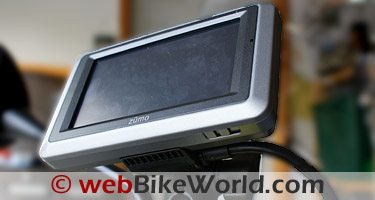
Garmin zūmo 660 GPS Review
This is an ongoing comparison of features between the newer Garmin zūmo zūmo 660 and the very capable Garmin zūmo zūmo 550.
Comparing the two GPS unites reveals a few observations.
The following is listed in no particular order:
Garmin zūmo 660 vs. zūmo 550 Feature Differences
- The zūmo 660 display really stands out when cranked up: the zūmo 550 display lacks the same range.
- The zūmo 660 has a comprehensive Help tool: the zūmo 550 lacks a Help tool.
- The zūmo 660 can do both 2-D and 3-D (with elevation data): the zūmo 550 is limited to 2-D only.
- The zūmo 660 has Sunrise and Sunset information; the zūmo 550 does not.
- The zūmo 660 has a World Clock and a World Map: the zūmo 550 does not.
- The zūmo 660 Trip Computer information is tailorable: the zūmo 550 ‘Dashboard’ fields were fixed except for the bottom information fields.
- The zūmo 660 has less of a tool hierarchy: more drill-down is needed to find the same or comparative features on the zūmo 550.
- The zūmo 550 supports XM: the zūmo 660 does not.
- The zūmo 550 has three selections under System (GPS, Safe and Garmin Lock): the zūmo 660 has four (GPS Simulator, Usage Mode, Units and Keyboard Layout).
- The zūmo 550 has a good Media Player for playing MP3s, viewing pictures and listening to Audio Books: the zūmo 660 has the same features, but music playlists can now be created or imported.
- The zūmo 550 Bluetooth audio stream was mono: the zūmo 660 features A2DP compatible Bluetooth, so audio from the Media Player is streamed in Stereo.
- The zūmo 550 can create and save up to 50 routes: the zūmo 660 is limited to 20 Custom routes.
Device Compatibility Table
As usual, the following table is not exhaustive by any means, but it does provide information on systems or devices tested with the zūmo 660 to this point in time.
Garmin zūmo 660 Compatibility With Other Communication Devices Previously Reviewed on webBikeWorld.com
| Device | 660 Bluetooth Audio | Comments | |
|---|---|---|---|
| (Input/Output) | Navigation | MP3 Stream | |
| Mobile Phone Devices | |||
| HTC Touch PDA | NA | Stereo | Phone audio is mono, default PIN is ‘1234’. |
| Kyocera BT – phone | NA | Stereo | Phone audio is mono. |
| Motorola i335 | NA | NA | Phone audio is mono. |
| LG LX165 | NA | NA | Phone audio is mono. |
| Bluetooth Communication Systems | |||
| AKE BT Multi-Interphone | Mono | Stereo | |
| AKE Stealth Intercom Set 201 | Mono | Stereo | |
| Midland BT2 version 1 | NA | NA | Device seen by zumo, but no connection made. |
| Midland BT2 version 2 | NA | NA | Device seen by zumo, but no connection made. |
| Twiins | Mono | Mono | Current version – mono audio only (EU restrictions). |
| Chatterbox XBi | Mono | Stereo | |
| Chatterbox XBi2 | Mono | Stereo | |
| BikerCom Control Box | Mono | Stereo | Control Box or Headsets connect if so configured. |
| Scala Rider Q2 Multiset | Mono | Stereo | |
| Camos BTS-300 | Mono | Stereo | Using headset or optional BHC-10 Headset Adapter |
| Blue Virtu BSH-01 | Mono | Stereo | |
| Interphone | Mono | Mono | Single speaker, mono only. |
| Headsets | |||
| wiREVO S-300 Headset | Mono | Stereo | |
| Note (1) – zumo 660 Menu – “Volume – Audio Output – Bluetooth Headset” must be selected (vice Speaker) | |||
According to the Garmin FAQ page, the only Garmin devices that can be paired with a Bluetooth headset to provide full audio services (phone, navigation and MP3 music) are:
- The nüvi 765, 775, 785, 2820 (also used for the BMW Navigator III system).
- The zūmo 550.
- And the zūmo 660.
Other Garmin Bluetooth devices will pair with a (compatible) Bluetooth mobile phone but for phone audio only.
| Garmin zūmo 660 – wBW Bottom Line Ratings | ||
|---|---|---|
| Feature | Rating | Comments |
| Packaging | Very Good | Even though my kit was in total disarray upon receipt, I have seen another new kit and its contents were well packaged in the simple box that hides all the good things. |
| Design | Excellent | Obviously based on the nuvi line, the device is larger and thicker than its siblings, but in large necessitated by a need to provide a fully ruggedized and certified device for motorcycle use. Subdued and sleek styling is appealingThe smooth styling is appreciated, but some handling ridges along the edges or corners would be a worthwhile addition as the hard plastic evenly shaped case can be slippery. |
| Execution | Very Good | The mounting cradle is simple but overly simplistic, lacking any security features, something sorely missed. The multi-lead integrated harness is very well done and should take a lot of abuse. Having multiple audio output connections is good and really supports the zūmo 660’s multi-usage abilities.Moldings and removable pieces are well done, but hiding the often-accessed ports was not a good idea, even though this is (probably) a design decision related to its IPx7 certification. |
| Features | Good to Very Good | As a more modern nuvi-style device, the zūmo 660 has some great features and attributes that I really appreciate. But directly compared to the zūmo 550 and one or two competitor products, it falls a bit short, especially in the external connectivity or interface departments.Having to remove the battery door to access the USB port or the SD media is a pain. The inability to lock or secure the zūmo 660 to the OEM bracket is disappointing. |
| Fit | Excellent | The standard four-hole mounting bracket provides lots of flexibility in mounting the zūmo 660 on a wide variety of motorcycles using a wide variety of solutions. The basic RAM mounting components provide an out-of-the-box fitment in many instances.Garmin accessories and compatible items offered up by other suppliers are readily available when a custom fit solution is needed. |
| Setup and Configuration | Very Good | Once past some initial firmware teething issues, setting up and configuring the zūmo 660 was a piece of cake. Its many tools and enhancements allow a pretty wide variety of scenarios or profiles to be accommodated.Bluetooth configuration works well overall, but I suspect the continual “reset” issue is tied to the wireless capability and the glitch in this feature really detracts from what was an otherwise seamless configuration. |
| Performance | Very Good |
For what it is touted to do, the zūmo 660 deserves an Excellent or Outstanding assessment, but a couple of niggling issues really drag it down, and to be honest, they have been experienced with other Garmin products.The Bluetooth can be quirky at times and when using the device with multiple Bluetooth communications systems or headsets, sometimes the stream will be in stereo, sometimes not, even though the systems all work perfectly with other A2DP devices. The ‘reset’ issue, possibly related to the Bluetooth wireless capability or power mode, is really bugging me. So far no solution has been found or offered up. Having to do a master reset, typically whenever the system is dismounted is not acceptable. |
| Ease of Use | Excellent to Outstanding |
The newest zūmo shines here. Without reading the basic setup instructions, the detailed PDF manual or browsing through the device’s Help tool, configuring and using the zūmo 660 is utter simplicity and intuitive.If one is familiar with other nuvi or zūmo products, the learning curve is an easy ascent and discovering some really neat additions and enhancements pure fun along the way. The display is not Texas-sized, but closer, and as such easier to use and read. Tactile input is very good and using the QWERTY keyboard a reality on-screen, but remember, no touch typing while moving! |
| Power | Good | The battery indicator in the upper right corner works well and provides an accurate status. However, my battery, properly initialized and exercised, only gives me one to two and a half hours of use time when dismounted, even when just displaying a route and not accessing tools, etc. |
| Reliability | Very Good | The disappointing battery life and continuing reset issue really pull this category down. Nothing else has broken or failed and the zūmo 660 just keeps on ticking during constant exposure to the elements and use on the motorcycles, in the SUV and on foot. I’m hoping it lasts a long time. |
| Maintenance and Support | Good | Other than having to perform the major ‘Clearing User Data’ reset, maintenance after five months has been minimal. Charging the battery when the unit is dismounted and cleaning the screen now and then is it.Garmin has not yet responded to my queries about the Bluetooth and reset issue, so most information requirements are being addressed through the Garmin FAQ pages and other on-line forums. |
| Cost | Good | If compared dollar for dollar to the zūmo 550, then the zūmo 660 would appear to be a real bargain. But apple to apple, the $100.00 savings is not what it seems in the greater scheme of things, especially in meeting (well-defined) user requirements. |
| Value | Good |
Getting a modern wide-screen robust navigation device for the typically listed price is good, particularly when it is $100.00 less than the older style zūmo 550 model. It does have some new and useful tools, better processing speed and a far better display than the zūmo 550.What keeps the zūmo 660 from getting a much higher assessment rating is the fact that it could be so much more, for probably close to the same price. The purchase of the new zūmo 660 Touratech mount or a related product would have been done anyway as these after-market products provide a locking mechanism, a feature not provided by Garmin. Just something else to consider… |
| Garmin zūmo 660 Review: | |
| ▪ 1: Introduction to the the zūmo 660 | |
| ▪ 2: Physical Tour | |
| ▪ 3: Where To? | |
| ▪ 4: Using the zūmo 660 | |
| ▪ 5: zūmo 660 Specifications | |
| ▪ 6: zūmo 550 vs. 660 Comparison | |
| ▪ 7: Installation | |
| ▪ Owner Comments (On Page 1) | |
Owner Comments and Feedback
See details on submitting comments.
Product Review Details and Owner Comments in Part 1: Introduction